AI generated code security: review what assistants write
AI generated code security is the work of checking code that a coding assistant wrote before it reaches your users. The assistant is fast and often right. But it does not know your threat model, it can invent package names, and it will happily build a database query out of raw user input if that is the shortest path to working code.
This guide gives you a review gate you can run on every AI-written change, what OWASP now says about it, and one worked example you can copy.
Why AI generated code security needs its own check
Code from an assistant looks finished. It compiles, it has comments, and it may come with tests. That polish makes it easy to skim. The problems tend to sit in a few lines: where input meets a database, a shell, a file path or a web page, and where nobody checked who is allowed to do what.
Two more things make it different from a colleague's pull request. First, the assistant has no memory of your security decisions unless you paste them in. Second, it can suggest a package that does not exist, and someone else may have registered that name.
What OWASP's 2026 list says
The OWASP Top 10 for LLM Applications 2026 covers this in two entries.
- LLM10:2026 Improper Output Handling now includes the insecure code that assistants generate. Its examples are the classic ones: model output passed to a shell or
eval, SQL built without parameters, file paths built from output without checks, and script that ends up running in a browser. One scenario is an app that compiles and deploys generated code with no human review or security testing, so insecure code reaches production. - LLM04:2026 Supply Chain describes coding assistants making up plausible package names that do not exist. Attackers register those names in advance, a trick OWASP calls slopsquatting, so an unchecked install pulls in their code. The advice is to verify that every AI-suggested dependency exists and is the package you meant.
The core rule in LLM10 is simple: treat the model as any other user. Its output is input to your system, and you check it the same way. Our guide to LLM output handling covers the runtime side of that rule; this post covers code you commit.
Check every new package first
Start with the dependency file, because a bad package runs the moment someone installs it. For each package the change adds, answer three questions:
- Does it exist? Open its page on the registry yourself. Do not trust a link the assistant gives you.
- Is it the one you meant? Compare the exact spelling with the project's own documentation. Look-alike names are the point of the attack.
- Do you need it? A small helper the assistant pulled in for one function is often a few lines you can write and review yourself.
Pin the version you reviewed and commit the lock file. Our post on LLM supply chain security covers the same checks for models and datasets.
Find the risky lines
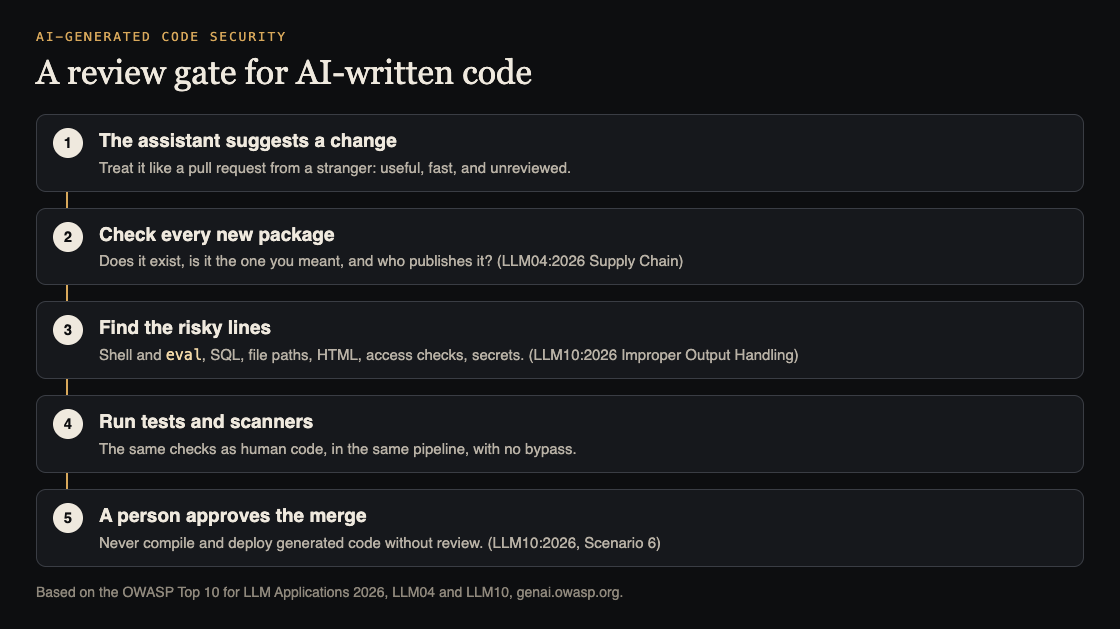
You do not need to read every line with the same care. Search the change for the places OWASP lists, and read those slowly:
- Shell and eval. Any call that runs a command or evaluates a string. Prefer a library call with fixed arguments. The OWASP command injection cheat sheet lists safe patterns.
- SQL. Any query built by joining strings. Replace it with a parameterized query, as in the OWASP query parameterization cheat sheet.
- File paths. Any path that includes a name from the request. Generate names on the server instead.
- HTML. Any place that writes raw HTML or turns off the framework's escaping.
- Access checks. Every new route or handler. Is there a check that this user may do this to this record? An assistant can leave it out. See our guide to broken access control.
- Secrets. Keys or tokens written into code, or placed in files the browser downloads.
Worked example: one AI-written endpoint
Say you ask an assistant: "Add an endpoint that lets admins export orders matching a search term as a CSV file." It returns a working handler, a test and one new package for writing CSV files. Here is the review, step by step.
- The package. You open the registry page yourself. The name is close to a well-known CSV library but not the same. You remove it and use the library your project already has.
- The query. The handler builds
WHERE note LIKE '%" + term + "%'. You change it to a parameterized query and add a test with a search term containing a quote mark. - The file name. The handler writes the export to a path built from a
filenamefield in the request. You generate the name on the server and drop the field. - The access check. The route checks that the user is signed in, not that they are an admin. You add the admin check and a test where a normal user gets refused.
- The merge. The change runs through the same tests and scanners as any other, and a person approves it.
In this example the assistant did most of the typing, and a short review removed four real problems. That trade is the point: keep the speed, add the gate.
Put the checks in your pipeline
A review gate works best when it does not depend on memory.
- Label pull requests that are mostly AI-written, so reviewers know to use the checklist above.
- Run the same tests, linters and dependency scans on every change, with no way to skip them for "small" AI fixes.
- Fail the build when a new dependency appears without a reviewer's approval.
- Never let an assistant or agent merge or deploy its own code. If an agent writes code in your pipeline, keep its permissions narrow; our post on excessive agency shows how.
Frequently asked questions
Is AI-generated code less secure than human code?
It can have the same kinds of bugs as human code, and it adds one new risk: made-up package names that attackers can register. Review it to the same standard as any code, and check its dependencies first.
Can a security scanner replace the review?
No. Scanners catch known patterns, but they miss a missing access check or a wrong business rule. Use both.
Should we tell the assistant our security rules?
Yes, it helps. Put your rules in the prompt or project instructions, such as "always use parameterized queries". Still review the output, because the assistant does not always follow them.
What about agents that write and run code on their own?
That risk is larger, because no one reviews the code before it runs. OWASP's Agentic Top 10 gives it its own entry, ASI05 Unexpected Code Execution; OWASP advises running such code in a sandboxed container with strict limits, never as root, and keeping a person in the loop for elevated runs.
Get started
Want a second pair of eyes on code your team or an assistant wrote? whitehatstoic's cybersecurity and AI safety testing covers web app and API review, with a written report, fixes and a retest after fixes. If you want a verdict before you commit to a codebase, the independent review service gives a plain written verdict on a project, codebase or vendor.
Book a meeting about security testing, or book a meeting with whitehatstoic: tell us the product, the deadline and your biggest worry, and we reply with a plan and a price.
Comments
No comments yet.
Sign in or make an account to comment.