CORS misconfiguration: how to check your API settings
A CORS misconfiguration usually starts with a red error in the browser console. Someone searches the message, finds a line that makes it go away, and ships it. The error is gone, but the API may now let any website read responses meant only for your own app. This guide explains what CORS controls, the settings that cause trouble, and how to check your own API in a few minutes.
It is based on MDN's guide to CORS and the CORS section of the OWASP HTML5 Security Cheat Sheet.
What CORS does and does not do
CORS, cross-origin resource sharing, is a set of response headers that tell a browser whether a script on one site may read a response from another. If your app at app.example.com calls api.example.com, the API's CORS headers decide whether the browser hands that response to your script.
Two things it does not do are easy to miss:
- It is not login. OWASP warns not to rely only on the Origin header for access control, because it can be faked outside a browser. Your API still has to check who the user is on every request.
- It does not stop CSRF. OWASP says CORS does not prevent data from going to an unauthorized place, so you still need normal CSRF protection.
The common CORS misconfiguration patterns
Most problems come from a few settings:
- A wildcard on private data.
Access-Control-Allow-Origin: *lets any site read the response. OWASP says URLs that answer with it should carry no sensitive content. - Echoing the Origin back. The server copies whatever Origin arrives into the response. OWASP says not to return the Origin header content without checks, because this lets every site in, including with the user's cookies.
- A loose match. OWASP gives the example of checking whether an origin contains
.owasp.org:owasp.org.attacker.compasses. Compare against exact names. - Allowing
nullor every subdomain without thinking about who controls them. - CORS on routes that do not need it. OWASP suggests using the header only on URLs that really need cross-site access, not the whole domain.
How browsers treat cookies and the wildcard
MDN explains a rule that protects you, and one reason echoing the origin is dangerous. When a request carries credentials, most often a cookie, the server must name an explicit origin, not *. If the response uses the wildcard, the browser blocks access to it and reports a CORS error. MDN also notes that a Set-Cookie header is ignored when the allowed origin is the wildcard.
That is exactly why teams start echoing the Origin: it turns the wildcard error into a success. But an echo plus Access-Control-Allow-Credentials: true means any website a signed-in user visits can read their data from your API.
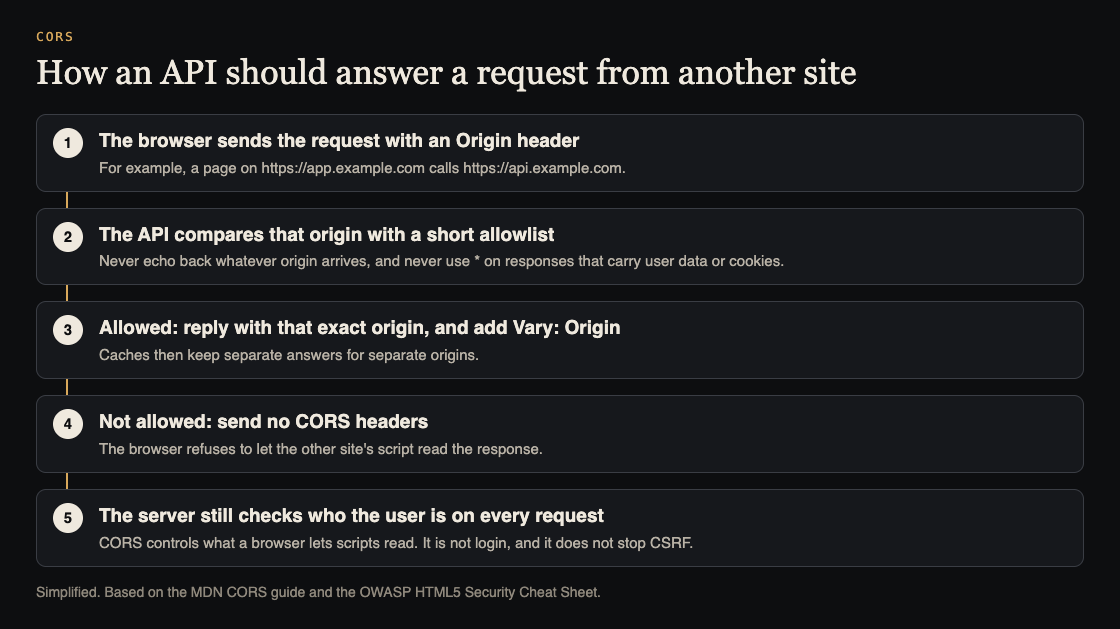
What a safe setup looks like
- Keep a short allowlist of exact origins, such as your production and staging front ends.
- When the request's origin is on the list, reply with that exact origin. MDN says to add
Vary: Originwhen the value changes by request, so caches do not hand one site's answer to another. - When it is not on the list, send no CORS headers at all.
- Do not use
*on any route that returns user data, and never with credentials. - Check permissions on every route, including plain GET and POST. OWASP notes that browsers may not send a preflight request, so the real request must do its own access control.
Worked example: check your own API in five requests
Run this against your own staging API, with a route that returns data for a signed-in user. Replace the hosts with yours.
- Your real front end:
curl -s -D - -o /dev/null -H "Origin: https://app.example.com" https://api.example.com/me. ExpectAccess-Control-Allow-Origin: https://app.example.comandVary: Origin. - A site you do not own: repeat with
Origin: https://unknown.example. Expect noAccess-Control-Allow-Originheader. If it comes back with that origin, you have an echo. - A look-alike: try
Origin: https://app.example.com.unknown.example. If it is allowed, your match is too loose. - The null origin: try
Origin: null. It should not be allowed on private routes. - Without a cookie: call the route with no session. It should refuse, whatever the CORS headers say, because CORS is not your access control.
Any surprise in steps 2 to 4 is a finding to fix in your CORS settings. A surprise in step 5 is a bigger one, covered in our guide to testing broken access control.
If you find an echo or a loose match
Fixing a CORS misconfiguration is usually a small change in one place, but it is worth doing carefully, because the same setting often covers every route.
- Find where the header is set. It may be in your framework's middleware, a reverse proxy, a CDN rule, or all three. Two layers setting different values is a common source of surprises.
- Replace the rule with an exact allowlist. Write out the full origins, including the scheme, such as
https://app.example.com. Avoid patterns unless you control every name they can match. - Decide whether credentials are needed. If the front end does not send cookies to the API, do not send
Access-Control-Allow-Credentials: true. MDN's rules for explicit origins, headers and methods apply when it is on. - Narrow the routes. OWASP suggests CORS headers only on the URLs that need cross-site access, rather than across the whole domain.
- Run the five requests again, on staging and then on production after release, and keep them as a test so the next change does not quietly undo the fix.
Where CORS fits in a pre-launch check
CORS is one setting among many that change between development and production. A common pattern is a permissive setting added during local development that is never tightened. Add the five requests above to your pre-launch checklist, and run them again whenever someone changes the API's middleware.
Frequently asked questions
Is Access-Control-Allow-Origin: * always a CORS misconfiguration?
No. It is fine for truly public data, such as a public font or open dataset. OWASP's advice is that responses using it should carry no sensitive content.
Does CORS protect my API from attackers?
Not by itself. CORS controls what browsers let scripts read. Someone calling your API directly ignores it, so your API still needs authentication and access checks on every route.
Why do I need Vary: Origin?
MDN says that when the allowed origin changes per request, the response should include Vary: Origin, so caches keep separate answers for separate origins.
Get started
CORS settings are part of every web app and API review we run. whitehatstoic offers security tests on web apps and AI systems, with a written report, fixes and a retest after fixes, scoped after a short call.
Book a meeting with whitehatstoic: tell us the product, the deadline and your biggest worry, and we reply with a plan and a price.
Comments
No comments yet.
Sign in or make an account to comment.