File upload security: a checklist for your web app
File upload security is easy to underestimate. An avatar picker or an invoice upload looks like a small feature, but it lets anyone with an account put a file of their choosing on your servers. If the app trusts the file's name, its claimed type, or its size, that small feature can become a way to fill your storage, run code, or serve harmful content from your own domain.
This checklist follows the OWASP File Upload Cheat Sheet, and ends with a test you can run on staging using harmless files.
Why file upload security needs layers
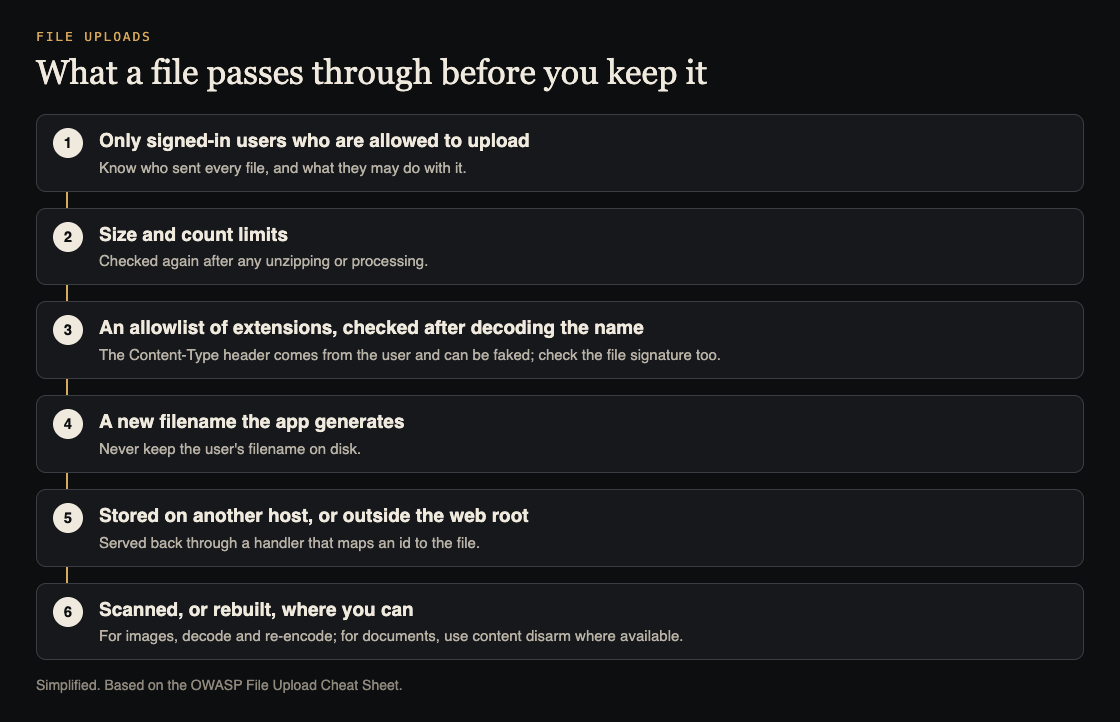
No single check makes an upload safe. Extensions can be disguised, the type the browser reports can be faked, and the code that processes files can have its own bugs. OWASP's answer is a set of layers: decide who can upload, control the name, check the type in more than one way, limit the size, store the file away from your code, and process it carefully. If one layer misses something, the next one is still there.
Who can upload, and how much
- Only authorized users. OWASP lists this directly. An upload route that works without signing in, or that lets any user write to any folder, is the first thing to close.
- A size limit. Set one on purpose for each upload type. OWASP warns about huge files, ZIP bombs and XML bombs designed to fill storage or overload processing.
- Limits after unpacking. If you extract or convert files, OWASP says the size limit should consider the size after decompression, not only the upload.
- A count limit per user and per time window, so one account cannot upload thousands of files in a minute.
Names and extensions
OWASP's advice is to allow only the extensions your feature truly needs, and to check them after decoding the filename. It lists the bypasses that catch simple checks:
- Double extensions, such as
photo.jpg.php, which pass a check that only looks for.jpg. - Null bytes, such as
file.php%00.jpg, where everything after the null may be dropped. - Alternative extensions that the server runs the same way, such as
.phtmlor.php5. - Windows alternate data streams, using a colon in the name. OWASP says to reject any filename containing a colon.
The simplest defense is to stop using the user's filename on disk at all. OWASP recommends changing the filename to one generated by the application, limiting its length, and restricting its characters. Keep the original name in your database for display if you need it.
Checking the real file type
The Content-Type sent with an upload comes from the user's side. OWASP says not to trust it, because it can be spoofed. Check the file's signature, the first bytes that identify a real PNG or PDF, as well as the extension.
Even a correct signature is not proof the file is safe. A file can be a valid image and still carry something else. That is why the processing layer matters.
Where to store uploads and how to serve them
OWASP recommends storing uploaded files on a different server, or at least outside the webroot, so a file that slips through can never be run as code by your web server. It also warns that attackers may try to upload a server configuration file, such as .htaccess or web.config, into the upload folder to change how it behaves.
If users need to download files, serve them through a handler that maps an id to the file, as OWASP suggests, instead of exposing the storage path. That handler is also where you check that the person asking may see that file, which ties into our guide to testing broken access control.
Processing: re-encode images, rebuild documents
- Images: OWASP suggests decoding and re-encoding to an allowed format, removing unneeded metadata. It is honest that this does not guarantee every harmful part is gone, and that the image library itself is handling untrusted input, so keep it updated.
- Documents: for types like PDF and DOCX, OWASP suggests content disarm and reconstruct, which rebuilds the file from its safe parts, where it applies.
- Archives: OWASP does not recommend accepting ZIP files, because they can contain any kind of file.
Worked example: test your upload on staging
Use your own staging app, a test account, and harmless files you create yourself. None of these files needs to contain anything dangerous; the point is to see what the app accepts.
- Write down the rules first: allowed extensions, maximum size, and where files end up.
- Upload a text file renamed to
test.jpg. If it is accepted as an image, the app trusts the extension and not the signature. - Upload
test.jpg.txtandtest.txt.jpgand see which pass and what name each is saved under. The saved name should be generated, not yours. - Change the type in the request. With your browser's developer tools or a proxy, resend an allowed upload with a different
Content-Type. The server's decision should not change. - Try a file one megabyte over the limit and confirm a clear refusal.
- Upload a file named
.htaccesscontaining only a comment. It should be refused. - Copy a file's download link, sign in as a second test user, and open it. If the second user can read the first user's file, that is an access control finding.
Record each result against your written rules. Add the steps to your penetration test preparation, so testers know where uploads live.
Frequently asked questions
Is checking the file extension enough for file upload security?
No. OWASP lists several ways around extension checks, and says not to trust the Content-Type header either. Combine an allowlist with a signature check, a generated filename and safe storage.
Where should uploaded files be stored?
OWASP recommends a different server, or at least a place outside the webroot, served back through a handler that maps an id to the file.
Does re-encoding an image make it safe?
It helps, but OWASP notes it does not guarantee that all harmful content is removed, and the image processor itself handles untrusted input, so keep it updated.
Should I accept ZIP uploads?
OWASP does not recommend it, because a ZIP can contain any kind of file. If you must, apply size limits after decompression and check every file inside.
Get started
Upload features are a regular part of the web app reviews we run. whitehatstoic offers security tests on web apps and AI systems, with a written report, fixes and a retest after fixes, scoped after a short call.
Book a meeting with whitehatstoic: tell us the product, the deadline and your biggest worry, and we reply with a plan and a price.
Comments
No comments yet.
Sign in or make an account to comment.