Frontend secrets: how to check your bundle before you ship
Frontend secrets are API keys and passwords that end up in the JavaScript your visitors download. It happens to careful teams, because the key was "in an environment variable" and that felt private. But build tools copy some environment variables straight into the browser bundle, and once a key is there, anyone who opens developer tools can read it.
This guide explains the rules in Vite and Next.js, how to check a production build in a few minutes, and what the OWASP Secrets Management Cheat Sheet says to do when you find one.
How frontend secrets end up in the bundle
Code that runs in the browser cannot keep a secret. Everything it needs is downloaded to the visitor's machine. Build tools know this, so they only expose variables you mark as public, and they mark them with a prefix. The trouble starts when someone adds the prefix to make an error go away.
The usual story: a page needs to call a paid API. In development the call fails because the key is undefined in the browser. Someone renames API_KEY to VITE_API_KEY or NEXT_PUBLIC_API_KEY, the call works, and the key ships to every visitor.
The rule in Vite
Vite's documentation says variables prefixed with VITE_ are exposed in client-side source code after bundling. Its example is direct: import.meta.env.VITE_SOME_KEY returns the value in the browser, while import.meta.env.DB_PASSWORD is undefined there.
It also says plainly that VITE_* variables should not contain sensitive information such as API keys, because the values are bundled into your source code at build time, and suggests a backend server or serverless or edge functions for secrets in production.
The rule in Next.js
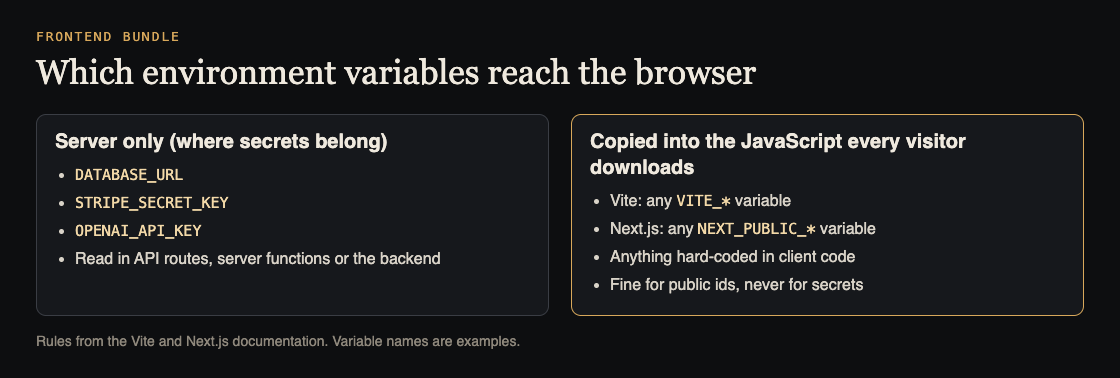
Next.js works the same way with a different prefix. Its documentation says variables without NEXT_PUBLIC_ are only available on the server, in the Node.js environment. Variables with the prefix are inlined at build time into the JavaScript bundle sent to the browser.
It adds a detail that surprises teams: after the build, the app no longer responds to changes in those public variables. So rotating a leaked key in your hosting settings does not remove the old one from a bundle that is already built and cached. You have to revoke the old key at the provider and rebuild.
What is safe in the browser, and what is not
- Usually fine: values that are designed to be public, such as an analytics id or a payment provider's publishable key, which the provider expects you to put in the page.
- Never in the browser: database connection strings, secret keys for payments, AI model API keys, admin tokens, and anything a provider calls "secret" or "server-side".
- Check the docs when unsure. If a provider offers a public key and a secret key, only the public one belongs in the frontend.
The fix for a secret the browser needs is to move the call to your server. The browser calls your own API route, which checks who the user is and then calls the provider with the secret it keeps.
Places keys hide besides environment variables
The prefix rule is the common path, but not the only one. When you check a project, look in these places too:
- Hard-coded values in a config file or a component, often left from a quick test. Build tools ship these whatever their name.
- Source maps published with the site, which can include the original source and its comments.
- Static files in the public folder, such as a JSON config that is served as-is.
- Third-party snippets pasted into a tag manager or a site builder, outside your repository and your review.
- Mobile and desktop builds of the same app, which are also downloaded to the user's device and can be unpacked.
Worked example: search your production build
This takes a few minutes and needs no special tools. Run it on your own project.
- List your public variables. Search your
.envfiles and hosting settings for every name starting withVITE_orNEXT_PUBLIC_. For each, ask: would I paste this value on our home page? If not, it does not belong there. - Build for production the way your pipeline does.
- Search the output. Look through the built folder (
distfor Vite,.next/staticfor Next.js) for the prefixes your providers document for their secret keys, the start of each real key you hold, and words likesecret,passwordandpostgres://. Any hit needs a look. - Check the live site. Open your production site, open developer tools, and search all loaded scripts for the same strings. This catches keys added outside the build, such as in a tag manager.
- Watch the network panel while using the app. Any request that goes from the browser straight to a paid provider with a secret key in a header is a key the visitor can copy.
If you find a secret in the bundle
Treat it as leaked, even if you think nobody noticed. OWASP says secrets that are potentially compromised must be revoked. In order:
- Revoke or rotate the key at the provider, so the copy in old bundles stops working.
- Move the call to the server and rebuild without the prefix.
- Give the new key the least privilege it needs, as the cheat sheet recommends, and an expiry where the provider supports one.
- Check the provider's usage logs for activity you do not recognize.
Stop the next one before it ships
OWASP suggests catching secrets at the developer level, before commit, in the editor or with a pre-commit hook, and making secrets part of your threat model. Add the build search above to your pre-launch checklist, and list every key the app uses in your penetration test preparation so testers know what to look for.
Frequently asked questions
Are environment variables safe for frontend secrets?
Only the ones that stay on the server. Vite exposes VITE_ variables and Next.js inlines NEXT_PUBLIC_ variables into the bundle, so anything with those prefixes is public.
Can I hide an API key by minifying or obfuscating the code?
No. The browser has to be able to read the key to use it, so anyone with developer tools can too. Move the call to your server.
I changed the key in my hosting settings. Is the old one gone?
Not from bundles already built. Next.js notes public values are fixed at build time. Revoke the old key at the provider and rebuild.
Get started
whitehatstoic builds products and tests them to protect them. We run security tests on web apps and AI systems, with a written report, fixes and a retest after fixes. Every engagement is scoped after a short call.
Book a meeting with whitehatstoic: tell us the product, the deadline and your biggest worry, and we reply with a plan and a price.
Comments
No comments yet.
Sign in or make an account to comment.