How to photograph a cat with your phone, the calm way
If you want to know how to photograph a cat with your phone, the good news is that you do not need a better camera. Most blurry, dark or startled cat photos come from a handful of fixable things: the flash, the zoom, the focus, the light, and how you behave around the cat. This guide covers each one, using advice from the UK charity Cats Protection and from International Cat Care, then gives you a five-step routine for cats you meet outside.
Why phone photos of cats so often go wrong
Cats move without warning, they sit in shade, and they notice you long before you notice them. A phone tries to help by firing the flash, guessing the focus and brightening the scene. Each of those guesses can work against you.
The fix is to take a few decisions away from the phone and give a few back to the cat. You set the light and focus. The cat decides how close you get.
The settings to check before you start
Cats Protection's guide, How to take amazing photos of your cat, has clear advice for phones:
- Turn the flash off. The guide says a flash could startle your cat. Shoot outdoors or in a well-lit room instead.
- Do not zoom. On a smartphone, zooming degrades the photo quality.
- Tap to focus on the eyes. Just before you take the shot, tap the screen. The eyes are the best point to focus on.
- Try pet or portrait mode if your phone has one.
- Use burst mode. Several shots in a row raise your chances of a sharp one. Delete the blurry ones later.
You do not need manual settings. A Cats Protection volunteer's list of 9 tips for better cat snaps points out that hardly anyone changes the manual settings on a phone, because the default auto settings adjust well to conditions.
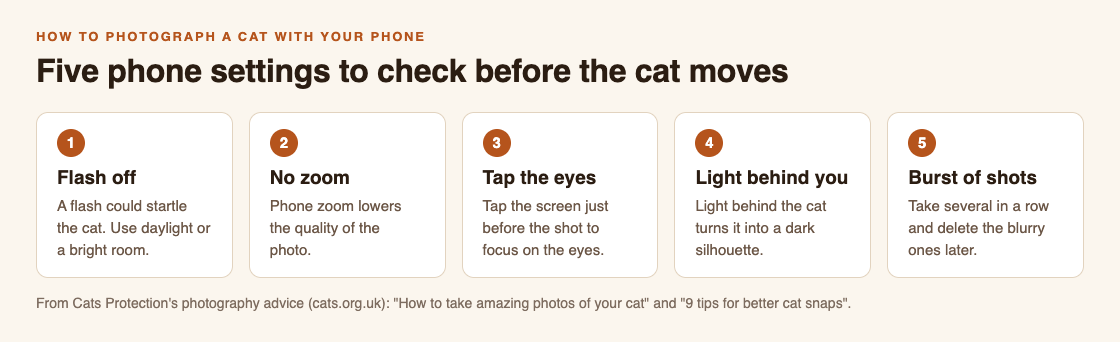
Five checks that fix most phone cat photos.
Light and background do most of the work
Light is where most phone photos win or lose. Cats Protection warns that a backlit subject comes out dark, like a silhouette. Keep soft light behind you, or falling on the cat, not behind it.
Timing helps too. The volunteer's tips say the golden hour, shortly after sunrise or before sunset, is best, because the light is softer and more red. At home, the main guide suggests trying just after your cat has eaten or woken up naturally.
Then think about what is behind the cat. A white cat looks striking against a dark background. The main guide also suggests picking a background that sets off the colour of the cat's eyes. Move yourself a step to the side and the background changes completely, while the cat stays put.
How to photograph a cat with your phone when the cat is not yours
Your own cat knows you. A cat on a wall or a doorstep does not. Before you lift the phone, read the cat. Cats Protection's page on cat body language lists the signs.
- Relaxed: an upright tail, and ears that are relaxed, forward and rounded.
- Worried: ears flat or turned to the side or back, eyes open with wide pupils, or trying to hide or get up high.
If you see the worried signs, lower the phone and walk on. A good photo is never worth a scared cat.
If the cat looks relaxed, make yourself less scary. International Cat Care's guide, How to greet a cat, says to get down to the cat's level and avoid facing it directly. Look beyond it rather than straight at it, and blink slowly. Staring, it says, tends to create distance rather than reduce it. Cats Protection makes the same point: a cat can see staring as a threat.
Above all, let the cat choose. International Cat Care notes that a cat can politely decline by walking away. When it does, let it go. Stay on the pavement or path, take the photo from where you are, and never follow a cat into a garden or onto private property.
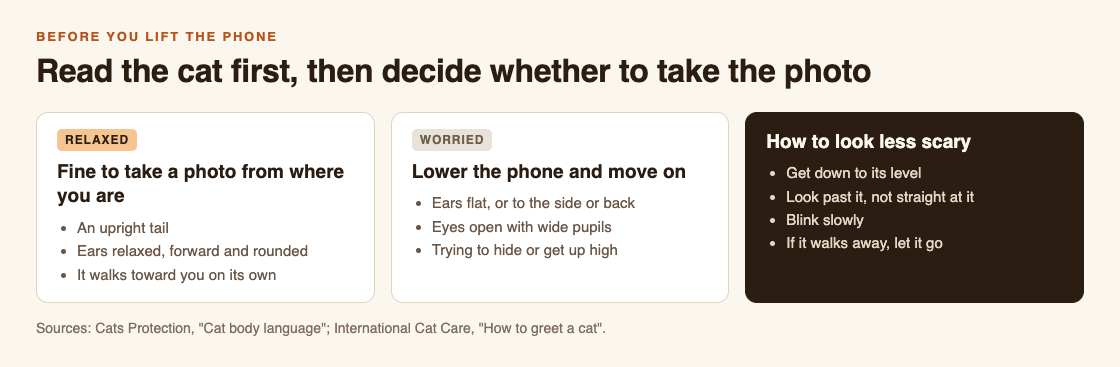
Read the cat before you lift the phone.
A five-step routine for a cat you meet outside
Here is a worked example. You are walking home late in the afternoon and see a ginger cat sitting on a low wall, in sun.
- Stop where you are. Do not walk straight at it. Check the signs: tail up, ears forward. It looks relaxed.
- Get lower and look past it. Crouch a little so you are closer to its eye level. Look slightly to one side and blink slowly.
- Set up the shot. Flash off. Keep the sun behind you so the cat is lit, not a silhouette. Do not zoom. If the cat is small in the frame, that is fine.
- Focus and shoot a burst. Tap on its eyes, then hold the shutter for a short burst.
- Leave on a good note. Put the phone away and walk on. If the cat turned away or flattened its ears at any point, you stop there.
Back home, delete the blurry frames and keep the best one or two. As the volunteer's tips put it, when cats have had enough, let them be, and keep your phone close for the moments you don't want to miss.
Turn your cat photos into a game with Cat Go
If you already stop to photograph cats on your walks, Cat Go gives each photo a purpose. It is a game that plays in your web browser: "Walk anywhere, photograph a real cat, lure it with food and catch it. Every catch keeps its breed and where you found it."
In Cat Go, you catch a cat by taking its photo. The camera screen says "Fit the whole cat in the frame", which fits well with the no-zoom advice above: a whole cat, sharp and well lit, beats a blurry close-up. The site says photos are only used to check for a cat and to keep a picture of your catch.
If the photo has no cat in it, the game says "No catch this time", and no in-game food is used, so you can try again. The food, the luring and the catch are all inside the game; the real cat is only photographed. Each catch records where the cat was found, so Cat Go needs your location, and your camera, allowed in the browser.
Frequently asked questions
Should I use the flash to photograph a cat?
No. Cats Protection advises turning the flash off because it could startle the cat. Use daylight or a well-lit room instead.
Is it better to zoom in or move closer?
Do not zoom on a phone, because it lowers the photo quality. With a cat you do not know, stay where you are and accept a smaller cat in the frame rather than walking up to it.
What time of day is best for outdoor cat photos?
A Cats Protection volunteer recommends the golden hour, shortly after sunrise or before sunset, when the light is softer and more red.
How do I know a cat does not want its photo taken?
Flat or turned-back ears, wide pupils, or trying to hide or get up high are signs of a worried cat. Lower the phone and walk on.
Get started
Try the five-step routine on the next cat you meet, flash off and eyes in focus. Then play Cat Go in your browser: walk anywhere, photograph a real cat, lure it with food and catch it, and keep every catch with its breed and the place you found it.
Comments
No comments yet.
Sign in or make an account to comment.