How to study diagrams: turn any figure into quiz questions
If you have ever stared at a labelled diagram until every arrow looked familiar, then blanked on it in the exam, you already know the problem. This guide shows how to study diagrams by turning them into quiz questions you answer from memory, using one photo and about ten minutes.
Diagrams are dense. A single figure of the heart, the water cycle or a circuit packs in names, positions and cause and effect. Looking at it feels like learning because you recognise it. Recognising is not the same as recalling, and exams ask you to recall.
Why looking at a diagram is not enough
A large review of learning techniques by Dunlosky and colleagues rated two methods as high utility: practice testing and spreading your study over time. Rereading and highlighting came out low. You can read the summary on PubMed.
Staring at a diagram is a form of rereading. It is comfortable, and it is weak. In a well known experiment, Roediger and Karpicke found that students who restudied a passage did better on a test five minutes later, but students who were tested on it did better two days later and a week later. The abstract is on PubMed. We cover the wider idea in retrieval practice: why testing yourself beats rereading your notes.
So the aim is simple. Stop looking at the diagram and start answering questions about it.
How to study diagrams: the three step loop
The loop has three steps, and you repeat it over a few days.
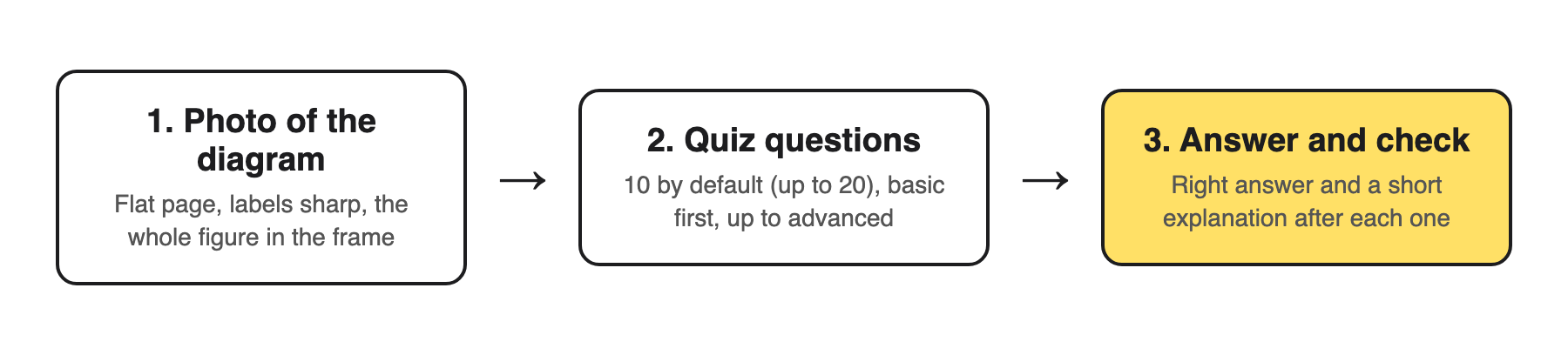
The loop: photo, questions, answer and check.
- Photograph the diagram. One figure per photo, with its labels and caption.
- Get questions on it. Basic questions on names and parts first, then harder ones on how the parts connect.
- Answer and check. Commit to an answer before you look, then read why the right answer is right.
You can do this by hand: cover the labels with sticky notes and quiz yourself. That works, but it only tests the names. The rest of this guide uses Study Shot, which writes the questions for you from a photo, including questions on what the diagram means.
Step 1: take a photo the questions can be written from
The questions can only be as good as the photo. In Study Shot you press Take photo or Choose photo. The app's own advice is to hold the page flat and fill the frame, and it accepts textbooks, notes, diagrams and whiteboards.
- Keep every label sharp. If you cannot read a label in the photo, no question can be written about it.
- Include the caption and the key. They often hold the one fact that makes the figure make sense.
- One diagram per photo. A page with three figures gives you questions spread thin across all of them.
- Your own sketches count. A diagram you redrew in your notes or on a whiteboard works too, and redrawing it is good practice on its own.
The photo is not stored on Study Shot's server. It is kept on your own device, so the quiz can show it to you again later.
Step 2: choose how many questions and which level
Before you press Create questions, you pick two things.
How many: 5, 10, 15 or 20. The default is 10, which suits one diagram. Go to 15 or 20 for a big figure with many labels, like a full cell or a map.
Which level:
- Tiered (the default): a ladder, basic first, up to advanced. Use it the first time you quiz a diagram.
- Basic: key terms, facts and definitions. For diagrams, this is naming the parts.
- Intermediate: explain, compare and connect ideas. This is where you show you know what the arrows mean.
- Advanced: apply and predict in new situations. What happens if one part changes or fails?
You can also choose the language the questions, answers and explanations are written in, from 50 languages. The app's buttons stay in English. Then wait while it reads your page; it can take up to a minute.
Step 3: answer, check, and read every explanation
Each question is multiple choice with four options and one right answer. Pick one and press Check answer. You see Correct! or Not quite., the correct answer, and a short explanation of one to three sentences.
Read the explanation even when you were right. With diagrams, you can pick the right label for the wrong reason, and the explanation is where you find that out. When you finish, the results screen shows your score as a percentage and a grade, a score for each level, your page, and a list called Look at these again with every question you missed.
Questions are written by an AI model, so they can contain mistakes. Check anything odd against the diagram itself, and use Report a problem if a question is wrong.
A worked example: the heart diagram in one week
Say your biology test is on Friday and the textbook has a labelled diagram of blood flow through the heart. Here is a plan you can copy.
- Monday, 10 minutes. Photograph the diagram with its caption. Choose 10 questions, Tiered. Going by the level descriptions, expect basic questions on the names of chambers and vessels, intermediate ones on how blood moves from one part to the next, and advanced ones that ask you to predict, for example, what goes wrong if a valve does not close.
- Monday, 5 more minutes. Open Look at these again. For each missed question, find the part on your page and say out loud why the right answer is right.
- Wednesday, 10 minutes. Press Retake quiz on the same quiz. Do not look at the diagram first. Compare your new score with Monday's.
- Thursday, 10 minutes. Make a new quiz from the same photo at Advanced level. This gives you a new set of questions that test whether you can use the diagram, not just name it.
- Friday morning. Redraw the diagram from memory on paper, then check it against the photo.
The days in between matter. Spreading the quizzes out is the second high utility method from the review above. For reading the scores, see what to study next: how to use your practice quiz results.
Common mistakes when you study diagrams
- Looking at the diagram just before the quiz. You are then testing your short term memory, not what you learned.
- Stopping at Basic. Naming parts is the easy half. Most exam marks on a diagram come from explaining it.
- Cropping out the caption. The caption often says what the diagram is for.
- Quizzing the whole chapter at once. For text pages, see practice questions from a textbook page in about a minute, and keep diagrams in their own quizzes.
If you study with a friend, Share this quiz gives them a link. They need their own Study Shot account, and they get their own copy of the questions without your photo, so send them a picture of the diagram too.
Frequently asked questions
What is the best way to study diagrams?
Answer questions about the diagram from memory, then check each answer against the figure. Repeat it over a few days instead of in one long sitting.
Can I use a diagram I drew myself?
Yes. Study Shot accepts photos of notes and whiteboards as well as textbooks. Make sure every label is readable in the photo.
How many questions should I make for one diagram?
Start with the default of 10. Use 15 or 20 for a large figure with many labels.
Which level should I pick?
Pick Tiered the first time, which runs from basic up to advanced. Once you know the names, switch to Intermediate or Advanced to practise explaining and predicting.
Is my photo kept?
It is not stored on Study Shot's server. It stays on your own device so the quiz can show it next to your results.
Get started

Study Shot at studyshot.vlvd.net.
Try Study Shot: it is free to start. Photograph one diagram you need for your next test and run the three step loop tonight.
Comments
No comments yet.
Sign in or make an account to comment.