LLM data poisoning: protect training and RAG data
LLM data poisoning is what happens when someone slips bad data into what your model learns from or reads, so it starts giving wrong, biased or harmful answers. If your team fine-tunes a model on its own examples, or feeds it company documents to answer from, that data is part of your attack surface. Anyone who can change it can change what your app says.
OWASP covers this as LLM04:2025, Data and Model Poisoning. This guide turns it into checks you can run on the data your team controls.
What LLM data poisoning is
OWASP defines data poisoning as manipulating pre-training, fine-tuning or embedding data to introduce vulnerabilities, backdoors or biases. It calls it an integrity attack: the model still runs, but you can no longer trust what it says.
The results OWASP lists are the ones a product team would care about most:
- Worse answers overall.
- Biased or toxic content in replies.
- Harm to the systems downstream that act on the model's output.
Poisoning does not need a skilled attacker. OWASP's examples include falsified documents written to end up in training data, toxic data that was never filtered, and users who paste sensitive or private information that the model could later repeat to someone else.
Where poisoned data gets in
OWASP names three stages of a model's life where data can be poisoned. Knowing which ones you control tells you where to put your checks.
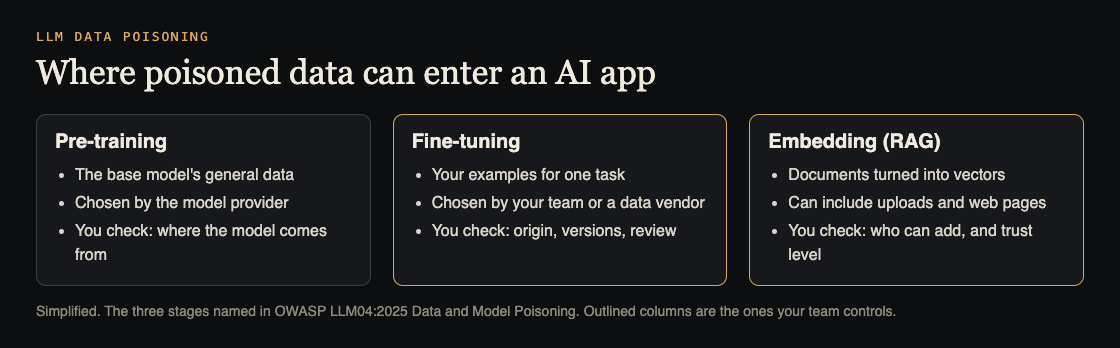
- Pre-training is the model learning from huge amounts of general data. If you use a model from a provider, this happened before you got it. Your check is where the model comes from.
- Fine-tuning adapts a model to a specific task using your examples. You or a data vendor choose that data, so you own its checks.
- Embedding turns text into numbers so a retrieval system (RAG) can find relevant documents. Anything that lands in that store can shape answers, including uploads and web pages.
OWASP adds one more warning about where models come from: models shared through public repositories can carry malware through a technique called malicious pickling, which runs harmful code the moment the model file is loaded. That is a reason to load model files only from sources you trust, separate from any data checks.
Why backdoors are hard to find
The worst form of poisoning is a backdoor. OWASP explains that a backdoor can leave the model behaving normally until a certain trigger, such as a rare phrase, makes it change. Normal testing will not hit the trigger, so the model looks fine.
OWASP's fifth attack scenario spells out what a hidden trigger could do: authentication bypass, data leaks, or hidden command execution. Those outcomes depend on what the model is connected to. A model that can only write text can do less harm than one that can call tools, which is why our guide to excessive agency matters here too.
Because you cannot test for every trigger, the main defense is knowing exactly what went into your model, and being able to roll it back.
Checks for your fine-tuning data
From OWASP's mitigations, these are the ones that fit a small team:
- Record where every example came from. OWASP recommends tracking data origins and every change made to it. It names OWASP CycloneDX and ML-BOM, a bill of materials for machine learning, as tools for this.
- Version your datasets. OWASP recommends data version control, so you can see what changed between two training runs and spot tampering.
- Vet data vendors. If you buy or download data, check who made it before you use it.
- Use focused datasets. OWASP suggests specific datasets for each use case, which also keeps unknown data out.
- Watch the training. OWASP advises monitoring training loss and the model's behavior for signs of poisoning, with thresholds that flag unusual outputs.
Checks for your RAG and embedding data
RAG data changes every day, which makes it the easiest stage to poison. OWASP recommends sandboxing so the model is not exposed to unverified data sources, infrastructure controls that stop it reaching data it should not, and anomaly detection to filter out hostile data.
In practice that means three questions for every source your app reads from: who can add to it, how fast does a new document reach users, and can you remove one quickly. OWASP also points out an advantage here: keeping user-supplied information in a vector database, rather than training it into the model, lets you fix it without retraining. Our guide to RAG security testing covers who should see which documents, and prompt injection testing covers instructions hidden inside them, which OWASP also lists as a way to insert misleading data.
Worked example: review data before your next fine-tune
Say your team is about to fine-tune a model on support replies to match your tone. Before you press go:
- List every source in the training set: exported tickets, a vendor's dataset, examples written by the team. Note who can change each one.
- Save the exact dataset with a version number and a short note of what changed since the last one.
- Search it for things that should never be learned: email addresses, keys, internal links, and replies that promise refunds or features you do not offer.
- Read a random sample of 50 examples by hand. Look for odd repeated phrases, which can be a trigger.
- After training, run the same set of test questions on the old model and the new one, and compare. Any answer that got worse needs a reason.
- Keep the old model ready, so you can roll back the day something looks wrong.
OWASP also recommends checking outputs against trusted sources and running red team campaigns, where people try hard to make the model misbehave. Step 5 is a small first version of both.
Frequently asked questions
Can I be affected if I never fine-tune a model?
Yes. If your app uses RAG, the documents it reads are embedding data, and poisoning them changes its answers.
What is a backdoor in a model?
Hidden behavior that stays quiet until a specific trigger appears in the input. OWASP notes this makes backdoors hard to test for and detect.
Is data poisoning the same as prompt injection?
No, but they meet. Poisoning changes what the model learns or reads; prompt injection changes what it is told in the moment. OWASP lists prompt injection as one way to insert misleading data.
How can I tell if my model was poisoned?
Watch for answers that change after a data or model update, and compare key answers with trusted sources. OWASP recommends monitoring the model's behavior with thresholds that flag unusual outputs.
Get started
whitehatstoic builds software, runs the tests that protect it, and researches AI safety. Our cybersecurity and AI safety testing covers web apps and AI systems, with a written report, fixes and a retest after fixes. For labs, startups and grant-funded projects, AI safety research includes behavior evaluations and fine-tuning experiments. Every engagement is scoped after a short call.
Book a meeting with whitehatstoic: tell us the product, the deadline and your biggest worry, and we reply with a plan and a price.
Comments
No comments yet.
Sign in or make an account to comment.