LLM hallucination testing: check answers before users do
LLM hallucination testing means checking, on purpose and before launch, how often your AI feature gives answers that sound right but are not. Most teams try a handful of friendly questions, see good replies, and ship. Then a user gets a confident answer about a refund policy that does not exist, and that answer has your name on it.
OWASP lists this risk as LLM09:2025, Misinformation: a model producing false or misleading information that appears credible. This guide shows how to turn that entry into a small test you can run on your own app, again and again.
What LLM hallucination testing checks
A hallucination is content a model makes up while sounding sure of itself. OWASP explains that models fill gaps in what they learned using statistical patterns, without truly understanding the content. Biased or incomplete data adds more errors on top.
A good test looks for four kinds of failure, all named in the OWASP entry:
- Wrong facts. The answer states something false, such as the wrong price, date or policy.
- Unsupported claims. The answer invents a source, a case or a quote to back itself up.
- False expertise. The answer sounds more certain, or less certain, than the evidence allows.
- Made-up code. A coding helper suggests a library that is insecure or does not exist.
Why wrong answers are a security problem
It is tempting to treat hallucinations as a quality issue for the product team. OWASP files them under security for two reasons.
First, the harm does not need an attacker. OWASP describes a medical chatbot without sufficient accuracy that gives poor information, harms patients, and leads to a successful lawsuit. It also cites a real case: Air Canada's chatbot gave travelers wrong information, and the airline was successfully sued.
Second, attackers can use hallucinations. In OWASP's first scenario, attackers ask coding assistants for help, note the package names they often invent, and publish malicious packages under those names. A developer who trusts the suggestion installs the attacker's code.
OWASP also names the human side: overreliance, when people trust AI answers without checking them. The more polished your app looks, the more users will trust it, so the answers need to earn that trust.
Build a test set from real questions
You do not need a research lab to start. You need a list of questions with known answers, kept in a spreadsheet or a file next to your code.
- Questions you can answer. Take 20 to 30 real questions from support tickets, sales calls and your help pages. Next to each, write the correct answer and the document it comes from.
- Questions you should not answer. Add 10 or so the app should decline or hand to a person: topics outside your product, questions your documents do not cover, and requests for a name, number or link that does not exist.
- Questions with a trap. Add a few that assume something false, such as "How do I turn on the offline mode?" when there is no offline mode. A model that plays along is guessing.
Keep the set small enough that a person can read every answer in one sitting. You will run it many times.
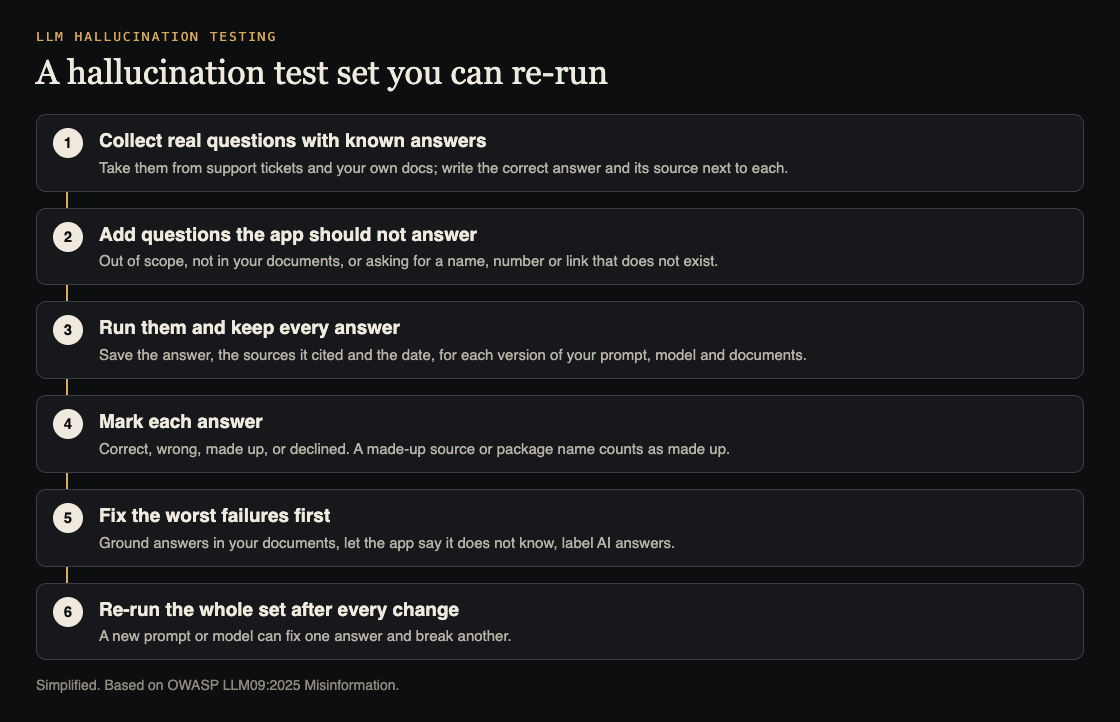
Score answers the same way every time
Give every answer one of four marks:
- Correct: it matches your known answer and cites the right source, if your app shows sources.
- Wrong: it states something false.
- Made up: it invents a source, a feature, a link or a package name. Treat this as worse than wrong, because it looks checked.
- Declined: it says it does not know, or passes the question to a person. This is the right answer for the questions you should not answer, and a miss for the ones you can.
Record the model name, the prompt version and the date with every run. A new model or a small prompt edit can fix one answer and break three others, and you only see that if you can compare runs.
Worked example: test a support assistant
Say your app has an assistant that answers customer questions from your help pages. Here is a first run you could do in an afternoon on a staging copy.
- Pick 25 real support questions and write the right answer for each from your help pages.
- Add 8 questions the assistant should decline: two about a competitor's product, two about features you do not have, two asking for a legal or medical opinion, and two asking for a contact person by name.
- Add 3 trap questions that assume a feature or plan you do not offer.
- Run all 36 through the assistant exactly as a user would, in the real chat window, and paste each answer into your sheet.
- Mark each answer. Count the made-up ones first, then the wrong ones, then the misses on questions it should have declined.
- For every made-up answer, check whether the right document was found at all. If it was not, the problem is retrieval, which our guide to RAG security testing also covers. If it was found and ignored, the problem is the prompt or the model.
- Change one thing, then run all 36 again and compare.
Your goal for the first run is not a score. It is a list of the worst answers, with the reason each one happened.
Fixes that reduce made-up answers
OWASP's mitigations for LLM09 fall into three groups. None removes hallucinations entirely, so keep testing after each one.
Ground the answers. Retrieval-augmented generation (RAG), where the app looks up trusted documents and gives them to the model, helps the model answer from your facts instead of its memory. OWASP also mentions fine-tuning to improve output quality.
Check the important outputs. OWASP recommends automatic validation of key outputs, especially in high-stakes settings, and human review for critical or sensitive information. A simple version: if an answer mentions a price, a link or a package, check it against a known list before showing it. For code suggestions, confirm a package exists and is the one you meant before installing it. Our guide to LLM output handling covers the other side of trusting model output.
Be honest in the interface. OWASP advises clearly labeling AI-generated content, telling users about limits on accuracy, and being specific about what the feature is meant for. Let the assistant say "I don't know" and offer a person instead.
Frequently asked questions
Can testing remove hallucinations completely?
No. Testing shows you how often and where your app makes things up, so you can fix the worst cases and warn users about the rest.
How many test questions do I need?
Start with 30 to 40 that a person can read in one sitting, and add every bad answer users report. A small set you run often is worth more than a large one you run once.
Is hallucination testing the same as prompt injection testing?
No. Hallucination testing checks honest questions for wrong answers; prompt injection testing checks whether someone can trick the app into breaking its rules. Most AI apps need both.
Should I tell users the AI can be wrong?
Yes. OWASP lists clear risk communication and labeling of AI content among its mitigations.
Get started
whitehatstoic's cybersecurity and AI safety testing runs security tests on web apps and AI systems, with a written report, fixes and a retest after fixes. For deeper work on how a model behaves, the AI safety research service offers behavior evaluations on request. Every engagement is scoped after a short call.
Book a meeting with whitehatstoic: tell us the product, the deadline and your biggest worry, and we reply with a plan and a price.
Comments
No comments yet.
Sign in or make an account to comment.