OWASP LLM Top 10 2026: what changed and how to test each risk
The OWASP LLM Top 10 2026 is the newest version of the best-known list of security risks for apps built on large language models. OWASP posted it on its Gen AI Security Project site in August 2026. The order changed more than in past years, one entry has a new name, and several grew to cover newer attacks.
This guide shows what changed from the 2025 list, then turns each of the ten entries into a test you can run on your own app. The full document is on the OWASP 2026 resource page.
What the OWASP LLM Top 10 2026 is
The list ranks the risks that matter most when a language model is part of your application. OWASP describes it as community-driven and built by hundreds of AI security experts, with attack scenarios and fixes for each entry.
The way it was built changed this year. The project leads write that earlier versions rested on practitioner judgment alone. For 2026 they also gathered 7,714 real incidents from public vulnerability databases and an AI-harm database, and sorted the 6,639 that had enough detail. The community vote carries three quarters of the weight and the incident record one quarter.
The two did not always agree. Prompt injection drops out of the top ten if you only count public incidents. The leads explain this as a defense effect: teams fight it hard, so fewer clean exploits get reported. It stays first. Misinformation went the other way. Voters placed it near the bottom, the incidents placed it near the top, and it now sits in the middle.
The ten risks and what moved
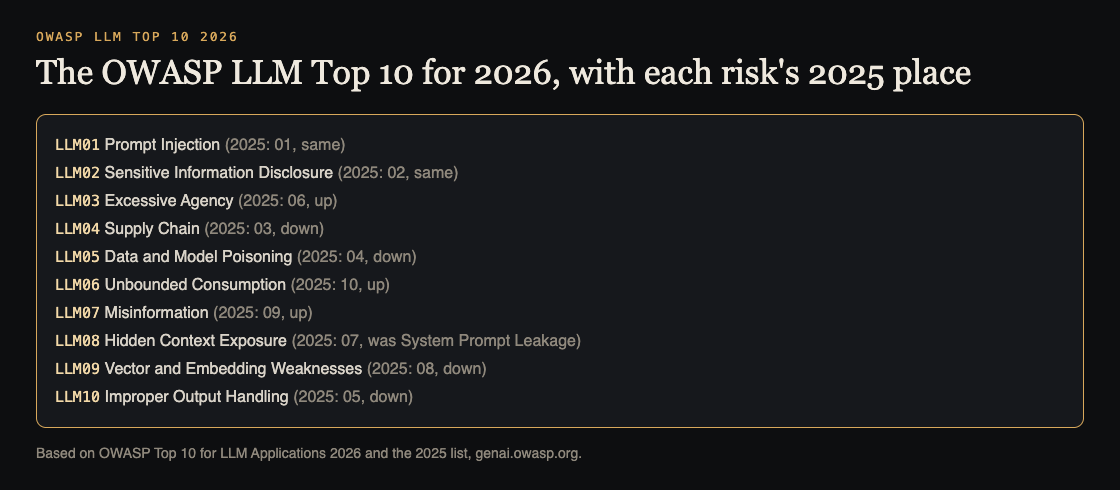
The moves OWASP calls out:
- Excessive Agency rose to third, from sixth. OWASP calls it the most important move, because AI agents are where the damage is landing.
- Unbounded Consumption rose four places, to sixth.
- Improper Output Handling fell the furthest, from fifth to tenth.
- System Prompt Leakage became Hidden Context Exposure, a wider entry covering everything placed in the model's context that users are not meant to see.
Some entries also grew. Prompt injection now covers instructions hidden in images or audio. Supply chain covers a model file that is not what it claims to be. Poisoning now includes fine-tuning that has been subverted. Output handling now includes insecure code written by AI assistants.
OWASP also draws a boundary. This list covers the model as a part of your app. Once the model acts on its own, with tools, memory between sessions and real consequences, OWASP says to read it together with the OWASP Top 10 for Agentic Applications.
Inputs and hidden context: LLM01 and LLM08
LLM01 Prompt Injection. Test every place text reaches the model: the chat box, uploaded files, web pages it reads, tool results, and now images and audio. Our prompt injection testing guide has a full checklist.
LLM08 Hidden Context Exposure. OWASP says to assume anything in the model's context can be discovered: the system prompt, developer instructions, retrieved policy text and tool definitions. The test is to read your hidden context as if it were public. If it holds a key, a secret rule or the only check on who can do what, move that into code.
Data: LLM02, LLM05 and LLM09
LLM02 Sensitive Information Disclosure. Sign in as one test user and try to get another user's data out of answers, logs and tool calls. OWASP's 2026 advice is to check permissions before retrieval, inside the search itself.
LLM05 Data and Model Poisoning. List every source that feeds training, fine-tuning or your search index, and who can write to each one. Add a test document with hidden text and see whether it changes answers.
LLM09 Vector and Embedding Weaknesses. Check that each customer's search runs only over that customer's vectors, and that backups of the index are protected like the documents. Our guide to RAG security testing shows how with two test accounts.
Actions and answers: LLM03, LLM07 and LLM10
LLM03 Excessive Agency. List every tool the model can call and what each can change. Try to get it to call a tool the user should not be able to use. Our guide to excessive agency covers how to cut permissions back.
LLM07 Misinformation. OWASP defines the core risk as a wrong answer that someone, or something, trusts and acts on. Build a small set of questions with known answers, including ones the model should refuse, and check the results before each release.
LLM10 Improper Output Handling. Find every place a model reply is shown as HTML, run as code, or passed into a query, and test it with a reply that contains a script or a command.
Parts and cost: LLM04 and LLM06
LLM04 Supply Chain. List your model, adapters, datasets and packages, check where each came from, and compare file hashes. Our guide to LLM supply chain security has a review you can follow.
LLM06 Unbounded Consumption. OWASP describes this as uncontrolled use that can take a service down, run up costs or let someone copy the model. Send a burst of long requests from one account and confirm limits, timeouts and spending alerts all fire.
Worked example: a five-day test plan
Say you have a customer-facing assistant that searches your help docs and can open support tickets. Here is one way to cover the list in a working week:
- Day 1: map it. Draw what the assistant reads, what it can call, and where its replies go. Mark which of the ten entries apply. If it calls tools or keeps memory, note that the Agentic list applies too.
- Day 2: inputs and hidden context. Run prompt injection tests through chat, uploads and the help docs. Read the system prompt and tool definitions as if a user had them.
- Day 3: data. Run two-account tests for leaks, add a poisoned test document, and check how the index is split between customers.
- Day 4: actions and answers. Try to open tickets for another customer, run your known-answer questions, and test how replies are displayed.
- Day 5: parts, cost and report. Check the model and package list, run a load burst, then write up each finding with the entry it maps to and a fix.
Rerun the parts that changed after every release. A small team will not do every check in depth each time, and that is fine if you know which ones you skipped.
Frequently asked questions
Is the 2025 list still useful?
Yes. Most entries are the same risks with new numbers, so tests written for 2025 still apply; update the labels and add the new coverage, such as cross-modal injection and the wider Hidden Context Exposure entry.
What happened to System Prompt Leakage?
It is now LLM08:2026 Hidden Context Exposure, which covers the system prompt plus other hidden material in the model's context, such as tool definitions and retrieved policy text.
Does the list cover AI agents?
Partly. OWASP says this list covers the model as a part of your app, and that once the model acts on its own with tools and memory, you should also use the OWASP Top 10 for Agentic Applications.
Do we need to test all ten risks?
Test the ones your app can actually hit. A chatbot with no tools has less to check under Excessive Agency than an agent that can send email, so start with a map of what your app reads, calls and outputs.
Get started
Want the list run against your own app? whitehatstoic builds products and tests them to protect them. Our cybersecurity and AI safety testing covers web apps, APIs and AI systems, including prompt injection tests, with a written report, fixes and a retest after fixes.
Book a meeting with whitehatstoic: tell us the product, the deadline and your biggest worry, and we reply with a plan and a price.
Comments
No comments yet.
Sign in or make an account to comment.