Password reset security: how to test your reset flow
Password reset security deserves as much care as the login form, because the reset flow is a second way into every account. Anyone can start it with just an email address, and if the link, the token or the page behind it is weak, an attacker never needs the password at all. Reset flows are also often built last, in a hurry, from a tutorial.
This guide follows the OWASP Forgot Password Cheat Sheet through the four parts of a reset flow, then gives you a test to run with two test accounts.
The four parts of a reset flow
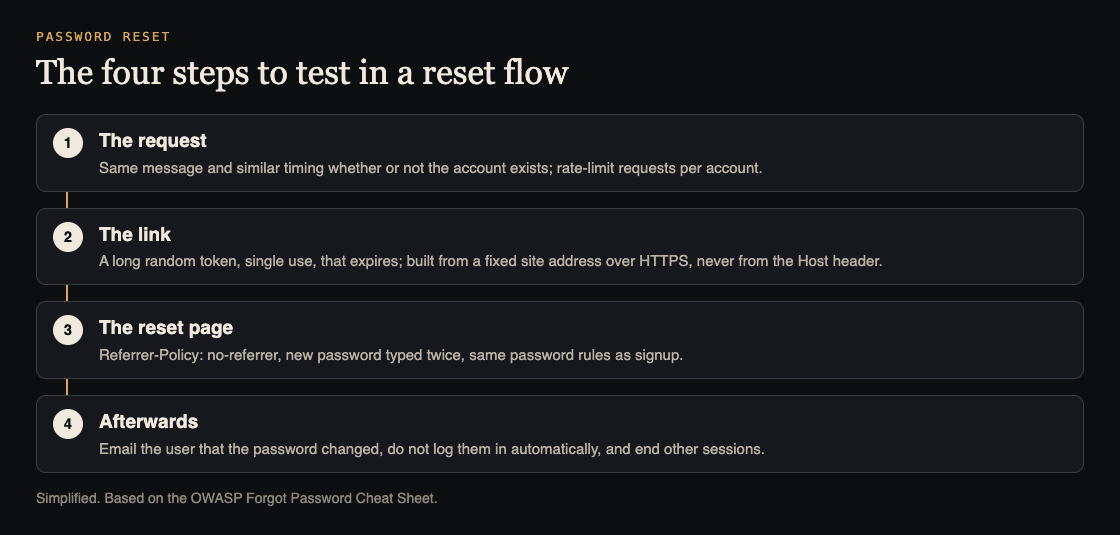
Every reset flow has the same shape: someone asks for a reset, the app sends a link or code, the user sets a new password on a reset page, and the app cleans up afterwards. Each part has its own failure modes, so test them one at a time.
Part one: the request
The request form must not tell a stranger which emails have accounts. OWASP says to return a consistent message for existing and non-existing accounts, such as "If that email is registered, we have sent a link", and to make the response take a consistent amount of time, since a slower answer for real accounts gives the game away.
It also needs a limit. OWASP recommends protection against automated submissions, such as rate limiting per account or a CAPTCHA, because otherwise someone can send thousands of reset emails to one person. Our guide to testing sign-in and payments before launch covers the same limits on the login form.
One thing the request must not do is lock the account. OWASP says accounts should not be locked in response to forgotten password requests, because that lets anyone deny access to a user whose email they know.
Part two: the link and the token
The token in the link is a temporary password, so it needs the same care. OWASP's rules:
- Random, from a cryptographically secure generator, not a timestamp, a user id or a hash of the email.
- Long enough to resist guessing, with rate limiting on the page that accepts it.
- Stored securely on the server.
- Single use, and expiring after a sensible period.
The link itself has two traps. First, OWASP warns not to build the reset URL from the request's Host header; hard-code your site address or check it against a list of trusted domains. Otherwise an attacker can request a reset for a victim while sending a fake Host header, and the victim's email arrives with a link to the attacker's site carrying a real token. Second, the link must use HTTPS.
Part three: the reset page
- Referrer-Policy: no-referrer. OWASP recommends it on the reset page, so the token in the URL is not sent to any third-party script or image the page loads.
- Type the new password twice, and apply the same password rules as the rest of the app.
- Security questions can be an extra step, but OWASP says they should never be the only way to reset a password, because the answers are often easy to guess or find.
Part four: afterwards
This is the part most often skipped. OWASP says:
- Email the user that their password was changed, without including the password.
- Do not log them in automatically. Send them through the normal sign-in, because auto-login adds complexity to session handling and makes mistakes more likely.
- End other sessions, or ask the user whether to. OWASP notes that a reset alone may not restore control of a compromised account: the attacker may still have a session, or may have changed recovery details or a second factor.
- Cancel outstanding reset links once the password has changed.
Recovery details and second factors
Resetting a password is one kind of account recovery. Changing the recovery email, phone number or second factor is another, and an attacker who briefly controls an account will often go after those first, so the next reset goes to them. OWASP's guidance for recovery covers this:
- Do not rely only on recently added or changed recovery details. Use evidence that was set up earlier, such as saved recovery codes.
- Do not automatically restore old recovery addresses or numbers, since they may have been replaced because they were lost or compromised.
- Notify the user through every registered channel that is still safe to use, with instructions for reporting a change they did not make.
Worked example: test password reset security with two accounts
Use your own staging app, a test account A you can sign in to, and an email address C with no account.
- Request a reset for A and for C. Compare the message, the status code and the time each takes in your browser's network panel. They should match.
- Request ten resets for A in a minute. A limit should kick in, and A should still be able to sign in normally.
- Read the link. Is the token long and random-looking? Request two resets and compare: the tokens should share no visible pattern. The link should start with https and your real domain.
- Change the Host header. Using a proxy or
curl, send the reset request for A with a differentHostvalue. The emailed link should still point to your real domain. - Use the link twice. Set a new password, then open the same link again. It should be refused. Also try an old link after its expiry time.
- Check the page. In developer tools, confirm the reset page sends
Referrer-Policy: no-referrerand that the password is asked for twice. - Check afterwards. Before the reset, sign in as A in a second browser. After the reset, that session should end or the user should be asked. Confirm A was not logged in automatically and that a change notice email arrived.
Any failure is a concrete fix. A reset that does not end old sessions is also worth checking against our guide to testing broken access control, since both decide who can still act as the user.
Frequently asked questions
What should a password reset page say when the email does not exist?
The same as when it does. OWASP recommends a consistent message and similar response time, so the form does not reveal which emails have accounts.
How long should a reset link last?
OWASP says tokens should be single use and expire after an appropriate period. Pick a short window that suits your users, and test that expired links fail.
Should the user be logged in after resetting the password?
No. OWASP recommends sending them through the normal sign-in instead of logging them in automatically.
Should a reset end the user's other sessions?
Yes, or ask the user. OWASP notes an attacker may still hold a session after the password changes.
Get started
Sign-in, reset and recovery flows are part of every sign-in and payments audit we run. whitehatstoic offers security tests on web apps and AI systems, with a written report, fixes and a retest after fixes, scoped after a short call.
Book a meeting with whitehatstoic: tell us the product, the deadline and your biggest worry, and we reply with a plan and a price.
Comments
No comments yet.
Sign in or make an account to comment.