Problem solving journal: how to keep one that helps
A problem solving journal is a notebook for one job: writing down the problems you carry, what you try for each one, and what happened. It is not a diary of your day. It is a record of attempts, so you stop repeating the fixes that failed and start building on the ones that worked. This guide shows you how to keep one that actually helps, with a worked week you can copy.
What a problem solving journal is for
Most of us fix the same problem more than once. You try something, it half works, you forget about it, and three months later the problem is back and you cannot remember what you tried. A problem solving journal fixes that memory gap.
It does three things a normal journal does not:
- It names each problem in a form you can act on.
- It keeps every attempt next to the problem, with an honest outcome.
- It shows you which problems are connected, so you can fix a cause instead of a symptom.
The Lean Enterprise Institute describes a plan as "a theory" of what will address a problem's cause, and says problem solving begins, rather than ends, when you start a fix (Lean Enterprise Institute, Problem Solving). A journal is where you keep score on those theories.
Write the problem in one line
Start every entry with the problem in a single sentence. One line forces you to decide what the problem actually is. "Work is overwhelming" is a mood. "I answer messages all morning and do no focused work before lunch" is a problem you can test fixes against.
A good one line problem has three parts:
- Who: usually "I" or "we".
- What happens: the thing you can see, not a guess at the reason.
- When or how often: "most mornings", "every month", "on Fridays".
Keep guesses about the cause out of the problem line. The Lean Enterprise Institute stresses that a problem should rest on verifiable facts, not assumptions. If you write "I am lazy in the mornings", you have baked in a cause you never checked. Write what you see, then test causes with your attempts.
The NHS makes the same point for stress: the first step to feeling better is to identify the cause (NHS, 10 stress busters). A journal is not health care, and if a problem is weighing on you, that NHS page is a better place to start than any notebook.
Record every attempt and its outcome
Under each problem, list the things you try. Each attempt gets two notes: what you did, and what happened. Keep the outcome to one of three words:
- Worked: the problem stopped, or got clearly better.
- Partly: it helped some days, or fixed half of it.
- Failed: nothing changed, or it got worse.
Three words sound blunt, but that is the point. A long paragraph lets you talk yourself into believing a fix worked. A single word makes you decide. Add one short line of evidence, such as "two clear mornings out of five", so future you knows why you picked that word.
This is the "check" step of the plan, do, check, act cycle. The Lean Enterprise Institute describes check as evaluating the results, and act as keeping the change or starting the cycle again, depending on those results (Lean Enterprise Institute, PDCA). Your journal is the check step written down.
Keep the failed attempts
It is tempting to delete what did not work. Do not. A failed attempt is useful information. It tells you which theory about the cause was wrong, and it stops you from trying the same thing again when the problem returns.
Problem Graph's home page puts it this way: "The graph is honest. A solution that failed three times stays on the map as a failed solution, and that is exactly what the next person needs to know." Often the next person is you, six months from now.
A simple rule: you may add to an entry, but you never erase one. If you change your mind about an outcome, add a new line with the date.
A worked example: one week in a problem solving journal
Here is a week you can copy. The problem is a common work one, and the example is made up to show the shape.
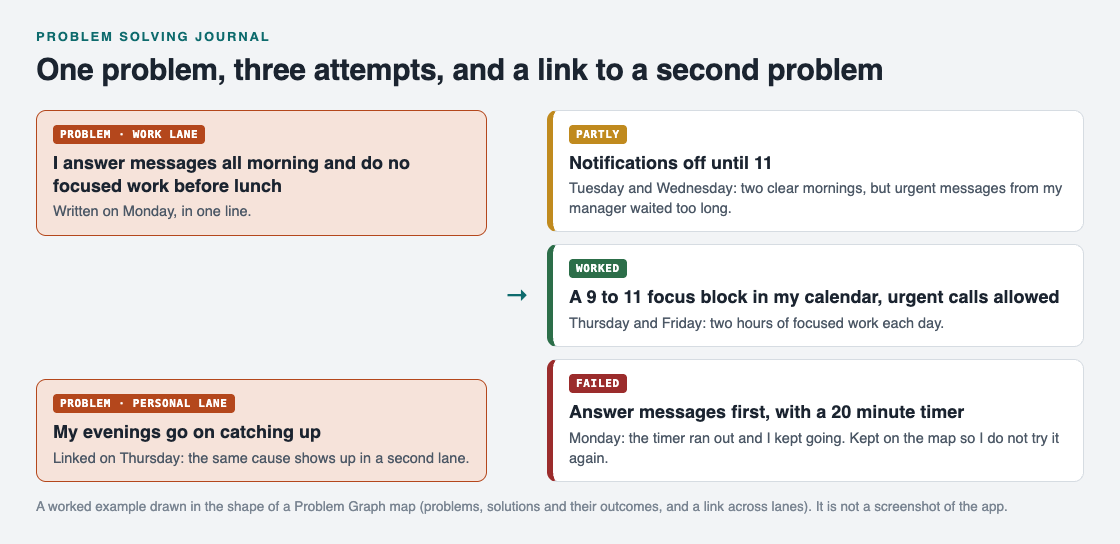
One problem, three attempts with honest outcomes, and a link to a related problem.
- Monday. Write the problem: "I answer messages all morning and do no focused work before lunch." Put it in the work lane. Try the first fix: answer messages first, with a 20 minute timer. Outcome by evening: failed. The timer ran out and you kept going.
- Tuesday and Wednesday. New attempt: notifications off until 11. Outcome: partly. Two clear mornings, but an urgent message from your manager waited too long.
- Thursday. Third attempt, built on what Tuesday taught you: a 9 to 11 focus block in your calendar, with urgent calls allowed. You also notice your evenings go on catching up, so you write that as its own problem in the personal lane and link the two.
- Friday. Check. The focus block gave you two hours of focused work on Thursday and Friday. Mark it worked. Keep the other two attempts on the page with their outcomes.
At the end of the week you have one problem, three attempts, one clear winner and a link that explains why your evenings felt short. That is far more useful than a page that says "busy week".
Link problems that belong together
The link on Thursday is where a problem solving journal starts to pay off. Problems rarely live alone. A work habit eats your evenings. Late nights make mornings harder. On a page, those sit in different entries and you never see them together.
When you notice that two problems share a cause, write the link down. Over a few weeks, the problems with the most links are usually the ones worth fixing first, because one fix there helps several others.
This is the part paper does badly. Problem Graph is built around it: it calls itself "a journal that draws itself". You write a problem in one line, put it in a lane (personal, work, expert or scientific), and it lands on the map when you press Enter. You attach solutions as ideas, mark the ones you are trying, and record the outcome as worked, partly or failed. You can link problems even across lanes, and, in the site's words, "patterns show up on the map that never show up in a list". If you prefer a list anyway, the app has a List view beside the map.

The three steps on Problem Graph's home page.
Your problems stay private by default. The home page says they are saved to your account, follow you to any phone or computer you log in on, and nobody else sees them.
Frequently asked questions
How often should I write in a problem solving journal?
Write when a problem shows up and when you try something new. A short check once a week, where you mark each attempt worked, partly or failed, keeps it honest.
What is the difference between a problem solving journal and a diary?
A diary records what happened to you. A problem solving journal records problems, the fixes you tried and their outcomes, so you can decide what to try next.
Should I write down solutions that did not work?
Yes. A failed attempt tells you which idea about the cause was wrong and stops you from repeating it. Keep it, marked as failed.
Can I keep a problem solving journal on my phone?
Yes. Problem Graph runs in the web browser and its home page says it works on your phone. Any notes app also works if you keep the same shape: problem, attempts, outcomes, links.
Get started
Pick one problem you have tried to fix more than once. Write it in one line, then list every attempt you can remember with worked, partly or failed next to it. You will probably spot one you should stop repeating.
Try Problem Graph: it is free, and you can look around the public network without an account. Write one problem down in a line and attach the first thing you will try.
Comments
No comments yet.
Sign in or make an account to comment.