Screen recording stopped by itself? What ends it early
You set up a long take, talked for forty minutes, and found the screen recording stopped by itself somewhere in the middle. Before you record again, find out which kind of stop it was. In Cheap Recorder only two things end a whole recording early, and a few others only cut one sound while the recording carries on. Each has its own fix, and this guide walks through all of them, then shows how to set up a 90-minute workshop so it runs to the end.
Why a screen recording stopped by itself
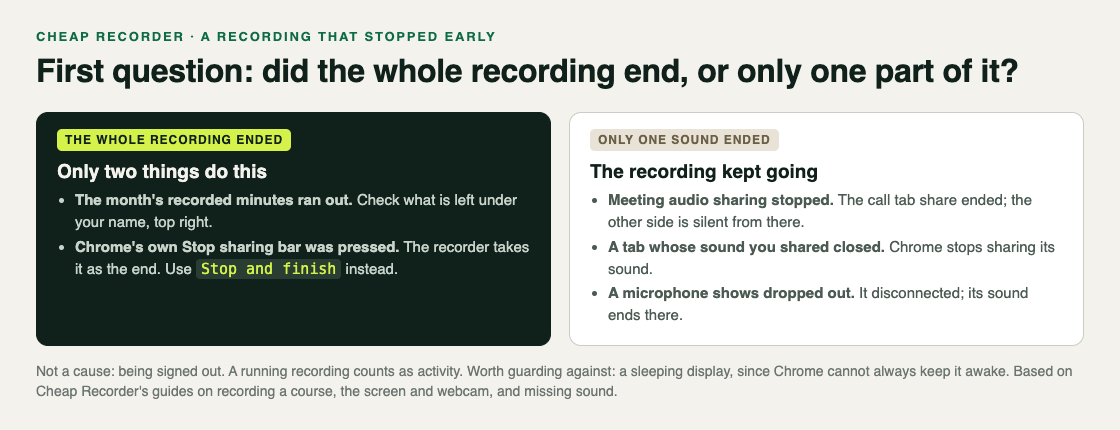
Start with one question: did the whole recording end, or did only part of it go quiet? Open the recording and play the last few minutes.
- The whole thing ended. The timer stopped and the file ends there. That points to one of the two causes below.
- The picture kept going but a sound vanished. The recording was still running. Something cut one source, such as the other side of a call or one microphone.
Your recording is written to the folder you picked every second while you record, so look there first.
Cause one: your month's minutes ran out
Each plan comes with a number of recorded hours a month. The Free plan has 12 hours, Creator has 80 and Business has 250. If the minutes run out in the middle of a recording, the recording stops.
It is most likely near the end of a busy month. A long session can start with plenty of time on the clock and still run past what is left.
To check, open your name in the top right of the recorder. It shows how many minutes are left this month. Do this before any session that will run long, and compare it with how long you expect to talk, plus a margin for a second take.
Cause two: Chrome's own Stop sharing bar
When you share a screen, window or tab, Chrome shows its own bar with a Stop sharing button. It is easy to press by accident.
Cheap Recorder takes that button as the end. Pressing it finishes the recording, the same as if you had meant to stop.
The fix is a habit: always end with Stop and finish on the recorder page, and never touch Chrome's bar while you record.
When only one sound stopped
These do not end the recording. The picture and every other sound carry on, which is why the file can look fine until you listen closely.
- The other side of a call went silent. If the call tab's share ends, the recorder shows Meeting audio sharing stopped. From then on the other side is silent. Picking the tab again does not add it back to a running recording, so you would stop and start a new one.
- A tab's sound disappeared. If you shared a tab's sound and that tab closed, Chrome stops sharing its sound. Keep the tab open until you press Stop and finish.
- Your voice cut out. If a microphone's name shows dropped out, it disconnected, and its sound ends there. It can happen with a USB or a Bluetooth microphone, and a message names the one that went.
If the sound was missing from the very start rather than cut off partway, that is a different problem. The post on finding which sound is missing covers it, and the no sound guide lists every check.
What does not end a recording, and one thing to guard against
Being signed out does not. Cheap Recorder signs you out after 15 minutes without activity, but a running recording counts as activity. That holds even while you work in another app for the whole session.
A long silence does not stop the transcript for good. If Chrome's speech recognition stops listening during a pause, the recorder starts it again for as long as you are still recording.
A sleeping display is worth guarding against. While a recording runs, the recorder asks Chrome to keep the display awake. Chrome cannot always do it. For anything long, set your computer's display to stay on before you start.
Use Google Chrome for long takes. In a browser that cannot save to a folder, step 1 says so, and the recording is kept in the browser's memory until you press Stop and finish. Chrome writes it to your folder as you go.
While you record, the counter by the timer shows how many MB have been written. If that number keeps growing, the file is being saved.
A worked example: a 90-minute workshop
Say you run a 90-minute online workshop on a Google Meet call, and you want the whole thing as one recording. It is the last week of the month and you are on the Free plan.
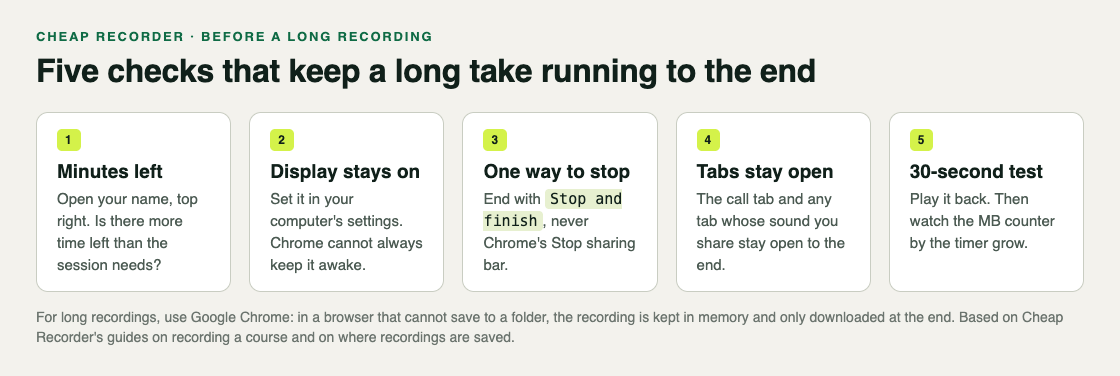
- Check the minutes. You open your name in the top right. It shows about an hour left. A 90-minute workshop would stop after roughly an hour, so before the day you either move to a plan with more hours (Creator has 80 a month) or decide which hour matters most and record only that.
- Keep the display on. You set the computer's display to stay on for the afternoon, because Chrome cannot always keep it awake.
- Join the call in a Chrome tab. The call has to be open in a Chrome tab for its sound to be recorded. In the Call audio tile you press Pick the call tab..., choose the Meet tab, tick Share tab audio and press Share.
- Use a wired microphone. A cable that stays plugged in will not drop out halfway.
- Record a 30-second test. You say a sentence, ask someone on the call to say one, stop and play it back. Both voices are there.
- Tell everyone. At the start, you say the workshop is being recorded.
- Record and leave the bars alone. During the workshop you keep the Meet tab open and never press Chrome's Stop sharing bar. You glance at the MB counter now and then.
- Finish properly. At the end you press Stop and finish. The file is already in your folder.
The course and tutorial checklist has the same long-lesson checks, and the post on recording a Google Meet call covers the call setup in full.
Frequently asked questions
Why did my screen recording stop by itself?
In Cheap Recorder, a whole recording ends early for two reasons: your month's recorded minutes ran out, or Chrome's own Stop sharing bar was pressed. Check the minutes left under your name in the top right.
Is the part I recorded before it stopped lost?
The recording is written to your chosen folder every second while you record, so look there first. Using Google Chrome keeps it that way for long takes.
Will I be signed out during a long recording?
No. A running recording counts as activity, so the 15-minute sign-out does not happen while you record.
Can I add the call's sound back after the share stopped?
Not to the same recording. Picking the tab again does not add it to a running recording, so stop and start a new one.
Get started
The free plan needs no card and gives you 12 hours of recording a month. Try Cheap Recorder in Chrome, and your recordings stay on your own disk.
Comments
No comments yet.
Sign in or make an account to comment.