Security headers for web apps: which ones matter
Security headers are short lines your server adds to every response, telling the browser how to treat your pages: only over HTTPS, not inside someone else's frame, without guessing file types. They are cheap to add and easy to get wrong in both directions. Some teams skip them entirely; others copy a long list from an old blog post, including headers that are now discouraged.
This guide sorts the list using the OWASP HTTP Headers Cheat Sheet: what to send, what to remove, and what to roll out carefully. It ends with a check you can run on your own staging site.
What security headers do, and what they do not
Headers are instructions to the browser. They narrow what an attacker can do with a bug, such as cross-site scripting or a page loaded inside a hostile frame. They do not fix the bug, and they do nothing for someone calling your API directly from a script. Think of them as a seatbelt: worth having on every trip, not a reason to drive carelessly.
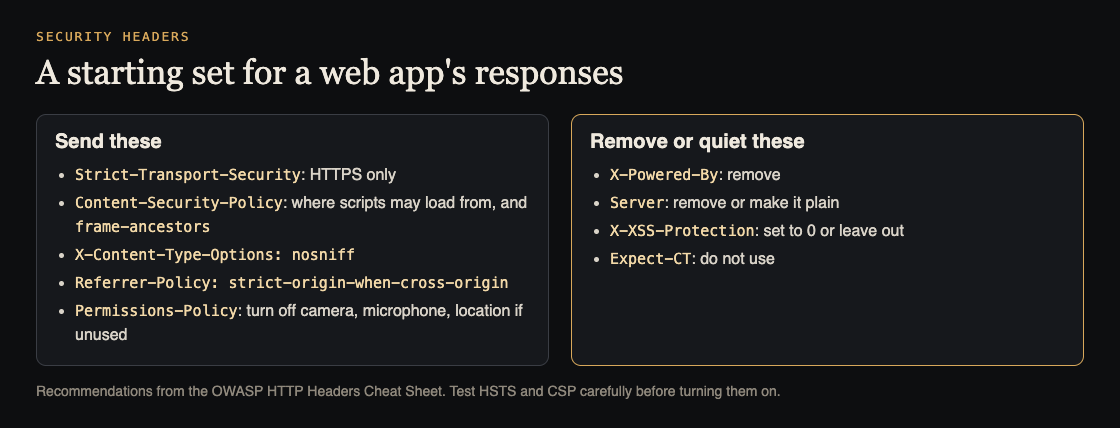
Send these on every page
X-Content-Type-Options: nosniffstops browsers from guessing a file's type. OWASP explains that sniffing can turn a harmless type into something the browser runs. Set theContent-Typeheader correctly too.Referrer-Policy: strict-origin-when-cross-originkeeps full URLs, which can contain ids or tokens, from leaking to other sites.Permissions-Policyturns off browser features you do not use. OWASP's example isgeolocation=(), camera=(), microphone=().- Frame protection. OWASP prefers the CSP
frame-ancestorsdirective, which replacesX-Frame-Optionsin browsers that support it, withX-Frame-Options: DENYas the older option. Cache-Control: no-storeon sensitive responses, such as account pages, so shared caches do not keep them.
Roll out carefully: HSTS and CSP
Two headers give the most protection and can also cause the most damage if rushed.
Strict-Transport-Security tells browsers to use only HTTPS for your site, even if someone types http://. OWASP's recommended value is max-age=63072000; includeSubDomains; preload, but it warns to read how the header works first: if it is misconfigured or your certificate expires or is revoked, real users might be unable to reach the site until the long duration passes. includeSubDomains also covers every subdomain, including old ones that may not have HTTPS. Start with a short max-age, confirm everything works, then raise it. Read the preload requirements before asking for preload.
Content-Security-Policy lists where scripts, styles and other content may load from. OWASP calls it an added layer that helps detect and reduce cross-site scripting and data injection, and also says it is complex to configure and maintain. A practical route is to run it in report-only mode first, read the reports, fix what breaks, then enforce it. For an API that returns JSON rather than pages, OWASP notes CSP may be meaningless.
Remove or quiet these
X-Powered-By: OWASP says it tells attackers what technology you run and helps them find vulnerabilities, and recommends removing it. Many frameworks add it by default.Server: remove it or set a plain value without versions.X-XSS-Protection: this one surprises people. OWASP warns it can create cross-site scripting problems in otherwise safe sites, and recommends not setting it, or setting it to0, and using a CSP instead.Expect-CT: OWASP says not to use it, and to remove it from existing code if possible.
Cross-origin headers for apps that need them
The cheat sheet also covers newer headers that isolate your pages from other sites: Cross-Origin-Opener-Policy, Cross-Origin-Embedder-Policy and Cross-Origin-Resource-Policy. They are useful, but they can break embedded content and pop-up flows such as some payment or sign-in windows. Add them one at a time, with testing, once the basics are in place. Access-Control-Allow-Origin belongs with your CORS settings and should name specific origins.
Where to set security headers
Headers can be added in several layers: your framework, your web server or reverse proxy, and your CDN or hosting platform. Pick one layer to own them and write it down. When two layers both set a header, you can end up with duplicates or conflicting values, and a later change in one layer quietly overrides the other.
Setting them at the edge, in the proxy or CDN, has one advantage: static files, error pages and redirects get the same headers as your app's pages. Setting them in the framework keeps them in code review with everything else. Either works if the choice is deliberate and tested. Whichever you choose, check error pages and redirects too, since they are often served by a different part of the stack.
Worked example: check security headers on staging
Run this on your own staging site.
- Fetch the headers. Run
curl -sI https://staging.example.com/and list what comes back. Repeat for a signed-in page, an API route and a static file, because different parts of a stack often send different headers. - Mark each header as send, remove or roll out carefully, using the lists above.
- Look for version strings in
ServerandX-Powered-By. Remove them in your framework or proxy settings. - Add the cheap ones first: nosniff, Referrer-Policy, Permissions-Policy, frame protection, and
X-XSS-Protection: 0or nothing. - Start HSTS with a short max-age on staging, then on production, and only raise it after a week with no problems.
- Turn on CSP in report-only mode, collect reports while you click through the whole app, then enforce.
- Re-run step 1 and keep the curl commands as a test in your pipeline, so a framework upgrade cannot quietly bring back a removed header.
Headers are one line of the pre-launch checklist, and worth fixing before a penetration test so testers spend their time on harder problems.
Frequently asked questions
Which security headers matter most?
For most web apps: HSTS, a Content Security Policy, nosniff, a Referrer-Policy, frame protection and Permissions-Policy, plus removing X-Powered-By and version details.
Should I still set X-XSS-Protection?
No. OWASP warns it can create XSS problems and recommends not setting it, or setting it to 0, and using CSP instead.
Can HSTS lock users out?
Yes, if it is misconfigured or your certificate fails. OWASP warns about this, so start with a short max-age and raise it once you are sure.
Do security headers protect my API?
Only partly. Headers instruct browsers. Scripts calling the API directly ignore them, so the API still needs its own authentication and access checks.
Get started
Header checks are part of every web app and API review we run. whitehatstoic offers security tests on web apps and AI systems, with a written report, fixes and a retest after fixes, scoped after a short call.
Book a meeting with whitehatstoic: tell us the product, the deadline and your biggest worry, and we reply with a plan and a price.
Comments
No comments yet.
Sign in or make an account to comment.