Session cookie security: the settings every web app needs
Session cookie security is easy to overlook because your framework sets the cookie for you. Users sign in, a cookie appears, and everything works. But that one cookie is the user's identity for as long as it lives, and a few missing attributes can let it leak, be read by a script, or outlive the logout button.
This guide walks through the settings in the OWASP Session Management Cheat Sheet, then shows how to check your own app in the browser's developer tools.
Why the session cookie matters so much
After login, the app no longer asks for a password. It trusts whoever presents the session cookie. Anyone who gets a copy of that value can act as the user until the session ends on the server. So the job of the cookie settings is simple: keep the value from being copied, and keep the session short enough that a copy is worth little.
One Set-Cookie line, part by part
OWASP gives this example for a session cookie:
Set-Cookie: __Host-SessionID=<value>; Secure; HttpOnly; SameSite=Strict; Path=/
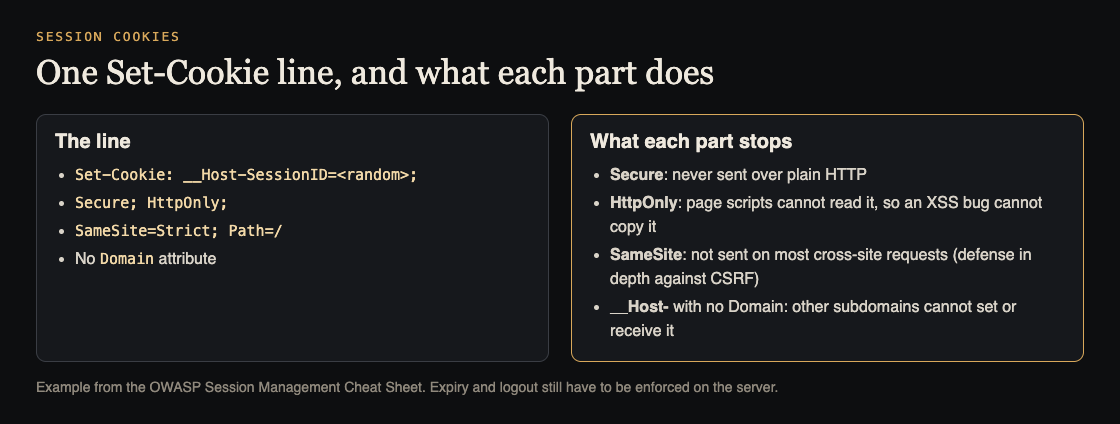
- Secure: the browser only sends the cookie over HTTPS. OWASP calls it mandatory, and notes that making the whole site HTTPS does not protect the session ID if this attribute is missing.
- HttpOnly: page scripts cannot read the cookie through
document.cookie. OWASP says this is mandatory to stop session theft through cross-site scripting. - SameSite:
Strictkeeps the cookie off cross-site requests;Laxallows top-level navigations with safe methods. OWASP treats it as defense in depth against CSRF, not a replacement for a CSRF token. - The __Host- prefix: the browser only accepts the cookie if it is Secure, has no Domain attribute and uses
Path=/. OWASP recommends it for session IDs because it blocks other subdomains from setting or overriding it.
Strict or Lax: choosing SameSite
OWASP's example uses SameSite=Strict, which keeps the cookie off every cross-site request. The trade-off is that a user who follows a link to your app from an email or another site arrives without their session on that first request, and may see a sign-in page even though they are signed in.
Lax allows the cookie on top-level cross-site navigations that use safe methods, such as following a link, while still keeping it off cross-site form posts and background requests. Many apps choose Lax for that reason. Either way, keep a CSRF token on actions that change data, since OWASP treats SameSite as an extra layer rather than the main protection.
What to avoid is turning SameSite off to fix a login problem without understanding why the cookie was missing. If a third-party embed or payment redirect needs the session, design that flow on purpose and test it.
A weak cookie, side by side
Compare the OWASP example with a line many apps ship by accident:
Set-Cookie: sessionid=<value>; Domain=example.com; Path=/; Max-Age=31536000
No Secure, so it can travel over plain HTTP. No HttpOnly, so any injected script can read it. A Domain that sends it to every subdomain. And a lifetime of a year, so a stolen value stays useful far longer than any real session needs.
Scope: Domain and Path
OWASP recommends not setting the Domain attribute at all, so the cookie only goes to the exact host that set it. Setting Domain=example.com sends it to every subdomain, so a weakness in a forgotten marketing site or a test server can expose sessions for your app. The cheat sheet also advises against mixing apps of different security levels on one domain.
Keep Path as narrow as it can be for the part of the app that uses the session.
Keep tokens out of localStorage
Many single-page apps store a token in localStorage because it is easy to read from JavaScript. That ease is the problem. OWASP says not to store authentication tokens, session IDs, JWTs, refresh tokens or any credential in localStorage or sessionStorage, because any script on the page can read them, so one cross-site scripting bug discloses every token. An HttpOnly cookie avoids that.
Renewal, timeouts and logout
The cookie's attributes protect the value. The server's rules decide how long it is worth stealing.
- Renew the session ID at login. OWASP says the ID must be renewed after any privilege level change, most commonly when the user signs in. Without it, an attacker who planted a session ID before login can use it afterwards. This is called session fixation.
- Set an idle timeout. OWASP gives common ranges of 2 to 5 minutes for high-value apps and 15 to 30 minutes for low-risk ones. Pick a number for your app on purpose.
- Set an absolute timeout, so even an active session ends eventually.
- End the session on the server at logout. OWASP calls server-side invalidation mandatory. Clearing the cookie in the browser alone leaves the old value working for anyone who copied it. Do not rely on the browser closing, either: browsers with session restore can keep session cookies.
Worked example: check session cookie security in your browser
Use your own staging app and a test account.
- Before login, open developer tools, go to the storage or application panel, and note any session cookie value.
- Sign in. The session cookie value should change. If it is the same as before login, the ID was not renewed.
- Read the attributes. Check the Secure, HttpOnly and SameSite columns, the Domain and Path, and the expiry. Compare with the line above.
- Look in localStorage and sessionStorage for anything that looks like a token or JWT.
- Copy the cookie value, then log out. In a private window, set the old value by hand and reload. If you are still signed in, logout only cleared the browser, not the server.
- Leave a session idle past your chosen timeout, then click something. You should be asked to sign in again.
Each step that fails is a concrete fix for the backlog. These checks sit naturally beside our pre-launch checklist for sign-in and payments. A strong session cookie still does not decide what a user may see once signed in; that is covered in our guide to testing broken access control.
Frequently asked questions
Is SameSite enough to stop CSRF?
No. OWASP treats SameSite as defense in depth and says it is not a replacement for a CSRF token.
Should I store a JWT in localStorage or a cookie?
OWASP says not to store tokens or any credential in localStorage or sessionStorage, because any script on the page can read them. An HttpOnly, Secure cookie is the safer place.
Why does logout need to happen on the server?
Because a copied cookie value keeps working until the server forgets it. OWASP calls server-side invalidation at logout and expiry mandatory.
Get started
Sign-in and sessions are one of the first things we look at. whitehatstoic runs security tests on web apps and AI systems, with a written report, fixes and a retest after fixes. Every engagement is scoped after a short call.
Book a meeting with whitehatstoic: tell us the product, the deadline and your biggest worry, and we reply with a plan and a price.
Comments
No comments yet.
Sign in or make an account to comment.