Threat modeling for a small team: a one-afternoon plan
Threat modeling sounds like something a large company does with a security department and a binder. It is not. At its core it is a short, structured conversation about how your app could be misused and what you will do about it, and a small team can run a useful first version in one afternoon.
This plan follows the OWASP Threat Modeling Cheat Sheet, which builds the whole process on four plain questions. You need a whiteboard or a shared drawing, the people who built the app, and about four hours.
What threat modeling is, in plain words
OWASP describes threat modeling as a structured, repeatable process: you model the system from a security point of view, find the threats that apply to it, and decide a response to each one. The best time is early, during design, so security is built in rather than bolted on.
The cheat sheet also says it is not a one-time task. A threat model should be kept and updated as the system changes. That matters for small teams, because it means the first afternoon does not have to be perfect. It has to be written down so the next session can improve it.
The four questions that run the afternoon
OWASP quotes the Threat Modeling Manifesto, which says the process should answer four questions:
- What are we working on?
- What can go wrong?
- What are we going to do about it?
- Did we do a good enough job?
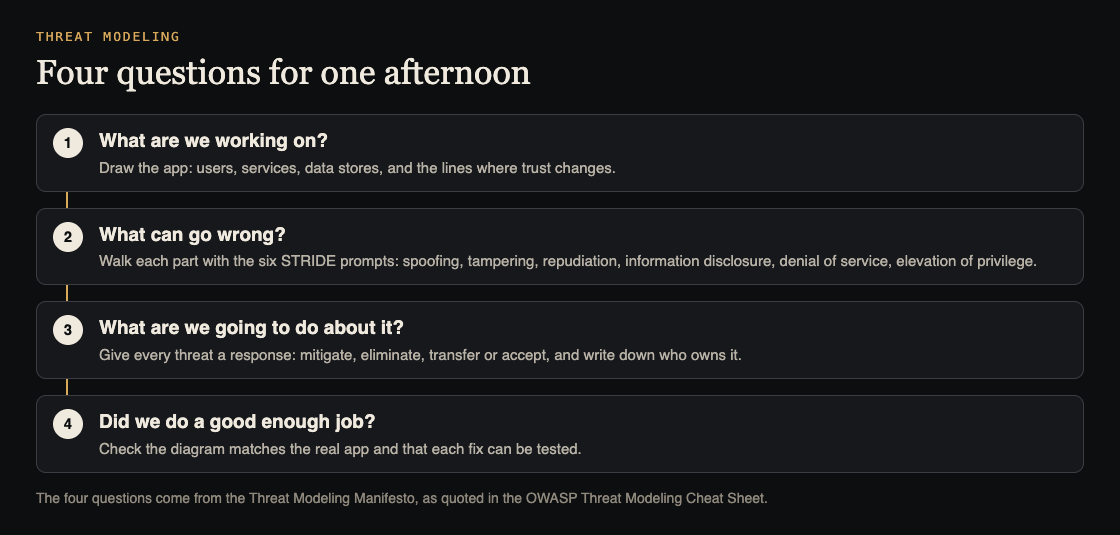
Give each question its own block of time. A simple split for a four-hour session is one hour to draw, ninety minutes to find threats, an hour to decide responses, and thirty minutes to review.
Hour one: draw what you are working on
OWASP calls data flow diagrams arguably the most common way to model a system, and says a whiteboard is fine as long as the result is saved somewhere the team can update. Draw boxes for users, services and data stores, and arrows for the data that moves between them.
Then draw the trust boundaries: the lines where data crosses from something you do not control to something you do. The browser to your API is one. Your API to a payment provider is another. Your app to an AI model is a third. Most real problems sit on those lines, so mark them clearly.
Keep the drawing at the level of the whole product for the first session. OWASP suggests a high-level overview alongside more detailed diagrams for complex parts, which you can add later.
Ninety minutes: what can go wrong, with STRIDE
STRIDE is a set of six prompts, originally from Microsoft engineers, that the cheat sheet uses to find threats. Walk each box and each arrow that crosses a trust boundary, and ask all six:
- Spoofing: can someone pretend to be another user or service?
- Tampering: can someone change data they should not?
- Repudiation: could someone deny an action because nothing records it?
- Information disclosure: can data leak to someone who should not see it?
- Denial of service: can someone make this part unavailable?
- Elevation of privilege: can a user gain rights they were not given?
Write every idea down with the part of the drawing it affects. Do not argue about likelihood yet. Ranking comes next, and a long rough list beats a short polished one at this stage.
One hour: what are we going to do about it?
OWASP says every threat must have a response, and lists four, from Adam Shostack:
- Mitigate: reduce the chance it happens.
- Eliminate: remove the feature or part that causes it.
- Transfer: give contractual or financial responsibility to another party. The cheat sheet notes this does not make the threat less likely, so record who owns what is left.
- Accept: live with it, and write down why.
Rank the list by how likely and how harmful each threat is, and spend your time on the top of it. For every mitigation, write the change as a task with an owner, so it lands in the same backlog as feature work.
Worked example: a small SaaS app with an AI helper
Picture a three-person team with a web app where customers sign in, upload invoices, pay through Stripe, and ask an AI assistant questions about their own invoices.
- Draw: browser, API, database, file storage, Stripe, and the AI model. Trust boundaries sit at the browser to API, API to Stripe, uploaded files to storage, and API to the model.
- STRIDE on "API to model": information disclosure stands out. Could the assistant answer with another customer's invoice? Elevation of privilege too: could an instruction hidden in an uploaded invoice make the assistant do more than it should?
- STRIDE on "Stripe to API": spoofing. Could someone send a fake payment event to the webhook?
- Respond: mitigate the invoice leak by filtering what the assistant can read by customer; mitigate the fake events by verifying webhook signatures; accept, for now, a low-impact denial of service risk on the marketing page, and write down why.
- Review: each mitigation becomes a test case, such as "customer A asks about customer B's invoice and gets nothing".
The AI threats in that list are covered in more depth in our guides to limiting what your AI agent can do and testing broken access control.
Thirty minutes: did we do a good enough job?
The cheat sheet's review questions make a good closing checklist. Does the drawing match the real system? Does every threat have an agreed response? Is the model saved where the people who need it can find it? Can each mitigation be tested, and can you tell if it worked?
The last question is the one teams skip. A threat model is only as good as the tests that prove its fixes, which is where a penetration test fits: it checks your answers from the outside.
OWASP is honest that threat modeling is hard for development teams: many developers lack security experience, and the work competes with deadlines. Its suggestion is to invite people with security experience into the session.
Frequently asked questions
How long does threat modeling take for a small team?
A first useful pass can fit in one afternoon if you keep the drawing high level. OWASP says the model should then be updated as the system changes, so later sessions can be shorter.
Do we need special software for threat modeling?
No. OWASP says a whiteboard works for data flow diagrams, as long as you save the result in a form the team can update.
Is STRIDE the only method?
No. The OWASP cheat sheet uses STRIDE as an example and lists other methods for privacy or business risk, which can be combined when the scope needs them.
Does a threat model replace a security test?
No. It tells you what to fix and what to test. A test checks whether the fixes actually work.
Get started
whitehatstoic builds products and tests them to protect them. If you want help running the session or testing what comes out of it, we run security tests on web apps and AI systems with a written report, fixes and a retest. Every engagement is scoped after a short call.
Book a meeting with whitehatstoic: tell us the product, the deadline and your biggest worry, and we reply with a plan and a price.
Comments
No comments yet.
Sign in or make an account to comment.