Types of malware explained: worm, trojan, spyware, rootkit
Worm, trojan, spyware, rootkit: people use these words as if they all meant "a virus". They do not. The types of malware differ in three ways that matter: how they spread, how they hide, and what they are after. Once you can tell them apart, security news and warnings start to make sense.
This guide explains each type in plain words, using the definitions from the US National Institute of Standards and Technology (NIST) and the Cybersecurity and Infrastructure Security Agency (CISA). It also shows how the free browser game Tank City Reboot turns each one into an enemy, which is an easy way to remember them.
What counts as malware
NIST's glossary defines malware as hardware, firmware or software put into a system on purpose, for a harmful purpose. The key word is intent. A bug that crashes your computer is not malware. Code someone planted to do damage, steal or spy is.
"Virus" is only one kind, and an older one. Most of what you read about today falls into the types below.
The main types of malware, by how they behave
A simple way to sort them is to ask three questions about each one.
- How does it get in? On its own over a network, or because someone ran it?
- How does it stay? In plain sight, or hidden deep in the system?
- What does it want? To spread, to watch, to lock, or to control?
Each type answers those questions differently.
Worm: spreads by itself
NIST describes a worm as a program that copies itself across a network onto other computers without needing a host program or anyone to do anything. That last part is what makes worms different. Nobody has to open an attachment. One weak computer on a network can pass it to the next.
NIST also notes that worms often use up resources such as storage or processing time, which is why a worm outbreak can slow a whole network.
Trojan: looks useful, hides harm
A trojan horse, in NIST's words, is a program that appears to have a useful function but also has a hidden and possibly malicious one. A trojan cannot spread by itself. It needs you to run it, so it dresses up as something you want: a free tool, a game, a document viewer.
The lesson is that a trojan's way in is trust, not a technical flaw.
Spyware and rootkits: watching and hiding
Spyware is software installed secretly to gather information on people or organizations without their knowledge. Its goal is not damage you can see. It wants to stay unnoticed for as long as possible and keep reporting what it collects.
A rootkit is about hiding. NIST describes it as a set of tools an attacker uses after getting root-level access, the highest level of control, to conceal what they are doing and keep that access. Because it works at that level, it can hide itself from the tools you would use to find it.
Two more names you will see often:
- Ransomware, as CISA explains, encrypts the files on a device so they cannot be used, then demands payment for the key. Attackers often also threaten to leak data they stole.
- A botnet is a network of infected computers that one criminal can control remotely, according to NIST's botnet entry.
A worked example: one download, four outcomes
Say a friend sends you a link to a "free video converter". You download it and run it. Here is how the same moment could play out with each type.
- Trojan: the converter works, so you suspect nothing. In the background it also opens a door for the attacker. The way in was you running it.
- Spyware: the converter quietly installs something that records the sites you visit and sends them off. Nothing looks broken.
- Rootkit: once the attacker has full control, they install tools that hide their files and programs, so a quick look at your running programs shows nothing odd.
- Worm: the hidden code starts copying itself to other computers on your home or office network, without anyone there opening anything.
Real attacks often combine these. A trojan gets in, a rootkit hides it, and spyware does the stealing. That is why security teams describe malware by what it does, not just by one label.
What would have helped in this example? Most of it comes back to the first step. Run software only from its maker's own site or a store you trust, not from a link that arrives out of the blue, even from a friend whose account may have been taken over. Keep your system and apps updated, because a patch, as NIST puts it, is the fix for an identified problem, and many updates close exactly the holes that worms use to move between computers. Neither step makes a computer safe on its own, but both make each type above harder to land.
Learn the types by playing: Tank City Reboot
Names stick better when you have to deal with them. In Tank City Reboot your antivirus tank guards a CPU core, and each type of malware is an enemy tank whose behavior hints at the real thing. Each card on the page gives the real idea behind it.
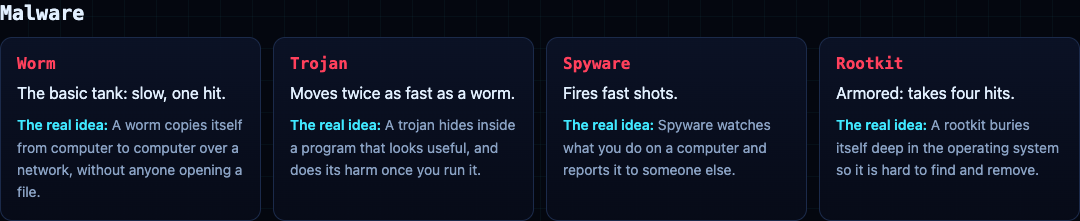
- Worm: the basic tank, slow and destroyed in one hit.
- Trojan: moves twice as fast as a worm.
- Spyware: fires fast shots.
- Rootkit: armored, and takes four hits, the way a real rootkit is hard to remove.
The second game on the site, Tank City Zero Day, adds more. Botnet drones come in threes and hunt you. Worms split in two when destroyed. Ransomware shots lock firewall into silicon. A cryptominer turret fires rings of shots, and a zero-day boss arrives every fifth wave.
A game teaches the names and one idea behind each. It is not a security course, and it does not protect a computer. It is a good first step before reading the NIST definitions above.
Frequently asked questions
What are the main types of malware?
The ones you will meet most are worms, trojans, spyware, rootkits, ransomware and botnets. They differ in how they spread, how they hide and what they are after.
What is the difference between a worm and a trojan?
A worm spreads by itself across a network without anyone running it. A trojan needs you to run it, so it pretends to be something useful.
Is a virus the same as malware?
No. Malware is the whole family of harmful code, and a virus is one kind of it.
Can a game teach me about malware?
It can teach the names and the idea behind each one, which makes real definitions easier to follow. It is a start, not a course.
Get started
Play Tank City Reboot: it is free, plays in your browser on a computer or a phone, and needs no account. Try to name each malware tank before you read its card.
Comments
No comments yet.
Sign in or make an account to comment.