Webhook security: verify signatures before you trust them
Webhook security matters because a webhook is an instruction from outside your app. A payment provider says "this invoice was paid" and your code ships the order. A code host says "this branch was pushed" and your pipeline deploys. If your handler accepts any POST to that URL, anyone who finds it can send those instructions too.
This guide follows Stripe's webhook documentation and GitHub's guide to validating webhook deliveries, and ends with a test you can run against your own staging endpoint.
Why webhook security is a business risk
Stripe puts it plainly: without verification, an attacker could send fake webhook events to your endpoint to trigger actions like fulfilling orders, granting account access, or modifying records. Webhook URLs are not secret in practice. They show up in logs, in front-end code that mentions them, in screenshots, and in guessable paths like /webhooks/stripe.
So the handler has to prove each message came from the provider and was not changed. That proof is the signature.
How signatures work
When you set up a webhook, the provider gives you, or asks you for, a shared secret. Stripe's endpoint secrets start with whsec_. GitHub asks you to choose a random string with high entropy, and says never to hardcode it or push it to any repository.
For each delivery, the provider combines the secret with the exact payload and sends the result in a header: Stripe-Signature for Stripe, and X-Hub-Signature-256 for GitHub, an HMAC digest of the secret and payload. Your handler repeats the calculation with its copy of the secret. If the two match, the message came from someone who knows the secret and was not modified on the way.
The raw body problem
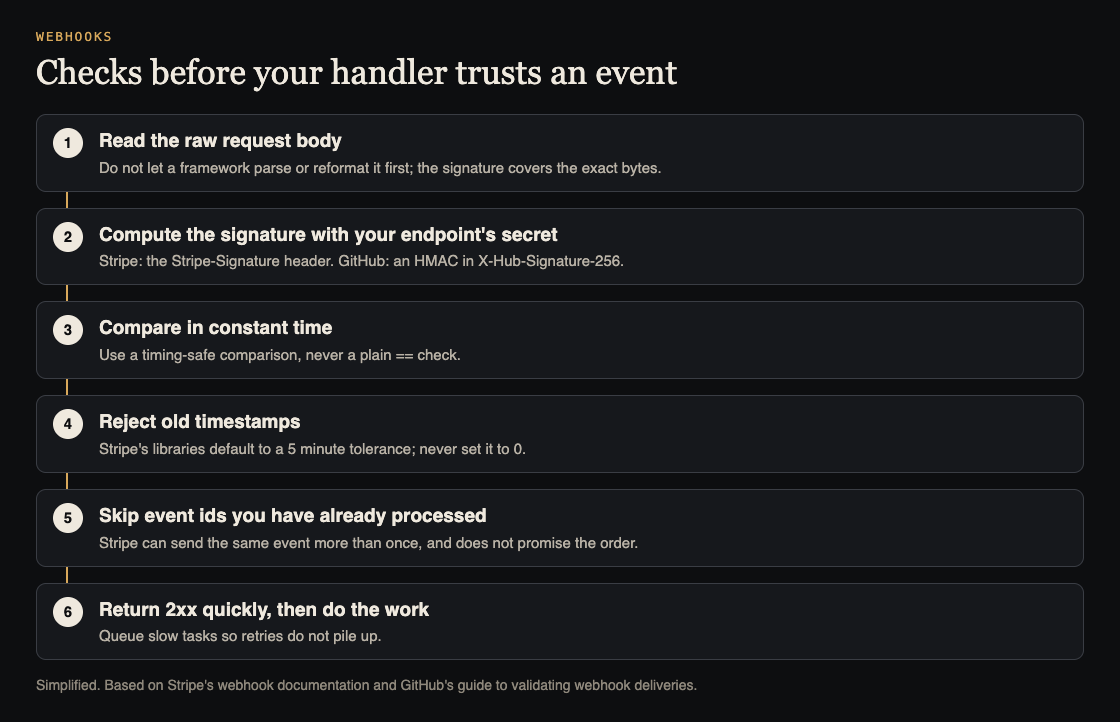
The most common reason verification fails is that the body your code checks is not the body that was signed. Stripe's guide explains that some frameworks change the request body by adding or removing whitespace, reordering keys, converting it to JSON or changing the encoding, and any of those breaks the signature.
Its example for Express is a good warning: the JSON body parser has to come after the webhook route, because middleware order matters. Teams who hit this error sometimes "fix" it by turning verification off. Fix the body handling instead, and keep the check.
Compare in constant time
GitHub's guide says never to use a plain == operator to compare signatures. Use a constant-time function such as crypto.timingSafeEqual in Node.js or secure_compare in Ruby, which takes the same time whether the first character or the last one differs. That removes a timing clue an attacker could use to guess a valid signature. If you use the provider's official library, it does this for you; if you wrote the check by hand, look at this line first.
Replays, duplicates and order
A valid signature proves who sent a message, not that it is new. Three more rules from Stripe's documentation cover the rest:
- Replays. Stripe puts a timestamp inside the signed header, so it cannot be changed without breaking the signature. Its libraries reject events older than a default tolerance of 5 minutes. Stripe says never to set the tolerance to 0, because that turns the check off, and to keep your server clock accurate with NTP.
- Duplicates. Endpoints can receive the same event more than once. Stripe suggests logging the event IDs you have processed and skipping any you have seen.
- Order. Stripe does not guarantee events arrive in the order they were created, so your code should not depend on it.
Other settings from Stripe's best practices
- Return 2xx quickly, before any slow work, and handle events through an asynchronous queue, so spikes do not overwhelm the endpoint.
- Listen only to the event types you need. Fewer event types means fewer code paths to secure.
- Exempt only the webhook route from CSRF checks, because the provider cannot send your CSRF token. The signature takes that job on this route.
- Use HTTPS, which Stripe requires in live mode.
- Roll the signing secret periodically, and right away if you suspect it leaked.
- Add IP allowlisting alongside signatures; Stripe recommends using both.
Keep the signing secret secret
Every check above depends on one value staying private. GitHub's guide says to store the webhook secret somewhere your server can read it, and never to hardcode it into an application or push it to a repository. In practice that means an environment variable or a secrets manager on the server, never a value in front-end code, and never a line in your logs.
Use a different secret for each endpoint and each environment. Stripe notes that the secret for events forwarded by its CLI differs from the secret of a dashboard endpoint, and mixing them up is a common cause of failed checks. If a secret ever appears somewhere it should not, roll it, as Stripe recommends. List each webhook and its secret's location in your penetration test preparation, so testers know which endpoints to try.
Worked example: test your webhook endpoint on staging
Use your own staging endpoint and test-mode keys. You can trigger real test events with the provider's tools, such as the Stripe CLI, and send fake ones with any HTTP client.
- Send an unsigned POST. Post a copy of a real test event's JSON with no signature header. Expect a 400 and no change in your app.
- Send a wrong signature. Add a
Stripe-SignatureorX-Hub-Signature-256header with a made-up value. Expect a 400. - Change one character. Capture a real signed test delivery, change one value in the body, such as the amount, and resend it with the original signature. Expect a 400.
- Replay an old delivery. Resend a captured, unmodified delivery after more than 5 minutes. With a correct tolerance, expect a refusal.
- Send a real event twice. Resend a valid test event from the provider's dashboard. Your app should act once, not twice: one order, one email.
- Check the logs. Each refusal should be logged with the reason, and no log line should contain the signing secret.
Steps 1 to 3 failing means your handler is trusting the URL rather than the message. Payment webhooks also belong on your pre-launch checklist for sign-in and payments.
Frequently asked questions
Is a secret webhook URL enough for webhook security?
No. URLs leak through logs and code. Stripe says to always verify events come from Stripe, using signature verification and IP allowlisting together.
Why does signature verification fail even with the right secret?
Often because the framework changed the body before your code saw it. Stripe's guide says the body must be exactly what was sent, so read the raw body on the webhook route.
What tolerance should I use for replay protection?
Stripe's libraries default to 5 minutes. Stripe warns never to use 0, which disables the check.
How do I stop processing the same event twice?
Log each event ID after you process it, and skip IDs you have already seen, as Stripe suggests.
Get started
Payments and the webhooks behind them are part of every sign-in and payments audit we run. whitehatstoic offers security tests on web apps and AI systems, with a written report, fixes and a retest after fixes, scoped after a short call.
Book a meeting with whitehatstoic: tell us the product, the deadline and your biggest worry, and we reply with a plan and a price.
Comments
No comments yet.
Sign in or make an account to comment.