What is a zero-day? Flaws, patches and how they get fixed
"Attackers used a zero-day." You see that line in security news all the time, usually without an explanation. So what is a zero-day? It is a flaw in software or hardware that the people who make it do not know about yet, which means there is no fix. An attack that uses one has nothing in its way except whatever other defenses happen to be there.
This guide explains the term in plain words, walks through the life of a flaw from discovery to fix, and shows why updating your devices matters so much. At the end, it shows how the free browser game Tank City Zero Day turns the idea into a boss you have to survive.
What is a zero-day, in plain words
NIST, the US standards agency, defines a zero-day attack as an attack that exploits a previously unknown hardware, firmware or software vulnerability. A vulnerability is a weakness an attacker can use. "Previously unknown" is the important part: the maker has not found it, so they have not fixed it.
The name counts days. The makers have had zero days to fix the flaw since they learned of it, because they have not learned of it yet. Once they know and ship a fix, it stops being a zero-day and becomes a known flaw with a patch.
People use three related words, and it helps to keep them apart:
- Zero-day vulnerability: the unknown flaw itself.
- Zero-day exploit: the code or method that takes advantage of it.
- Zero-day attack: using that exploit against real systems.
Why zero-days are so dangerous
Most defenses work by recognizing something already known: a known bad file, a known attack pattern, a known flaw that a patch closes. A zero-day skips all of that. There is no patch to install and often nothing yet for security tools to match.
A zero-day only stays a zero-day until someone notices it. Each time it is used, there is a chance a security team spots the strange behavior and traces it back, and once the maker knows, the clock starts on a fix.
The life of a flaw: a worked example
Here is a simple timeline you can follow. The app and the dates are made up; the steps are the usual ones.
- The flaw exists. A photo app has a mistake in how it reads image files. Nobody knows. Every copy of the app has the flaw.
- Someone finds it. If a researcher finds it, they report it to the maker privately. If an attacker finds it first, they keep it quiet and use it. From here until a fix ships, it is a zero-day.
- It is used or reported. In our example, attackers send people a booby-trapped image. A security team notices strange behavior and traces it back to the app.
- The maker builds a patch. NIST describes a patch as the immediate fix for an identified problem, provided to users. It notes the patch is not always the final answer: a better fix may come in the next full release.
- The patch ships, and people install it, or do not. The flaw is no longer a zero-day. But every device that has not updated is still open, and now the flaw is public, so more attackers know where to look.
Step five is the one part you control. The flaw is known, the fix exists, and a device that is not updated is open to anyone who reads about it.
How flaws are tracked once they are known
Once a flaw is public, security teams track which ones attackers are actually using. In the US, CISA keeps the Known Exploited Vulnerabilities catalog, which it calls the authoritative source of vulnerabilities that have been exploited in the wild. Organizations use it to decide which patches to install first.
For you at home, the lesson is simpler: when a device or app asks to update, the update may be closing a hole someone is already using.
What you can do about zero-days
You cannot patch a flaw nobody has found. But you can limit the damage and shorten the time you stay exposed.
- Turn on automatic updates for your system, browser and apps, so step five lasts days, not months.
- Restart when asked. Many updates only take effect after a restart.
- Remove apps you do not use. Every app is code that could hold a flaw.
- Use two-factor sign-in on important accounts, so a stolen password alone is not enough.
- Keep backups of the files you care about, somewhere separate, so a bad day is not a lost year.
Learn it by playing: the zero-day boss
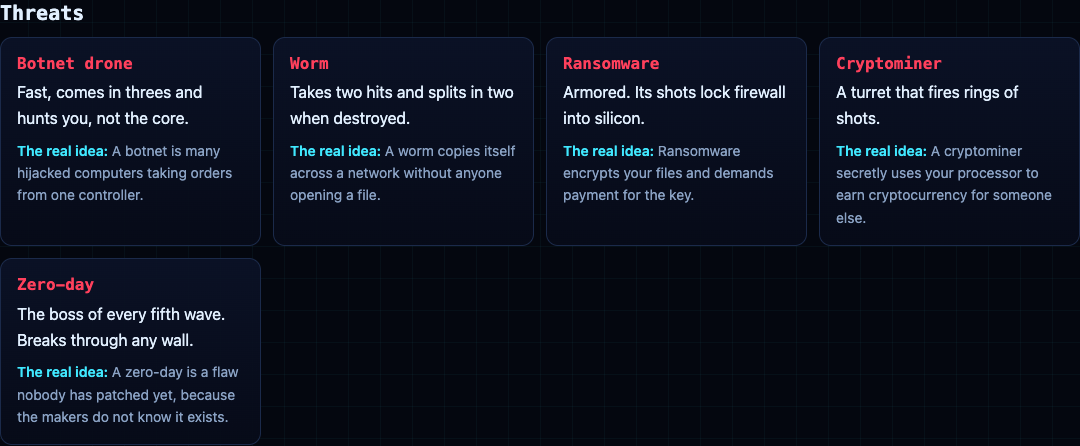
Tank City Zero Day is a free browser game built around this idea. Your tank guards a CPU core. Every fifth wave, a zero-day boss arrives and breaks through any wall, just as a real zero-day gets past defenses that were never built for it. The card on the page explains: "A zero-day is a flaw nobody has patched yet, because the makers do not know it exists."
Between waves, Patch Tuesday offers three upgrades named for real defenses, and you pick one. A few match the advice above:
- Sandbox: a shield that stops one hit and recharges. In real life, a sandbox runs untrusted code where it cannot touch the rest of the system.
- Hot patch: the core wall becomes silicon, every wave. A real hot patch fixes running software without restarting it.
- RAID: core integrity goes up by one and is fully repaired.
- Two-factor: one extra life.
You start with 3 lives and a core integrity of 3, and the run ends when either runs out. Pick defenses before the fifth wave, not during it. That is the real lesson too.
The game teaches the idea behind each name. It is not a security course, and it does not protect your devices; updates do that.
Frequently asked questions
What is a zero-day in simple terms?
A flaw in software or hardware that its makers do not know about yet, so no fix exists. An attack that uses it is a zero-day attack.
Why is it called a zero-day?
Because the makers have had zero days to fix it: they have not learned about it yet.
Can updates protect me from a zero-day?
Not before a fix exists. But once a patch ships, the flaw is public, so installing the update quickly is what closes it for you.
Get started
Play Tank City Reboot: it is free, plays in your browser on a computer or a phone, and needs no account. Start with the classic game, then try Zero Day and see how many waves you survive.
Comments
No comments yet.
Sign in or make an account to comment.