2048 edge merges: tiles that merge across a cube's edge
2048 edge merges are a rule in 3D 2048 that lets two equal tiles merge across the edge of the cube, not only on one face. The game puts it in one line: "A slide towards an edge of the front face also merges the tile at that edge with an equal tile just over the edge, on the next face." It is on unless you switch it off in Settings. This guide shows what that looks like in one slide, how it changes the end of the game, and how to plan with it.
What are 2048 edge merges?
3D 2048 is the 2048 puzzle on a cube you turn like a Rubik's cube: six faces of nine squares, 54 in all. You slide the front face, as in 2048, and equal tiles merge into their sum. On a flat board, a tile at the edge has nothing beyond it. On a cube, it does: the square just over the edge belongs to the next face.
Edge merges use that square. When you slide towards an edge, the tile at that edge of the front face can merge with an equal tile just over the edge. The How to play box adds one more detail: "The new tile stays on the front." So the merged tile ends up on the front face, where you can keep building with it.
A worked example: 8 and 8 across the edge
We tested this on 10 October 2026, signed out, with a script that put a small board into the browser's storage and then pressed one key. Here is the board and the slide.
- The front face held an 8 in its top right square and a 2 in its bottom left square.
- The right face held one more 8, in the square just over the edge from the front's 8.
- The top bar read Score 0 and Moves 0.
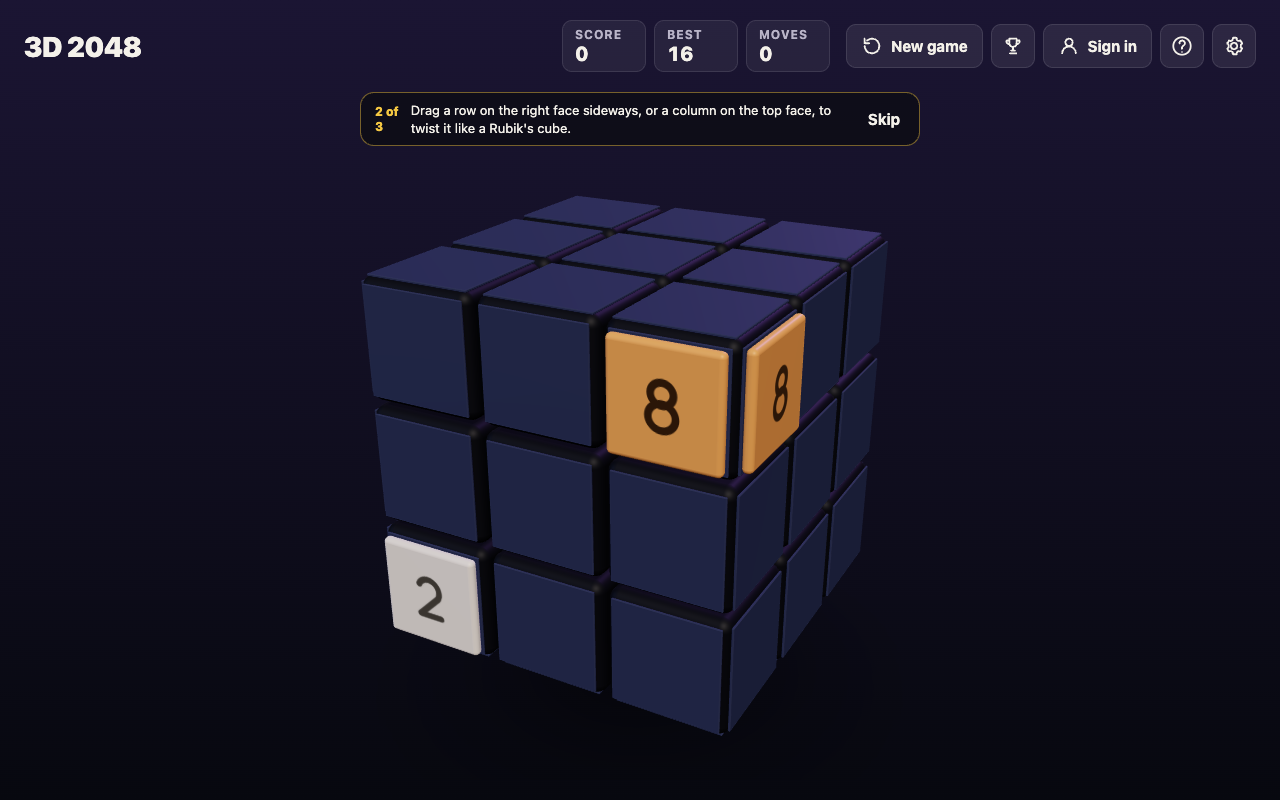
Before: the board was set up twice, so Best already reads 16 from the first try.
Then the script pressed the right arrow key once, a slide towards the right edge.
- The two 8s merged into a 16, on the front face's top right square.
- The right face was left empty.
- The top bar read Score 16 and Moves 1: an edge merge scores like any merge, the value of the tile it makes.
- The 2 slid to the right, and a new 2 appeared on the front face.
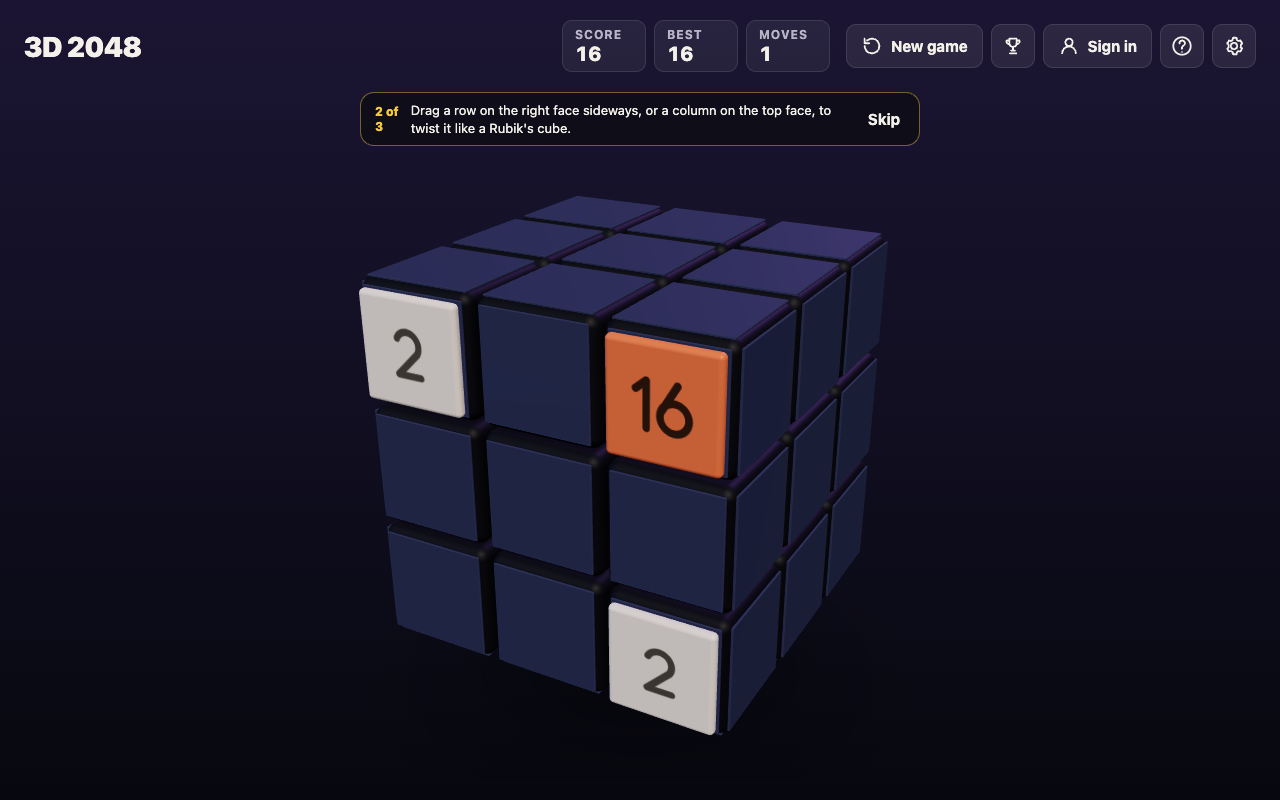
Notice what did not happen. Without edge merges, the two 8s could never meet by sliding: the slide would only push the front's tiles against its right edge, and the 8 on the right face would stay where it was. To join them you would have had to twist the right face to carry its 8 onto the front first, which costs a move and needs an empty square. With edge merges on, one slide did it.
We tested the right edge only. The game's rule names every edge of the front face, so the same check works towards the top, the bottom and the left.
How edge merges change the end of the game
The game ends when no move can change the cube, and edge merges add moves. The end rule has two versions, one for each setting:
- Edge merges on: "The game ends when all 54 squares are full and no two equal tiles sit side by side, on a face or across an edge."
- Edge merges off: "The game ends when all 54 squares are full and no face has two equal tiles side by side."
So with edge merges on, a pair that meets at an edge keeps the game alive, even when no face has a pair of its own. When the game does end, the No moves left box states the rule that applied. For a full check before you give up, see 2048 game over: what to do when no moves are left.
Edge merges on or off?
Settings has an Edge merges choice with On and Off, and it starts On. With it off, only tiles on the same face merge, which is closer to the game as it was before the setting existed; our older test games, in posts written before 10 October 2026, were all played that way. With it on, the edges of the front face become four more places to find a match.
Which to choose is a matter of taste. If you want every merge to happen on one face, switch it off. If you want the cube to count as one connected puzzle, leave it on. Your settings are saved on your device with your game, so the choice stays until you change it.
How to plan with edge merges
An edge merge needs two things: an equal tile just over the edge, and a slide towards that edge. These habits help you set one up:
- Turn to look first. Drag the space around the cube, or press Shift and an arrow key. Turning is free: it adds no move and no tile, so a look across every edge costs nothing.
- Twist a match into place. Drag a row on the right face sideways, or a column on the top face, to bring a tile round next to the front's edge. A twist needs one empty square for its new tile.
- Keep your big tile on an edge. A large tile at the edge of the front can merge with its equal on the next face, so it has more ways to grow than one in the middle.
- Slide towards the match. The merged tile lands on the front, so you can keep building there.
For the controls behind these steps, see how to play 3D 2048, and for a corner plan to build towards, 3D 2048 tips.
Frequently asked questions
Are edge merges on by default?
Yes. The How to play box says edge merges are on unless you switch them off in Settings.
Where does the merged tile go?
It stays on the front face. In our test, two 8s merged into a 16 on the front's top right square, and the right face was left empty.
Do edge merges score points?
Yes, like any merge. In our test the edge merge made a 16 and the Score went from 0 to 16 in one move.
Does turning off edge merges change when the game ends?
Yes. With them off, the game ends when all 54 squares are full and no face has two equal tiles side by side; pairs that meet only at an edge no longer count.
Get started
Open the game, check that Edge merges reads On in Settings, and play a few moves. Each time the front fills up, turn the cube and look across its edges for a tile that matches one on the front. Then slide towards it and watch the pair become one.
Play 3D 2048: it is free and plays in your browser on a computer or a phone.
Comments
No comments yet.
Sign in or make an account to comment.