2048 First Game Tips: What the Three Cards Say
If you search for 2048 first game tips, what the three cards say is the first thing Evolved 2048 shows you. When you pick a mode on your first visit, a small bar appears at the top of the screen, marked "1 of 3". It is the first of three short cards: slide, twist and turn. This post says what each one says, what makes the next one appear, and how to use each in your first minute.
2048 first game tips: what the three cards say
Evolved 2048 is the 2048 puzzle on a cube you turn like a Rubik's cube. It has six faces of nine squares, 54 in all. You slide the tiles on the front face so equal numbers merge, and you aim for a 2048 tile. It is free to play in your browser on a computer or a phone.
The first time you open the game, a "Pick a mode" box asks you to choose Evolved, Edge or Fun. The tip bar is already waiting behind it. Once you pick, the game starts and the bar stays at the top of the screen, above the cube, until you have seen all three cards.
The three cards are not the three modes. They are the three moves the game is built on, in the order you will use them. If you came here wondering about the modes instead, the post on the three modes covers them.
Card 1 of 3: slide
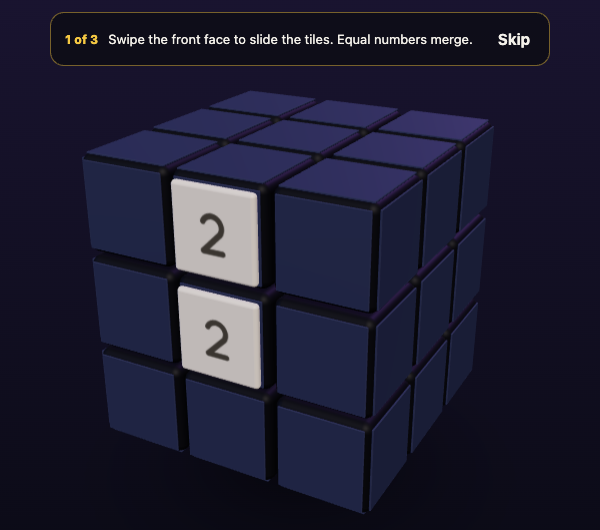
The first card reads: "Swipe the front face to slide the tiles. Equal numbers merge."
Swiping is one way to slide. The How to play box also lists the arrow keys and W A S D. Every slide moves all the tiles on the front face as far as they can go, and two equal tiles that meet merge into their sum.
A slide only moves you on if it moves a tile. In one test, a slide to the left on a fresh game moved nothing, and the card stayed on "1 of 3" with Moves at 0. When a slide did move tiles, Moves went to 1 and the card changed to "2 of 3". The game shows "Nothing moves that way. Try another way, or twist a row." when a slide cannot move anything, so a refused slide costs you nothing.
Card 2 of 3: twist
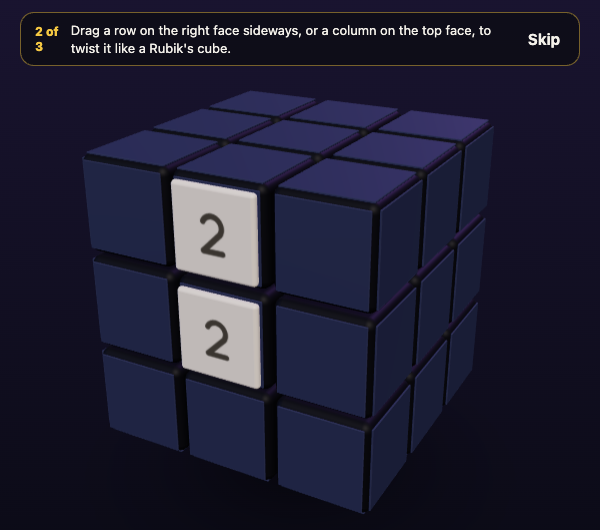
The second card reads: "Drag a row on the right face sideways, or a column on the top face, to twist it like a Rubik's cube."
A twist turns one layer a quarter and carries its tiles to the next face. It is how you bring a tile from a side face next to its match on the front. The How to play box adds the keys: 1 2 3 twist the rows right and 4 5 6 twist the columns up, and Shift with the same key twists the other way.
In a test on a set-up board with a 2 on the front and a 2 on the right face, dragging the right face's top row sideways counted as one move, put a third tile on the board and changed the card to "3 of 3". So a twist does cost a move, and like a slide it adds a new tile. The game says a twist needs one empty square for that tile.
Card 3 of 3: turn
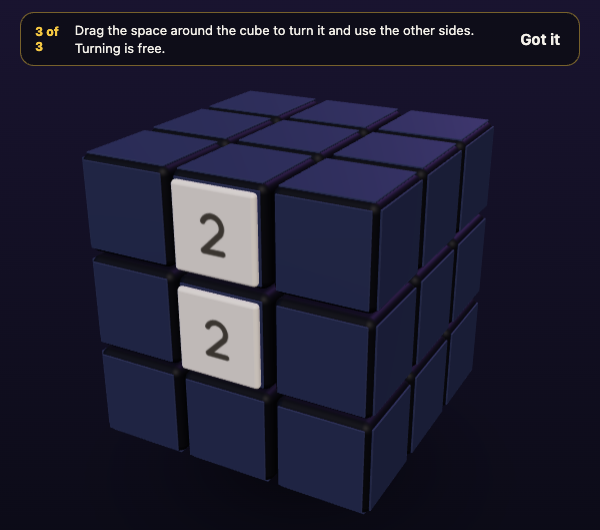
The third card reads: "Drag the space around the cube to turn it and use the other sides. Turning is free."
Turning moves the whole cube so a different face is in front, and it does not count as a move. The card's button says "Got it", where the first two say "Skip". In two tests the card closed by itself as soon as the cube turned: once with Shift and Left, once by dragging across the empty space beside the cube. Nobody had to click "Got it".
A turn on card 1 did not move the cards on. In a test, Shift and Left on "1 of 3" left it at "1 of 3". The cards only move on for the move each one names: a slide, then a twist, then a turn.
How to skip the cards, and what happens if you reload
The "Skip" button ends all three cards, not just the one in front of you. In a test, Skip on "1 of 3" removed the bar, and it stayed away after a reload.
If you leave without skipping, the game remembers where you were. In a test, a reload on "2 of 3" brought back "2 of 3". Your game and best score are saved on your device too. If you ever want the rules again, press H or ? to open How to play, which lists the same slide, twist and turn lines in one place.
Whether the cards come back on a later game was not tested, so this post does not say.
Your first minute, card by card
Here is a plan that follows the cards. It is a way to practise, not a way to win.
- Pick Evolved in the Pick a mode box. It is the plain version of the game, with slides on the front face only.
- Read card 1, then slide with an arrow key until a tile moves. Watch Moves go to 1 and the card change.
- Slide a few more times, aiming for two equal tiles side by side. When they merge, the new tile is a sum, such as 2 and 2 making 4.
- When card 2 asks for a twist, try one on purpose while the front still has room. Drag a row on the right face sideways, or press a number key from 1 to 6.
- Look at where your tile went. A twist carries a tile from a side face onto the front, or from the front onto a side face, next to a tile you want to meet.
- When card 3 asks for a turn, press Shift and an arrow key. Look at the other faces, then turn back. It costs nothing.
Once you have done the three in order, the cards are gone and the game is all yours. For every turn key, see the post on turning the whole cube.
Three habits the cards hint at
- Slide first, twist when you are stuck. Slides alone run out. In one scripted test game, the front face was full and stuck at move 46 with the other five faces empty. A twist is how you use the rest of the cube.
- Keep room on one face. The game's No moves left box says: "Next time, keep room on one face so a twist can still bring tiles round to their match."
- Turn to look before you decide. A turn is free, so use it to see tiles on the other faces before you slide or twist.
Every slide or twist adds a 2 or a 4, on the front face when it has room. That is why a crowded front is a problem: new tiles go where you need space. For the full list of how a game runs, read 2048 rules explained.
Frequently asked questions
What are the three cards in Evolved 2048?
They are the tips on your first game, marked 1 of 3, 2 of 3 and 3 of 3. They teach slide, twist and turn, in that order.
Can I skip the three cards?
Yes. Press Skip on the first or second card and all three are gone, and they stay gone after a reload. The third card has a Got it button, and it also closes when you turn the cube.
Why does the card not move on?
Each card waits for the move it names. A slide that moves nothing does not count, and neither does a turn on the first card. Slide a tile, then twist a row, then turn the cube.
Where can I read the tips again?
Press H or ? to open How to play. It lists the slide, twist and turn lines, and the keys for each.
Get started
Open the game, pick Evolved, and follow the three cards: slide, twist, turn. If you want to pick a different mode later, the Pick a mode box is a button away.
Play Evolved 2048: it is free to play in your browser on a computer or a phone.
Comments
No comments yet.
Sign in or make an account to comment.