2048 Game Modes: What Evolved, Edge and Fun Change
If you search for 2048 game modes: what Evolved, Edge and Fun change, the short answer is this: all three use the same cube and the same goal, and they differ in what a slide can reach. This post shows each mode on a small test board, so you can see the difference before you pick one.
2048 game modes: what Evolved, Edge and Fun change
Evolved 2048 is the 2048 puzzle on a cube you turn like a Rubik's cube. It has six faces of nine squares, 54 squares in all, and it is free to play in your browser on a computer or a phone.
On a first visit the game opens a box titled "Pick a mode" with three choices: Evolved, Edge and Fun. Each one has a line of its own under its name.
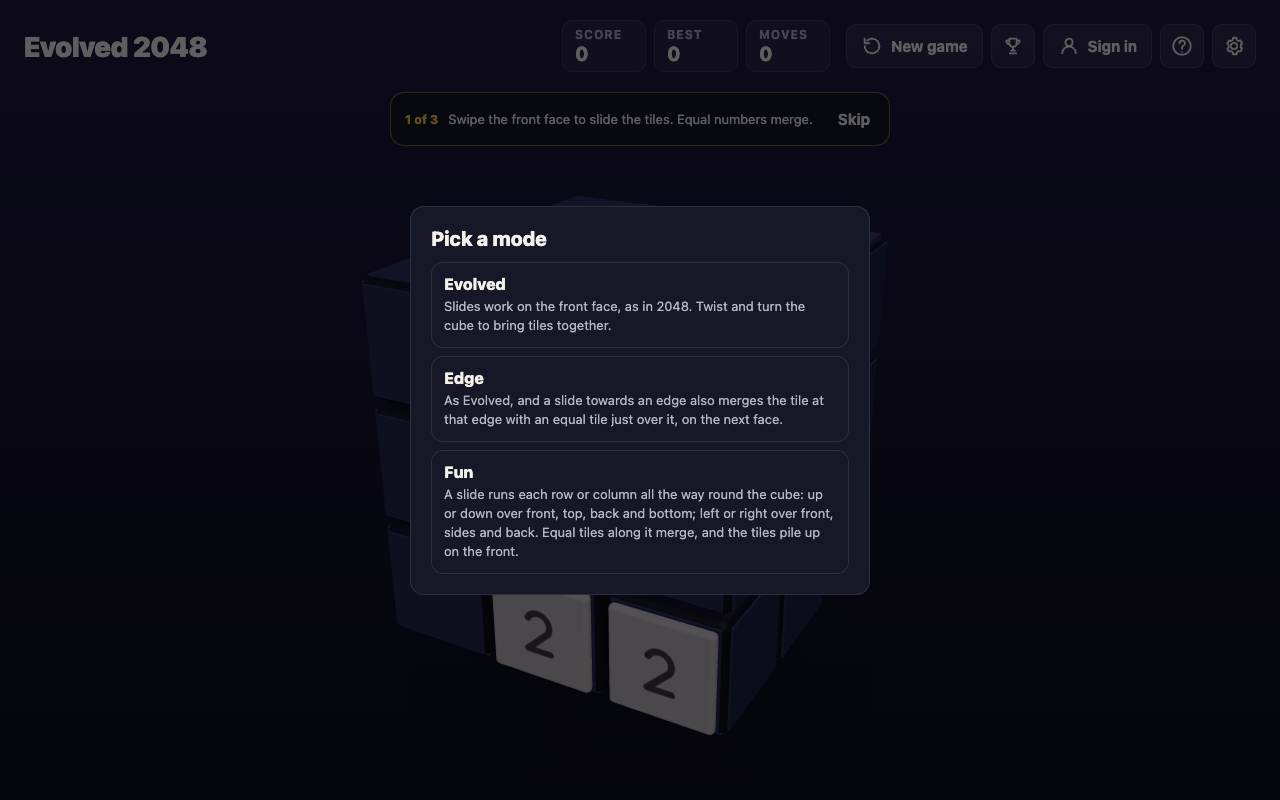
After you pick, the bottom left of the screen names your mode, for example "Fun mode". The same box opens again whenever you start a new game.
First, what stays the same in every mode. Three things do not change. You slide the front face with a swipe, the arrow keys or W A S D, and two equal tiles merge into their sum. You twist a row or a column to carry tiles to the next face. You turn the whole cube, and turning is free: it adds no points, counts no move and adds no tile.
A tile made in a merge does not merge again in the same slide. In a test, a row of 2 2 4 slid left became 4 4, not 8. And every slide or twist adds a 2 or a 4 to the front face when it has room.
So the modes do not change the cube or the goal. They change one thing: which tiles a slide can move and merge.
Evolved mode: slides stay on the front face
The game describes Evolved like this: slides work on the front face, as in 2048, and you twist and turn the cube to bring tiles together. It is the base mode. A slide never reaches past the front face's nine squares.
Here is the test board for the next two modes. It has an 8 on the front's top right square, another 8 on the right face just over that edge, and a 2 on the front's bottom left square. In Evolved, I pressed the right arrow key once. The two 8s stayed apart, the score stayed 0 and Moves read 1. The 2 slid across the bottom row and a new 2 appeared.
To merge those 8s in Evolved, you need a twist. Drag a row on the right face sideways, or press a number key, and that layer carries its tiles to the next face. Then you slide. That is the Evolved rhythm: twist to bring a tile next to its match, then slide to merge. For how moves are counted, see what counts as a move.
Edge mode: a slide can reach over an edge
Edge is Evolved with one extra rule. The game says: a slide towards an edge also merges the tile at that edge with an equal tile just over it, on the next face.
On the same test board, I pressed the right arrow key once in Edge mode. The two 8s merged into a 16 on the front's top right square. The right face was left empty, the score read 16 and Moves read 1. Only the right edge was tested, so this post does not describe the other edges.
What this means for play: a tile just over an edge is now a real merge partner. Before you slide, look at the squares just over the edge you are sliding towards. A plain slide may do the work a twist did in Evolved.
Fun mode: a slide runs round the whole cube
Fun changes the slide itself. The game describes it this way: a slide runs each row or column all the way round the cube. Up or down runs over front, top, back and bottom. Left or right runs over front, sides and back. Equal tiles along it merge, and the tiles pile up on the front.
The test board for this one has a 4 on the right face's middle row, a 4 on the back face's middle square and a 2 on the front's bottom right square. Neither 4 is on the front face, and the back one is out of sight. In Evolved, the left arrow key left both 4s where they were and the score stayed 0. In Fun mode, the same key merged them. The picture below shows the board before the slide.
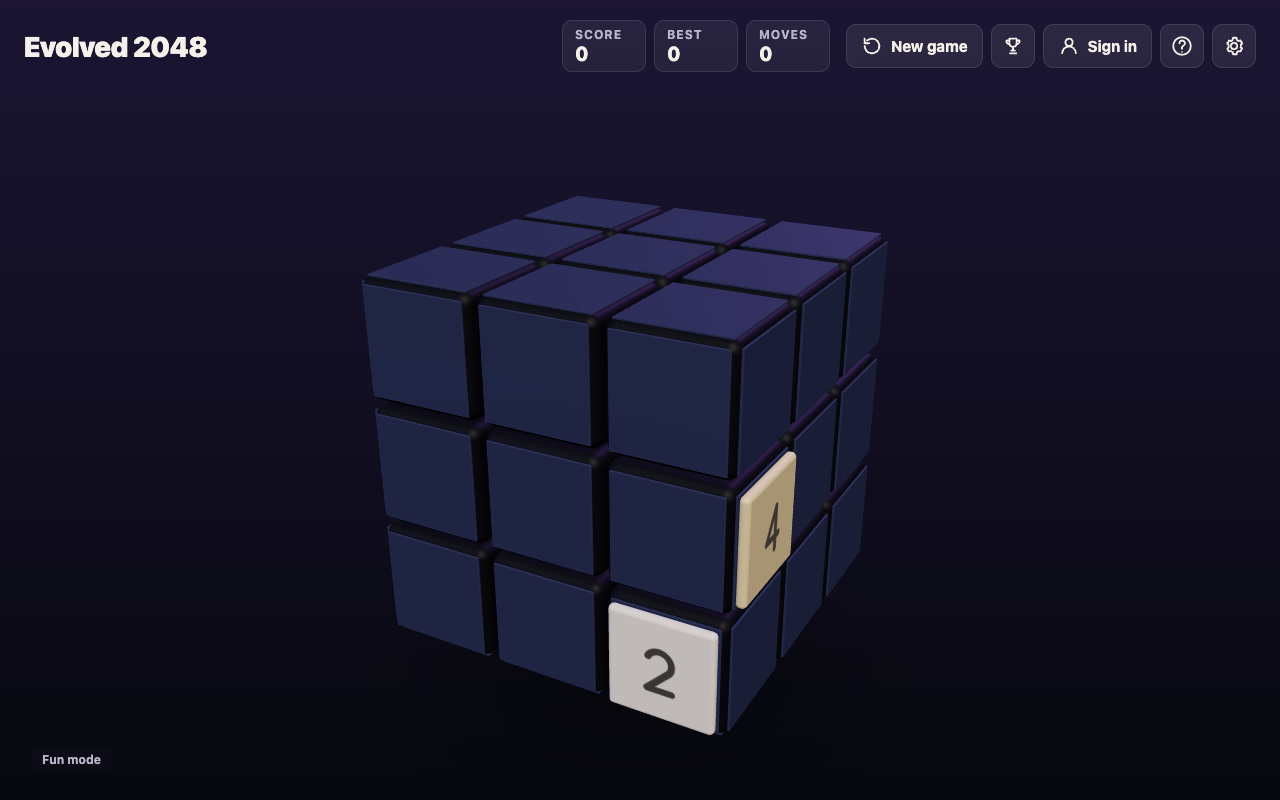
After one left slide, an 8 sat on the front's middle left square, the score read 8 and Moves read 1. The 4s had come from the right face and the back face, and they piled up on the front.
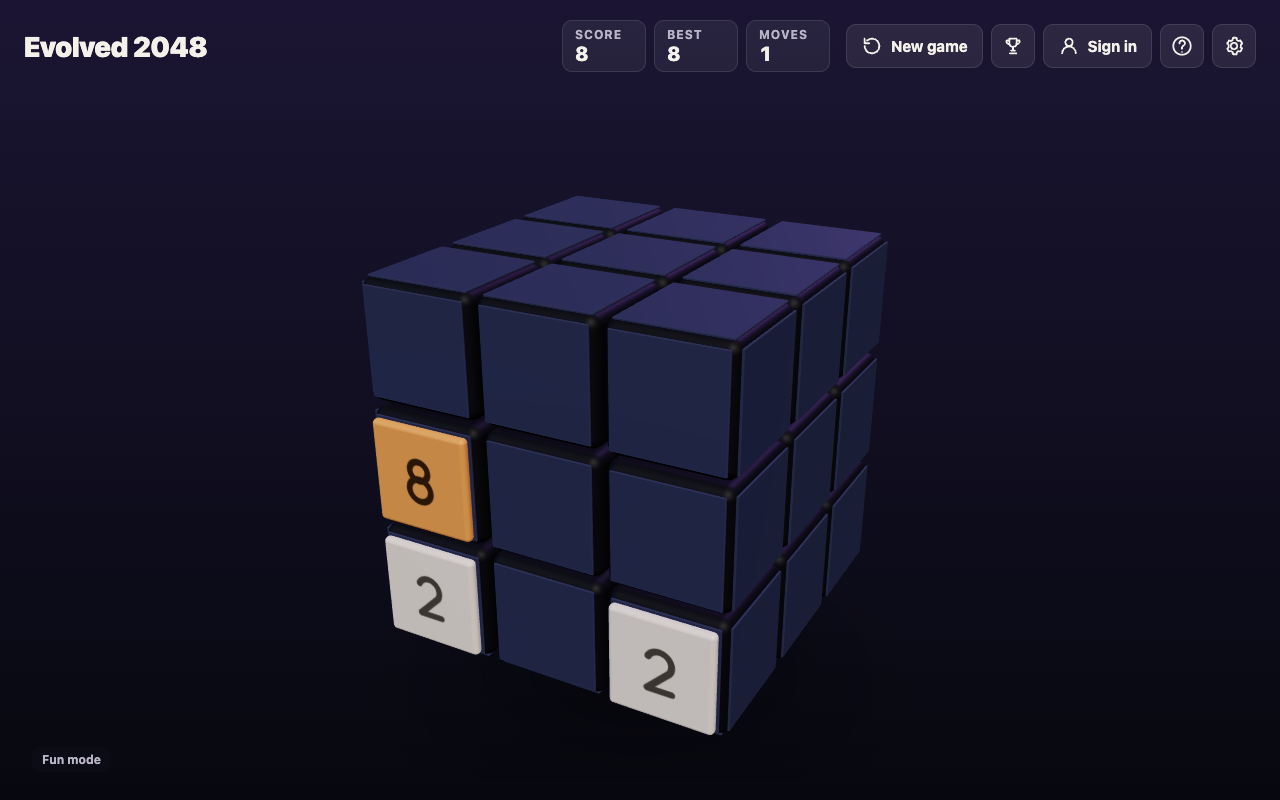
So in Fun mode, tiles on faces you cannot see still count, and a slide can bring them to the front without a twist. Long Fun games were not played for this post, so it says nothing about how far the mode goes or how a game ends in it.
Evolved, Edge and Fun side by side
- Evolved: slides work on the front face. Twist and turn the cube to bring tiles together. On the test board, the 8s stayed apart (Score 0).
- Edge: as Evolved, and a slide towards an edge also merges the edge tile with an equal tile just over it. On the test board, one slide made a 16 (Score 16).
- Fun: a slide runs each row or column all the way round the cube, and tiles pile up on the front. On its test board, one slide merged two 4s from other faces into an 8 (Score 8).
The game's end line differs too. In Evolved it reads: "The game ends when all 54 squares are full and no face has two equal tiles side by side." In Edge and Fun the page's script says no two equal tiles may sit side by side "on a face or across an edge". Games were not played to the end in each mode.
Best scores and starting a new game
The best score is kept for each mode. In one test, a best of 20 in Evolved was followed by a new game in Edge mode, and the Best box read 0. The browser's saved best listed each mode on its own line (Evolved 20, Edge 0, Fun 0). So compare scores only within one mode.
You change mode by starting a new game. Pressing New game asks first: "This game ends and its score of {score} is kept only if it is your best." The box then lists the three modes, marks the running one with "this game", and has a Keep playing button if you change your mind. There is more about that box in what the New game button does, and about the saved score in where your best score is kept.
Which mode should you pick?
- Pick Evolved if you want the puzzle in its base form, where every cross-face merge comes from a twist you plan.
- Pick Edge if you like Evolved but want a slide to merge over the edge too. Check the squares just over each edge before you slide.
- Pick Fun if you want a slide to look at the whole cube. Keep an eye on tiles that are out of sight, because they now merge.
A good way to learn the difference is to change only the mode between games and keep everything else the same. Play a few slides in one mode, start a new game in another, and compare what the same keys do.
Frequently asked questions
How many modes does Evolved 2048 have?
Three: Evolved, Edge and Fun. The game asks you to pick one on a first visit and again each time you start a new game.
Can I switch modes in the middle of a game?
The way the game offers is to start a new game, and its New game box shows the three modes. The game you leave ends, and its score is kept only if it is your best.
Is my best score shared between modes?
No. The best score is kept for each mode. A best of 20 in Evolved showed as 0 in a new Edge game in one test.
What does Edge mode add that Evolved does not?
A slide towards an edge also merges the tile at that edge with an equal tile just over it, on the next face.
Do I need an account to play a mode?
No. You can play without an account, and your game, best score and settings are saved on your device.
Get started
Open the game, pick a mode and play a few slides, then start a new game in another mode and compare. It is free to play in your browser on a computer or a phone.
Comments
No comments yet.
Sign in or make an account to comment.