2048 How to Play Box: What Each Part Says
This is the 2048 how to play box: what each part says, and what it means once you are playing. The box in Evolved 2048 is short, and every line in it is a rule. Press H and read it once, and you know how a slide, a twist and a turn work, what the three modes change and when a game ends.
Evolved 2048 is the 2048 puzzle on a cube you turn like a Rubik's cube: six faces of nine squares, 54 in all. If you know 2048 on a flat board, the first part will feel familiar. The twist and turn parts are the new ones.
2048 how to play box: what each part says
To open it, press H or ? on a keyboard, or press the How to play button in the top bar. The bar also holds Score, Best and Moves, then New game, a trophy button, Sign in and Settings. Escape closes the box, and so does the Close cross at its top right.
The box is taller than a short window, so it scrolls. Here it is in Edge mode, with every part showing:
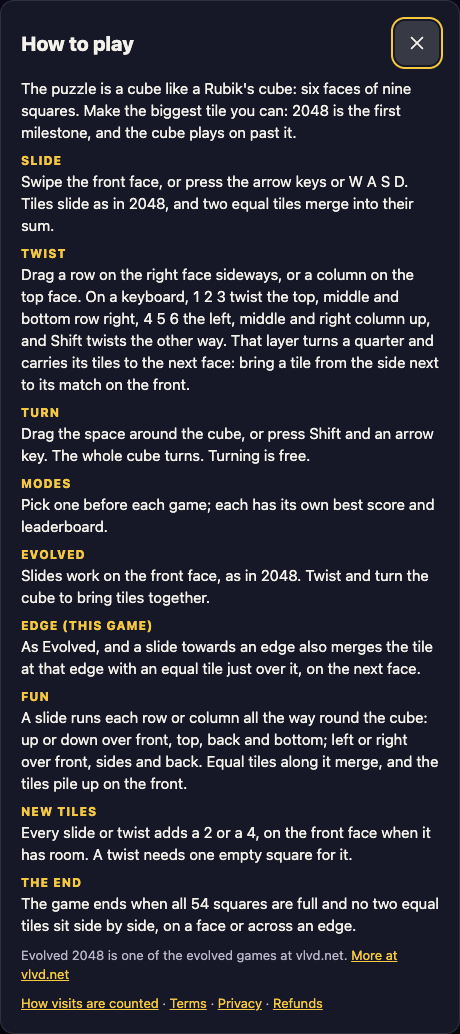
The How to play box in Edge mode. The heading of the mode you are in carries a gold tag, "this game".
The box starts with the goal, what you are aiming for: "The puzzle is a cube like a Rubik's cube: six faces of nine squares. Make the biggest tile you can: 2048 is the first milestone, and the cube plays on past it."
So 2048 is a milestone, not the end. When you make one, a box says how many moves it took and offers Keep going or a new game. Keep going closes the box, and the cube, your score and your moves carry on.
Slide: the part you already know
The box says: swipe the front face, or press the arrow keys or W A S D. Tiles slide as in 2048, and two equal tiles merge into their sum.
Two details are worth knowing, and both were tested on the live game. A tile made in a merge does not merge again in the same slide, so a row of 2 2 2 slid left becomes 4 2, not an 8. And when three tiles could pair up, the pair nearest the wall you slide towards merges first: slid right, 2 2 2 becomes an empty square, then 2, then 4.
Only the front face slides. If a slide moves nothing, the game says "Nothing moves that way. Try another way, or twist a row." That slide is not counted as a move.
Twist: carry tiles round from another face
This is the part that makes the cube different. The box says to drag a row on the right face sideways, or a column on the top face. On a keyboard, 1 2 3 twist the top, middle and bottom row right, and 4 5 6 twist the left, middle and right column up. Shift twists the other way.
Then comes the line that matters most: "That layer turns a quarter and carries its tiles to the next face: bring a tile from the side next to its match on the front."
Here is one example, played on the live game. Put a 16 on the front's middle-left square and another 16 on the right face, just over the front's top right edge. Press Shift and 1. The top row twists left and the right face's 16 lands on the front's top-left square, above the first 16, and a new 2 appears. Press Up and the two 16s merge into a 32. That took two moves, a twist and a slide.
A twist moves the whole layer, so the front's own squares in that row leave for the next face too. Twisting costs a move and adds a new tile, so it is not free. If you twist the wrong way, Shift and the same key twists it back, but that counts as a second move and adds a second new tile.
Turn: look at the other sides for free
The box says: "Drag the space around the cube, or press Shift and an arrow key. The whole cube turns. Turning is free."
Free means a turn adds no points, counts no move and adds no tile. Use it to see the other faces before you decide on a twist. If you want the turn keys in more detail, the post on turning the whole cube in 2048 goes through all four.
Modes: three ways to play, each with its own best score
The Modes part says to pick one before each game, and each mode keeps its own best score. Three short parts follow, one for each mode:
- Evolved: slides work on the front face, as in 2048. Twist and turn the cube to bring tiles together.
- Edge: as Evolved, and a slide towards an edge also merges the tile at that edge with an equal tile just over it, on the next face.
- Fun: a slide runs each row or column all the way round the cube, and equal tiles along it merge, with the tiles piling up on the front.
The box tags the mode you are playing: in Edge mode the heading reads "Edge (this game)", in Evolved mode "Evolved (this game)". Picking a mode, even the one already running, starts a new game. For the full walk through the Pick a mode box, read how to change the 2048 mode, and for what each mode does to play, 2048 game modes.
New tiles and the end: what appears and when a game is over
The box says: "Every slide or twist adds a 2 or a 4, on the front face when it has room. A twist needs one empty square for it."
Most new tiles are 2s. The game gives a 2 whenever its random number is under 0.9, and a 4 otherwise, so about one new tile in ten is a 4. The last line is the one to remember: a twist needs an empty square for its new tile. If the whole cube is full, the game says "The cube is full. Merge two tiles on a face to make room before you twist."
In Evolved mode the box reads: "The game ends when all 54 squares are full and no face has two equal tiles side by side." Note that it counts all 54 squares, not only the front. A stuck front face is not the end while other faces still hold squares that can be moved by a twist.
In Edge mode the same part is longer: "The game ends when all 54 squares are full and no two equal tiles sit side by side, on a face or across an edge." The reason is the Edge rule above, since two equal tiles on either side of an edge can still merge. Mode by mode, the box words its end rule to match.
What the box does not say
Some things you will want to know are not in the box. There is no undo: Control+Z, Command+Z, Backspace and Escape all did nothing in testing, and a reload keeps your board as it was. The score rules are not in the box either. A slide adds the value of every tile its merges make, a twist adds no points, and a turn adds none. So a game can show a score of 0 after a few moves if all you have done is twist.
The box ends with a line that the game is one of the evolved games at vlvd.net, a More at vlvd.net link, and the footer links: How visits are counted, Terms, Privacy and Refunds.
Frequently asked questions
How do I open the how to play box in Evolved 2048?
Press H or ? on a keyboard, or press the How to play button in the top bar. Escape or the Close cross at the top right closes it.
Does turning the cube cost a move?
No. The box says turning is free: a turn adds no points, counts no move and adds no new tile. Slides and twists each count as one move.
Which keys twist a row or column?
The keys 1 2 3 twist the top, middle and bottom row right, and 4 5 6 twist the left, middle and right column up. Hold Shift with the same key to twist the other way.
When does a 2048 game end in Evolved 2048?
The game ends when all 54 squares are full and no face has two equal tiles side by side. In Edge mode, two equal tiles across an edge also count.
Why does the box look different in each mode?
The box lists all three modes, and tags the one you are playing. In Edge mode it also words the end rule to include tiles across an edge.
Get started
Open the game, press H and read the Twist part once, then play a game with the number keys. If this is your first game, the three small tips on the screen walk you through slide, twist and turn, and the first game tips post shows what each one waits for.
Play Evolved 2048: it is free and plays in your browser on a computer or a phone.
Comments
No comments yet.
Sign in or make an account to comment.