2048 time limit: is there a timer in the game?
People search for a 2048 time limit because many puzzle games count down, and 2048 does not look like it should. So here is the answer for Evolved 2048, the 2048 puzzle on a cube. 2048 time limit: is there a timer in the game? No. The top bar shows Score, Best and Moves, and nothing counts seconds. I tested it on the live game rather than trusting memory, and this post shows what I saw.
2048 time limit: is there a timer in the game?
The top bar of Evolved 2048 holds three boxes: Score, Best and Moves. Beside them are five buttons: New game, a trophy, Sign in, How to play and Settings. None of them is a clock, a stopwatch or a countdown.
I ran a wait test on 14 October 2026. I opened the game signed out in a fresh browser and read the top bar: Score 0, Best 0, Moves 0. Then I touched nothing for 65 seconds and read the page again. The text was the same, word for word.
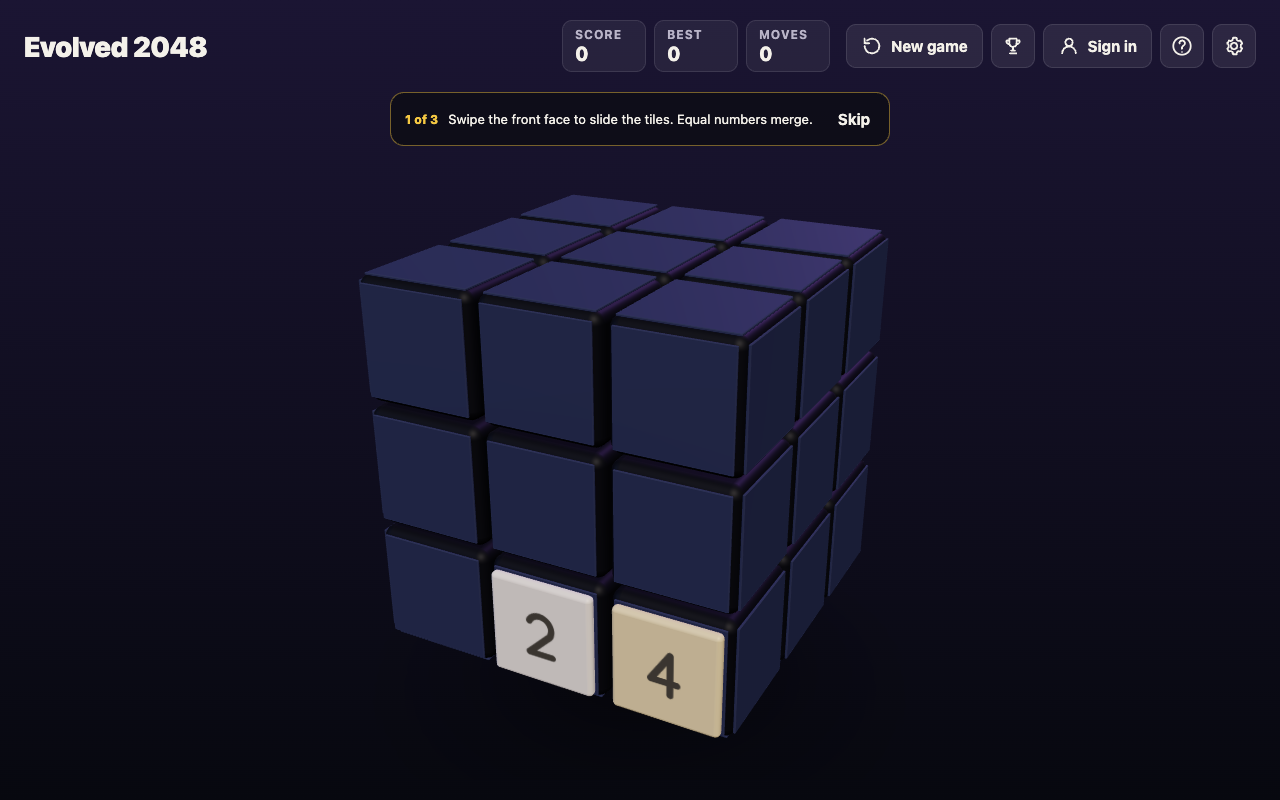
The game after a minute of waiting: Score 0, Best 0, Moves 0, and no timer anywhere.
After the wait I pressed the left arrow key once. Moves went from 0 to 1, and nothing else in the top bar changed. The game only moves when you do.
This covers Evolved 2048 only. Other versions of 2048 can differ, so check the rules of the one you play.
What the game counts instead of time
Evolved 2048 measures a game in moves. The rules, as the game itself states them, are short:
- A slide adds the value of every tile its merges make, and counts one move.
- A twist of a row or column adds no points, counts one move and adds a new tile.
- Turning the whole cube adds no points and counts no move. The game says: "Turning is free."
I checked the last rule on a set-up cube. Shift with Left, Right, Up and Down turned the cube each time, and Moves and Score stayed at 0. So you can spin the cube as long as you like to look for a plan, and it costs nothing. For the full list of what a move is, read 2048 rules explained.
What ends a game, if it is not the clock
A full board ends a game here, never time. The How to play box says the game ends when all 54 squares are full and no face has two equal tiles side by side. With Edge merges on, which is the default, the rule widens: no two equal tiles may sit side by side, on a face or across an edge. The edge merges post explains that setting.
A game can last a lot longer than the front face suggests. In my slides-only test games, the front face got stuck after between 28 and 72 moves. In a test game where I twisted whenever the front was stuck, all 54 squares were full at move 165, after 39 twists. Even then the game was not over, because other faces still held equal tiles side by side.
When a slide does nothing, the game says: "Nothing moves that way. Try another way, or twist a row." When the cube is full, it says: "The cube is full. Merge two tiles on a face to make room before you twist." A twist needs one empty square for its new tile. If you are stuck for good, the game over post shows what to try.
Reaching 2048 does not stop the clock, because there is none
Making a 2048 tile does not end the game either. A box opens that reads "You made 2048 in {moves} moves. Keep going for 4096, or start again." You pick New game or Keep going. The game reports your result in moves, not minutes, so moves are its own measure of how well you played.
Pausing and coming back later
With no clock running, there is no pause button to hunt for. Your game is kept in your browser's local storage on your device, and the Settings box says: "Your game, best score and settings are saved on this device."
I tested a reload. After 14 arrow-key slides the bar read Score 64, Best 64 and Moves 14, with 6 tiles on the cube. After a page reload the same Score, Best, Moves and tiles came back. I have not tested other devices or other browsers, so a game started on one will not follow you to another as far as I know. The best score post covers what is kept and when it resets.
One thing time cannot buy you is a take-back. On a test board I pressed Control+Z, Command+Z, Backspace, Z, U and Escape after a slide, and nothing changed. A twist can be twisted back with Shift and its key, but that is a second move and adds a second new tile. Since thinking is free, spend it before you move, not after. The undo post has the full test.
How to practise without a timer
If you want to get quicker, get better first. Speed comes from decisions you no longer have to think about. A simple routine:
- Learn the keys. Arrow keys or W A S D slide. Shift with an arrow key turns the cube. Keys 1 2 3 twist the top, middle and bottom row right, and keys 4 5 6 twist the left, middle and right column up. Shift with a number twists the other way. Reaching for the mouse is slower than keys.
- Take your time on the turns. Turning is free, so use it to look at all six faces before you commit to a slide or a twist.
- Keep room on one face. The No moves left box gives this tip itself: keep room on one face so a twist can still bring tiles round to their match.
- Change one thing per game. Try a different key order and keep the rest the same. With a clock gone, your Moves count and final Score are the numbers to compare.
- Read the board at a glance. Each tile value has its own color, so the tile colors chart helps you scan the cube faster.
Luck matters too, so do not judge a plan by one game. In my luck test, one start played with two different key orders got stuck at move 32 and at move 28, with the same best tile of 32 both times. A short game is not always a bad one.
Frequently asked questions
Does 2048 have a timer?
Evolved 2048 does not. Its top bar shows Score, Best and Moves only, and the game changes only when you slide or twist.
Can I pause 2048 and come back later?
You do not need to pause. The game saves your board, score and settings in your browser on your device, and a reload brought my test game back unchanged.
Is there a time limit to reach the 2048 tile?
No limit is shown in Evolved 2048. When you make 2048, the game tells you how many moves it took, and you can keep going for a bigger tile.
How long does a game of 2048 take?
I have no time figures. In my slides-only test games the front face got stuck after 28 to 72 moves, and a game with twists was full at move 165.
Do any versions of 2048 have a countdown?
I can only speak for Evolved 2048, which shows none. Check the rules of any other version you play.
Get started
Open the game, swipe the front face and take as long as you like. Watch your Moves count instead of a clock, and see how far the cube goes.
Play Evolved 2048: it is free and plays in your browser on a computer or a phone.
Comments
No comments yet.
Sign in or make an account to comment.