2048 vs 3D 2048: what changes when you play on a cube
If you are weighing 2048 vs 3D 2048, the short answer is that the slide is the same and the board is not. 2048 is played on one flat 4 by 4 grid. 3D 2048 puts the puzzle on a cube you turn like a Rubik's cube, with six faces of nine squares and two moves the flat game never had. This guide goes through each difference, with tests played on the cube, and what each one means for how you play.
2048 vs 3D 2048 at a glance
- The board. 2048: one 4 by 4 grid, 16 squares. 3D 2048: six 3 by 3 faces, 54 squares.
- The moves. 2048: slide in four directions. 3D 2048: slide the front face, twist a row or column, or turn the whole cube.
- New tiles. 2048: any empty square. 3D 2048: an empty square on the front face, anywhere else only when the front is full.
- Merges. The same rules in both, plus edge merges on the cube.
- The goal. A 2048 tile in both, and you can play on past it in both.
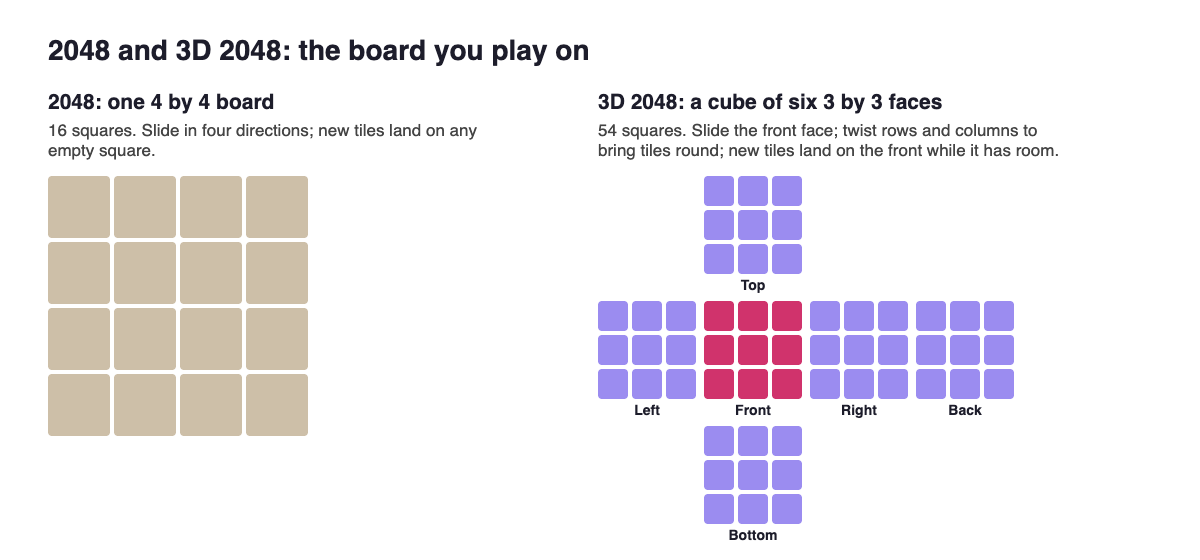
The original: one flat board
According to Wikipedia's 2048 article), the game was written by Gabriele Cirulli and released on the web on 9 March 2014. It is played on a plain 4 by 4 grid with the arrow keys. It starts with two tiles, and after each turn a new 2 or 4 appears in a random empty space, a 2 nine times in ten. It is won when a 2048 tile appears, and you can keep playing for bigger tiles.
Everything you own is in view at once, and every move is a slide. That simplicity is what the cube changes.
The same slide and the same merges
On the cube you slide the front face by swiping it, or with the arrow keys or W A S D. Tiles move as in 2048, and two equal tiles merge into their sum. The fine print matches too: a tile made in a merge does not merge again in the same slide, and with three equal tiles the pair nearest the wall joins first. A row of 2 2 2 slid left gives 4 2, and 2 2 4 gives 4 4, not 8. The original 2048 code works the same way, so your habits for a single slide carry over. Every case is laid out, tested, in 2048 merge rules.
What is new on the cube: twists and turns
A twist turns one layer. Drag a row on the right face sideways, or a column on the top face; that layer turns a quarter and carries its tiles to the next face. A twist adds no points, counts one move and adds a new tile, so it needs one empty square.
Here is one tested on the live game. A 16 sat on the right face, just over the front's top right edge, and another 16 sat on the front's left column, one square below the top. Dragging the right face's top row to the left carried the first 16 onto the front's top left square, right above its match. One slide down merged them into a 32.
The catch: the whole layer moves. The front's own squares in that row leave for the next face, so check what a twist sends away before you drag. The guide to when to twist a row covers the choice.
A turn spins the whole cube: drag the space around it, or press Shift and an arrow key. Turning is free. In a test, Shift and Left showed an empty face while Score and Moves stayed exactly the same.
Where new tiles land, and why it matters most
In 3D 2048 a new tile goes on a random empty square of the front face, and only on another face when the front is full. About one in ten is a 4; running the game's own random number code 10,000 times gave 1,001 fours, close to 2048's nine in ten 2s.
That placement rule is the biggest practical difference. The front has only nine squares and every new tile wants them. In 8 slides-only test games played for this site's corner strategy test, scores ran from 136 to 600, the best tile was 64, and every game stopped with the front full and the other five faces empty. An earlier game that twisted whenever the front was stuck reached a 128 tile at move 118 with tiles on four faces. One game each, not averages, but the lesson is plain: on the cube, slides alone use only nine squares.
Edge merges and the end of the game
Edge merges are on by default in Settings. A slide towards an edge of the front face also merges with an equal tile just over that edge, on the next face, and the new tile stays on the front. In a set-up test, an 8 on the front's top right and an 8 just over the edge on the right face became one 16 after a single slide right, for Score 16 and Moves 1.
The end changes with them. With edge merges on, the game ends when all 54 squares are full and no two equal tiles sit side by side, on a face or across an edge. Switch them off and the check is only within each face, which is closer to the flat game. In an earlier test, all 54 squares were full at move 165 and the game still was not over.
Making 2048 works much like the original: the game says "You made 2048 in" your number of moves, "Keep going for 4096, or start again.", and Keep going carries on with the same cube, Score and Moves.
How to adjust your play
- Keep your corner habit, on the front face. It still decides how well you use those nine squares.
- Twist when the front is stuck, choosing a layer that brings a tile next to its match and does not carry off your biggest tile.
- Turn freely to look around. It costs nothing.
- Build pairs across edges, so one slide can join them.
- Keep room on one face. The game's own advice when you run out is "Next time, keep room on one face so a twist can still bring tiles round to their match."
Frequently asked questions
Is 3D 2048 harder than regular 2048?
It is different more than harder. The front face is smaller and fills fast, but you have 54 squares in all, plus twists, free turns and edge merges to make room.
Do the merge rules change in 3D 2048?
Not within a slide. What is new is that edge merges can join a front tile with its match just over the edge.
Can you still make the 2048 tile on a cube?
Yes. The game is won when a merge makes a 2048 tile, and you can keep going for 4096 or start again.
Can I make 3D 2048 play more like the flat game?
Partly. Switch edge merges off in Settings, and only slide. You will still be on a 3 by 3 face, not a 4 by 4 board.
Get started
Open the game, slide until the front fills, then try the twist from this guide: drag the right face's top row and watch where its tiles land. H or ? opens How to play, your game, best score and settings are saved on your device, and you can play without an account.
Play 3D 2048 in your browser on a computer or a phone.
Comments
No comments yet.
Sign in or make an account to comment.