3D 2048 twist keys: when to press 1 to 6
The 3D 2048 twist keys are the six number keys, 1 to 6. Each one turns one layer of the cube a quarter, and Shift turns it the other way. They do the same job as dragging a row or column with the mouse, but faster and with no missed drags. This post explains what each key does, how to know which way a layer will go before you press it, and when a twist is a better move than a slide. Every example was tested on the live game at 3D 2048.
What the six 3D 2048 twist keys do
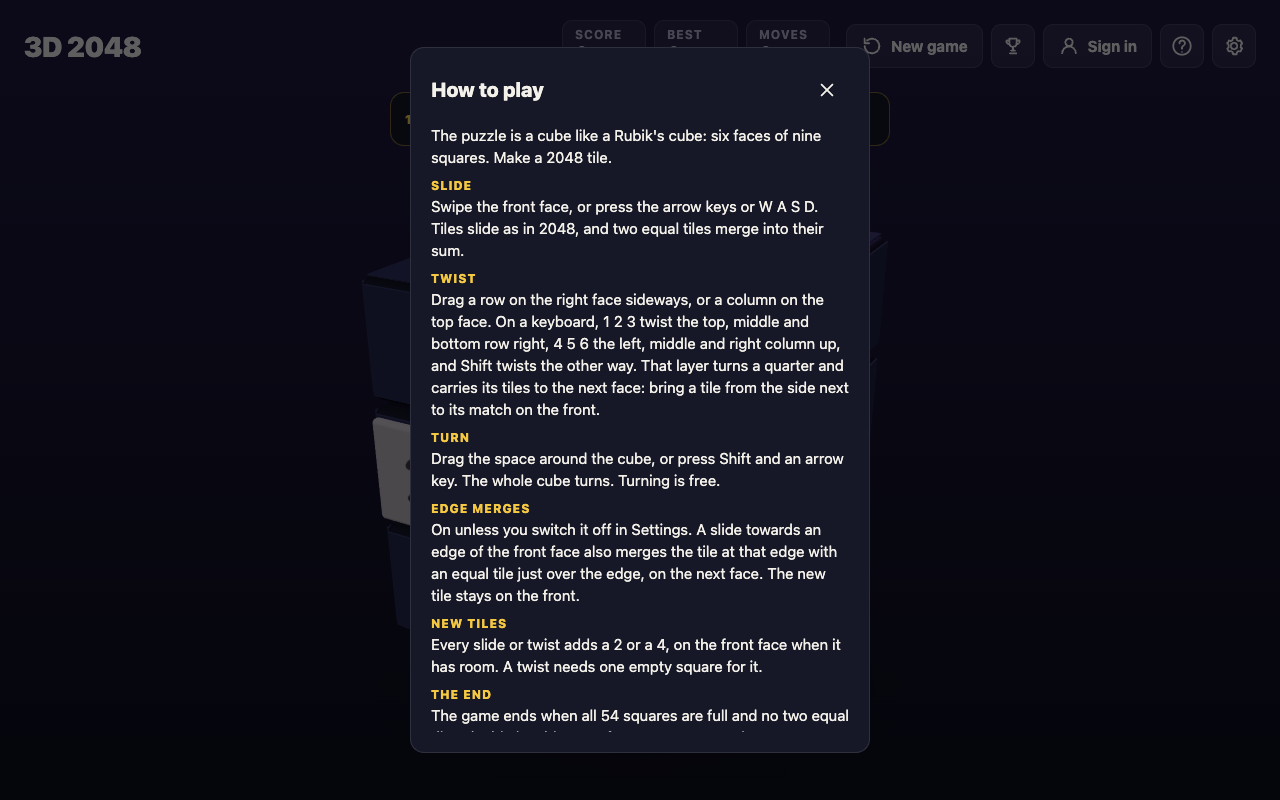
The game's How to play box (press H) says it in one line: "1 2 3 twist the top, middle and bottom row right, 4 5 6 the left, middle and right column up, and Shift twists the other way."
So the keys split into two groups of three:
- 1, 2, 3 twist the top, middle and bottom row of the front face to the right. Shift with the same key twists that row to the left.
- 4, 5, 6 twist the left, middle and right column of the front face up. Shift with the same key twists that column down.
A twist turns a whole ring of the cube, not just the front. The row you twist carries its tiles round through four faces, so tiles on the side faces come onto the front and tiles on the front leave it.
A twist counts as one move, adds no points and adds one new tile, a 2 or a 4. A whole-cube turn (Shift and an arrow) is different: it counts no move at all. The 2048 keyboard controls post lists every other key.
How to tell which way a layer will go
The trick is to think about where the tile you want is, and where it has to go.
- A tile on the right face comes onto the front with a row twist to the left: Shift and 1, 2 or 3.
- A tile on the bottom face comes onto the front with a column twist up: 4, 5 or 6.
- A tile on the top face comes onto the front with a column twist down: Shift and 4, 5 or 6.
- A tile on the left face comes onto the front with a row twist to the right: 1, 2 or 3.
Then pick the number for the layer the tile sits in: 1 for the top row, 2 for the middle, 3 for the bottom; 4 for the left column, 5 for the middle, 6 for the right.
A worked example: bring a 16 to its match
Here is a set-up you can follow. It was played on the live game with the board set up first, and the saved game was read after every key.
A 16 sits on the front's middle left square. Another 16 sits on the right face's top left square, just over the front's top right edge. The two 16s cannot meet with a slide, because one of them is not on the front.
- The 16 you want is on the right face, in the top row. So twist the top row left: press Shift and 1. The right face's 16 lands on the front's top left square, right above the other 16. Moves reads 1, Score still reads 0, and a new 2 appears on the front.
- Now the two 16s are in the same column. Press Up. They merge into a 32 in the top left corner. Score reads 32 and Moves reads 2.
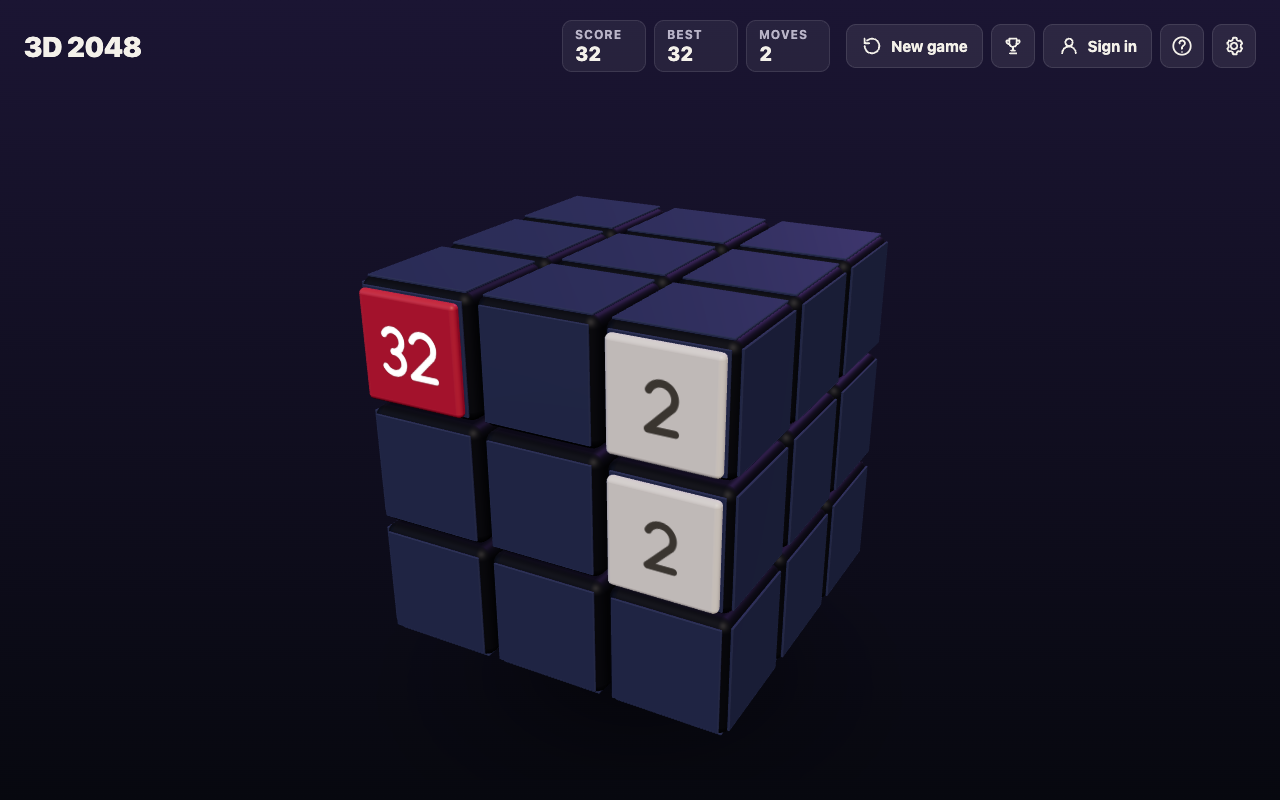
Two moves, and one merge the front face could never have made on its own.
What happens if you press the wrong way
On the same start, pressing 1 without Shift twists the top row to the right instead. The front's top row goes to the right face, and the right face's top row, with its 16, goes on round to the back face. Moves reads 1, nothing merges, and the 16 you wanted is now further away.
The fix is simple: Shift and 1 twists it back. The same goes for every key. In another test, 4 brought a 2, 4 and 8 up from the bottom face's left column onto the front's left column and sent the front's 16 up to the top face. Shift and 4 then put everything back where it was. But each of those twists counted a move and added a new tile, so a wrong twist is never free.
That is the main difference from a whole-cube turn. Turning is free. Twisting is not. Before you press a number, check where the tile you want is, and use the list above.
When a twist key does nothing
A twist needs tiles to carry. In a test with only one tile on the cube, sitting on the front's centre, pressing 1 changed nothing and Moves stayed at 0, because the top row's ring held no tile. An earlier keyboard test found the same for 5 with an empty middle column. The game has a message for this: "That row has no tiles to carry."
A twist also needs room. Every twist adds a new tile, so when all 54 squares are full the game refuses: "The cube is full. Merge two tiles on a face to make room before you twist." Keys outside 1 to 6, such as 7, 0 or Space, do nothing at all.
When to press a twist key instead of sliding
A slide is still the main move. It is the only move that merges tiles and the only one that scores. A twist is for the moments a slide cannot help. Press one when:
- The match is on another face. If the tile that would merge with one on the front sits on a side face, a twist brings it over, as in the example.
- The front is stuck. When no slide moves anything, the game says "Nothing moves that way. Try another way, or twist a row." A twist moves a whole row of the front away and brings in another.
- You need an empty row. Twisting a row of small, mixed tiles off the front clears a lane for new tiles to land in.
Hold off when your biggest tile sits in the row or column you would twist. A twist takes it off the front and out of its corner. With edge merges on (they are, unless you switch them off in Settings), a slide toward an edge can also merge with a tile just over that edge, so check for that before spending a move on a twist. When to twist a row instead of sliding goes deeper into this choice, and 2048 edge merges explains the edge rule.
The game's own advice, from its No moves left box, sums it up: "Next time, keep room on one face so a twist can still bring tiles round to their match."
Frequently asked questions
What do the number keys do in 3D 2048?
Keys 1, 2 and 3 twist the top, middle and bottom row right; 4, 5 and 6 twist the left, middle and right column up. Hold Shift to twist the other way.
Does a twist count as a move?
Yes. A twist counts one move, adds no points and adds a new 2 or 4. Only a whole-cube turn, Shift and an arrow, is free.
Why did my twist key do nothing?
The ring you tried to twist had no tiles in it, or the cube was full. A twist needs at least one tile to carry and one empty square for its new tile.
Can I twist with the mouse instead?
Yes. Drag a row on the right face sideways, or a column on the top face. The keys do the same thing.
Get started
Open the game, set up a match across an edge, and try Shift and 1 yourself. If you are new to the cube, start with how to play 3D 2048.
Play 3D 2048: it is free and plays in your browser on a computer or a phone.
Comments
No comments yet.
Sign in or make an account to comment.