A/B Test Sample Size: How Many Users a Prompt Test Needs
An A/B test sample size is the number of users each version needs before a difference between them means anything. For a prompt test, the number is usually larger than you hoped: to tell a 20% success rate from a 24% one, you need about 1,700 users per prompt. The site's own guide, How to A/B test two prompts for an AI feature, says to compare prompts offline on one eval set first, then split live users with a sample size you fix in advance. This post shows how to work out that number.
If you want the whole method behind it, the Evals: Shipping AI That Works course on Age of AI Entrepreneur covers building an eval set, judging outputs and running AI in production in short lessons with their sources; sign in with your email and an emailed code to open it.
Why A/B test sample size matters more for prompts
A button test changes one thing that behaves the same every time. A prompt test changes something that behaves differently every time. The same prompt can give a sharp answer to one user and a weak one to the next, so each user's outcome carries more noise, and more noise means you need more users to see the signal.
Two other things push the number up.
- The lifts are small. A rewritten prompt rarely doubles a success rate. A move from 20% to 23% is a good result, and small differences need large samples.
- Requests are not users. One person may generate 30 outputs in a session, and those outputs are tied together by the same person and the same task. Count 30 requests as 30 data points and you overstate your sample. Assign each user to one prompt and count users.
Each output also costs tokens, so a test sized wrong wastes money as well as time. The AI Product Stack course has a lesson on model APIs, tokens and what a request costs.
The four numbers you need
- Baseline rate. How often the current prompt succeeds today. Pick one metric a user action decides: the share who keep the generated draft, click "use this", or finish the task without regenerating. Pull it from the last few weeks of logs.
- Minimum lift. The smallest improvement worth shipping, not the one you expect. If a 1 point gain would not change your decision, do not design the test to find it.
- Confidence. How often you accept a false win. The usual setting is 95%, a 5% chance of calling a winner when the prompts are really the same.
- Power. How often you catch a real win of your minimum size. The usual setting is 80%, a 1 in 5 chance of missing it.
The minimum lift drives the result more than anything else. The sample size grows with the square of how fine a difference you want to see: halve the lift and you need roughly four times the users.
A worked example: two prompts and a 20% baseline
Say you run a tool that writes cold email drafts. Today 20% of users keep the draft the current prompt writes. Your new prompt adds the recipient's company and a clearer ask, and you decide a lift to 24% is worth shipping. You use 95% confidence and 80% power.
The standard formula for comparing two rates is:
n per group = (1.96 + 0.84)² × (p1(1 - p1) + p2(1 - p2)) / (p2 - p1)²
Here 1.96 sets 95% confidence and 0.84 sets 80% power. Plug in the numbers:
(1.96 + 0.84)²= 7.840.20 × 0.80 + 0.24 × 0.76= 0.16 + 0.1824 = 0.3424(0.24 - 0.20)²= 0.0016- 7.84 × 0.3424 / 0.0016 = about 1,678
Round up to 1,700 users per prompt, or 3,400 in total. With the same baseline, the minimum lift changes the answer a lot:
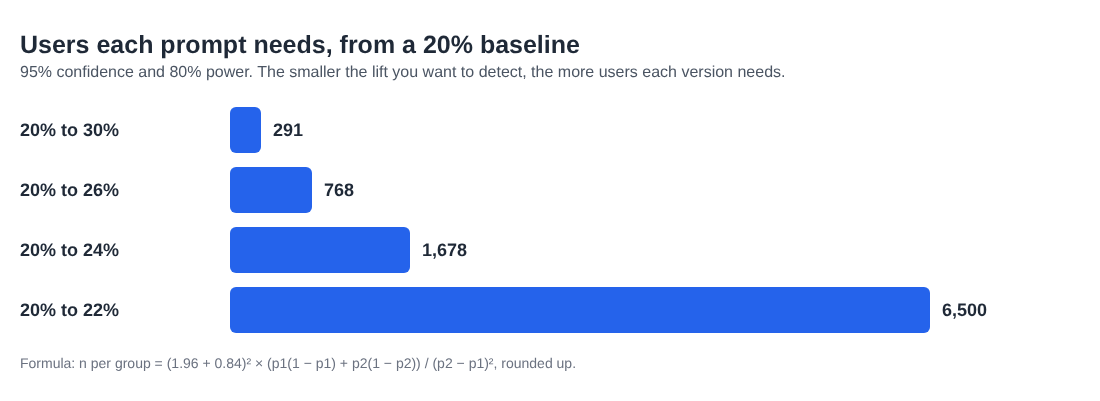
For a quick check in your head, Evan Miller's rule of thumb in How Not To Run an A/B Test is 16 × p(1 - p) / d², where p is the baseline and d is the lift. Here it gives 16 × 0.16 / 0.0016 = 1,600, close enough to tell you whether a test is realistic before you open a calculator.
Why you fix the sample size in advance
Once the test runs, the daily dashboard will tempt you. Prompt B is ahead by 6 points after 200 users. Why wait?
Because the 95% only holds if you look once, at the sample size you picked. Early on, a few users move the rates a lot. Evan Miller shows that if you check after every observation and stop at the first significant result, a test of two identical versions calls a winner 26.1% of the time, not 5%. Stopping early on a loss has the same problem in reverse.
So write three things down before launch: the metric, the minimum lift and the sample size per prompt. While the test runs, stop only for breakage: errors, timeouts or harmful output. Judge the winner when both groups reach the number.
Cut the users you need with an offline eval set
The cheapest live test is the one you do not run. Before any user sees a prompt, run both prompts on the same fixed set of inputs, for example 100 real requests from your logs, awkward ones included. Score each pair of outputs with a rubric, by hand or with a model as the judge, and check the scores against your own judgment on a sample.
This helps in two ways. Both prompts answer the exact same inputs, so differences between users drop out and a small set can show a clear gap. And it filters out losers: five candidate prompts tested live would need five groups of 1,700 users, while an offline round that narrows them to one challenger leaves one live test of two groups.
Your eval set is also where you catch problems traffic will not show quickly, such as a prompt that treats some users worse than others. The guide to AI bias examples and how to test for bias shows which cases are worth adding.
When your AI feature has too little traffic
Run the arithmetic first. If you need 3,400 users and 50 a day reach the feature, the test takes over two months. You have a few honest options:
- Test bigger changes. A 10 point minimum lift needs about 580 users in total. Small wording tweaks belong in the offline eval.
- Use a metric closer to the output. A "kept the draft" rate happens on every visit and moves more than a "paid next month" rate.
- Ship on the offline result. If the new prompt wins clearly on your eval set and breaks nothing, ship it and watch the live rate against the old baseline. This is weaker evidence, but it beats a test that never finishes.
- Talk to users. At small scale, ten conversations about bad outputs teach you more than a split, and a Wizard of Oz MVP can show what good output looks like before you have traffic.
The Launch, Price and Get Paid course has a lesson on the MVP and the Build-Measure-Learn loop, which fits this stage.
Frequently asked questions
What is a good sample size for an A/B test?
No single number fits every test, because it depends on your baseline rate and the smallest lift you care about. For a 20% baseline and a 4 point lift at 95% confidence and 80% power, you need about 1,700 users per version.
Can I stop an A/B test as soon as one prompt looks better?
Not if you planned a fixed sample size. Stopping the first time one prompt pulls ahead makes false wins much more likely; stop early only for errors, timeouts or harmful output.
How long should a prompt A/B test run?
Divide the total users you need by the eligible users you get per day. Round up to whole weeks so every day of the week is covered.
Does an LLM judge reduce the sample size I need?
It helps offline, where it scores many paired outputs cheaply so you can drop weak prompts before going live. It does not shrink the live test, which measures what users do.
Get started
Write down your baseline, your minimum lift, 95% confidence and 80% power, and do the math before you write the second prompt. If the answer is more users than you will see this quarter, move the work offline. To go deeper on evals, model costs and launching, open Age of AI Entrepreneur and sign in with your email and an emailed code: short hands-on lessons on how to build a business in the age of AI, with every side of the debate and the sources to read next.
Building a business in the age of AI, from a first project to a company.
Visit aientrepreneur.vlvd.net↗
Comments
No comments yet.