Acoustic guitar tracks for a camping gear review: a guide
The best acoustic guitar tracks for a camping gear review are quiet, steady and instrumental. They sit under your voice, they do not fight the sound of a zipper or a stove, and they make a tent look like a good place to be. This guide shows how to pick a track, where to put it in a review, and which license each use needs.
What a gear review needs from its music
A gear review is mostly talking, close-ups and demos. The music has one job: set a mood without getting in the way. Plucked or strummed guitar does that well. It sounds warm, and it leaves room for a voice reading weights and fabric names.
That means three checks before you press play on anything.
- Vocals or not. A sung lyric competes with your narration. Each track page on Wavecrate lists "Instrumental" or "With vocals" in its details.
- Energy. The music page has an energy filter from Calm to Intense. For a talking review, start at Relaxed or Steady.
- Versions. Track pages offer the full track, a 30 second edit and a loop, so you can fit a short opening or a long demo without a hard restart.
Wavecrate, the music library used as the example in this guide, has an energy filter and a tempo filter on its music page, and every download comes with a license certificate and a code.

Acoustic guitar tracks for a camping gear review: what Wavecrate has
The Acoustic page listed 10 tracks on 14 October 2026. Three of them were marked Free that day: Porch Light, Golden Weights and Rising Loop. Items can change from Free to Premium, so read the page on the day you download.
Two tracks say guitar outright. Porch Light and Wildflower Morning, both by Sable and Finch, are described as "plucked and strummed guitars with a light shaker". The other eight tracks in the genre have different descriptions, so do not assume guitar from the genre name alone. Golden Weights, for example, is described as the acoustic score of a film about neural networks, and its page does not name an instrument.
Here are the four tracks used in this guide, as their pages read on 14 October 2026:
- Porch Light: Free, 1:20, 96 BPM, G major, Relaxed, instrumental, tagged travel and wedding. It has a 30 second edit and an 8 bar loop.
- Wildflower Morning: Premium, 1:16, 104 BPM, Steady, with vocals, tagged vlog and travel. Use it for b-roll with no talking, if you use it at all.
- Golden Weights: Free, 2:26, 84 BPM, D major, Steady, instrumental. It comes as a 24-bit WAV and a 320 kbps MP3, with a 30 second edit and a loop.
- Rising Loop: Free, 1:46, 109 BPM, C major, Relaxed, instrumental, with a 30 second edit and a loop.
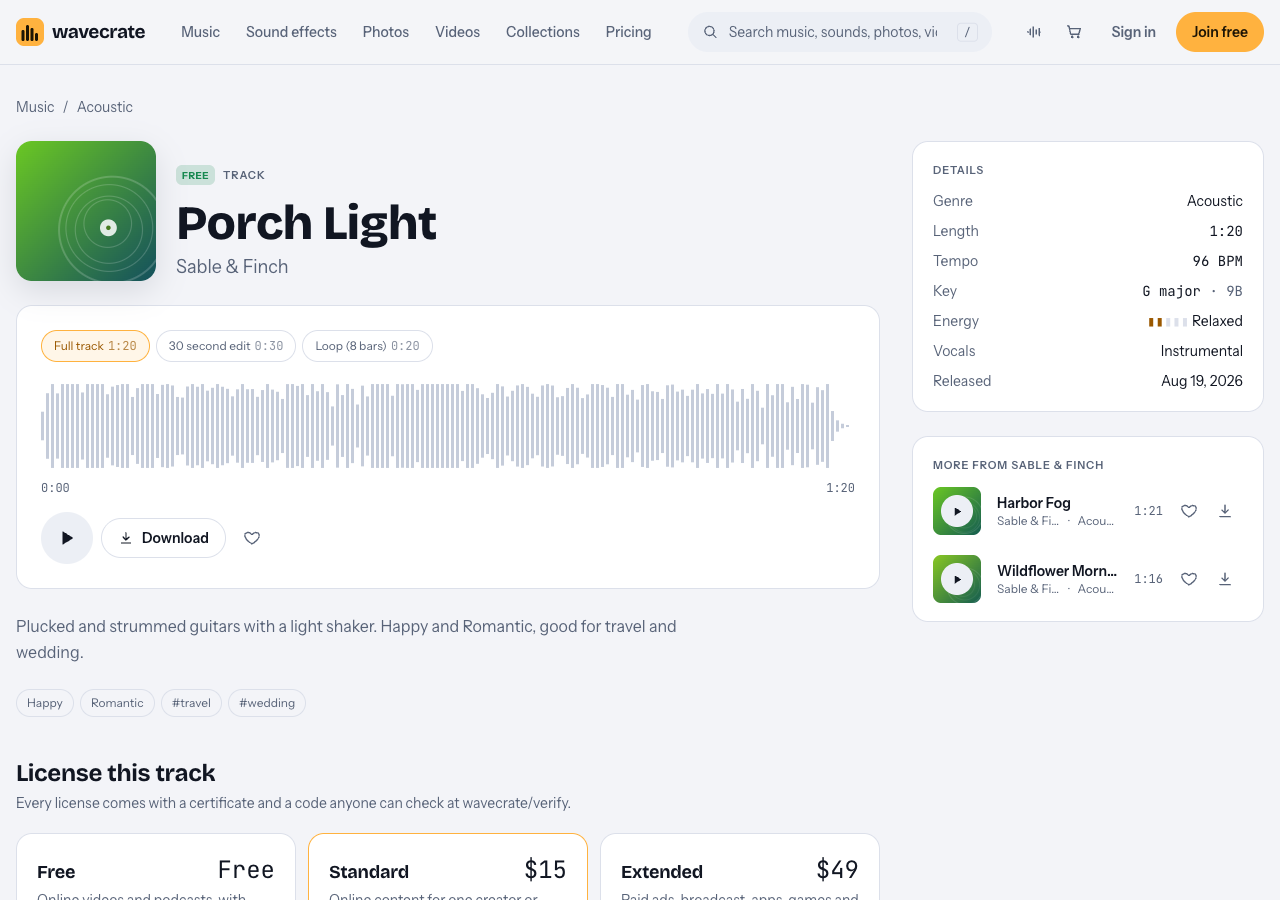
Porch Light's page: three versions, 96 BPM, instrumental.
Harbor Fog (80 BPM) is also instrumental, but its mood tags are melancholic and nostalgic, which is a poor match for a verdict that praises a tent.
Tempo and mood for each part of a review
Wavecrate's tempo filter calls anything under 90 BPM Slow, 90 to 120 Mid and over 120 Fast. The mood filter includes calm, hopeful, uplifting and happy, which are the ones to try here.
You do not need one track for the whole video. A review usually has four parts.
The cold open
Open on your best shot: the tent at dawn, the stove lit. Use the 30 second edit of a happy track such as Porch Light and let it end as you begin to talk.
The spec walkthrough
Here you read weights, packed size and fabric, and people need to hear the numbers. Pick the slow, steady track (Golden Weights at 84 BPM) and keep it very low.
The hands-on test
Pitching, boiling water, packing up. A loop works well under a long sequence because it repeats without a restart you can hear. Rising Loop at 109 BPM adds a little pace to the setup footage.
The verdict
Come back to the opening track as you give your rating. Repeating the first sound gives the video a shape without any extra work.

One review, three tracks. The times are an example, not a rule.
Worked example: an eight minute tent review
Say you review a two person tent in about eight minutes. This is one way to lay out the music, using the timeline above.
- 0:00 to 0:30. Porch Light, 30 second edit, at a clear level over the sunrise shots.
- 0:30 to 3:30. Golden Weights under your voice for the specs. Set your narration first, then bring the music in far below it.
- 3:30 to 7:00. Rising Loop under the pitching and packing footage, with the loop repeated.
- 7:00 to 8:00. Porch Light again for the verdict, ending on its last note or a short fade.
Two mixing habits help. Lower the music while you speak and let it rise a few decibels in the gaps, with short fades so the change is smooth. Then check the mix on a phone, because that is where most people will watch.
Which license does the same track need?
Take Porch Light and follow it across three uses. The cards below are as its page read on 14 October 2026. Paid licenses are not on sale yet: Wavecrate says purchases open soon, so the prices below are the listed prices for when sales open. Items marked Free, like Porch Light, can already be downloaded with a free account.
- Your own channel, no sponsor. The Free card covers online videos and podcasts on YouTube, TikTok, Instagram, Twitch and podcasts, including monetized channels, with credit text in the description. A free account gets 3 free downloads a month.
- A review for your own shop or brand. The Free card does not tick your own business and brand content. The Standard card does (listed at $15 for this track): online content for one creator or business, no credit needed, with your registered channels printed on the certificate. Pro covers Standard licenses for the whole catalog, and is listed at $99 a year or $12 month to month, but is not on sale yet.
- A brand pays for the video, or you run it as an ad. The Extended card (listed at $49) lists paid advertising, TV or radio broadcast, apps, games and client work. Pro never includes Extended. The pages do not say how a sponsored review or a gifted product is treated, so a paid brand deal is the cautious case: read the Extended card first.
You get a license to use the music, not ownership; Wavecrate keeps the copyright. Every license comes with a certificate and a code. Put the code in your video description. Anyone can enter it on the verify page with no account, and a reviewer can check it without contacting Wavecrate. The site does not say how any platform will respond to it, so treat it as proof of your license and nothing more.
Frequently asked questions
Should music for a camping gear review have vocals?
Choose instrumental for any part where you talk, because vocals compete with your narration. Wildflower Morning has vocals, so it suits only b-roll with no voiceover.
What BPM suits a camping gear review?
Slow to mid tempo, about 80 to 110 BPM, matched the tracks used here. Slow tracks suit spec talk, and mid tempo suits hiking and setup footage.
Can I use a free acoustic track in a monetized review?
Items marked Free cover monetized channels on YouTube, TikTok, Instagram, Twitch and podcasts, with the credit text in your description. If the review is for your own business or brand, the Free card does not tick that, so it needs Standard.
Do I need Extended if a brand sends me the gear?
The pages do not mention gifted products. They list paid advertising and client work under Extended, so if a brand pays you or runs the video as an ad, take the cautious reading and check the Extended card.
Get started
Browse Wavecrate: you can join free and download items marked Free now, paid licenses are not on sale yet (purchases open soon), and every download comes with a license certificate and a code anyone can check on its verify page. Open the Acoustic page, play three tracks under a rough cut of your review, and keep the one you stop noticing. Then read its license card and put the code in your description.


Comments
No comments yet.
Sign in or make an account to comment.