Acoustic songs for a travel vlog: pick tracks that fit each scene
The right acoustic songs for a travel vlog do a lot of quiet work. A plucked guitar under a street scene makes a place feel warm and close. A strummed chorus over a drone shot makes it feel open. This guide shows you how to pick tracks for each scene, how to edit to them, and which license each use needs.
Wavecrate licenses royalty-free music, sound effects, photos and videos, and every download comes with a license certificate and a code anyone can check on its verify page.

Why acoustic songs work so well for travel vlogs
Travel footage is busy. You have markets, traffic, waves, wind and your own voice. Acoustic music sits well in that mix because guitars and light percussion leave room for everything else. A thin arrangement does not fight your narration the way a dense electronic track can.
Acoustic music also carries a feeling people link with travel: being outside, moving slowly, a little nostalgic. You do not need to explain the mood of a place when the music already sets it.
Match the acoustic style to your destination and mood
Start with the feeling, not the genre. Ask what one word describes the scene. Then search for that word.
On Wavecrate, the music browse page lets you filter by mood, tempo, length and energy. The mood list includes calm, dreamy, uplifting, happy, romantic, nostalgic, hopeful and more. The energy filter runs from Calm and Relaxed to Steady and Driving.
Here is how that maps to common trips:
- Beach towns and slow mornings: calm or dreamy, energy Relaxed, tempo Slow (under 90 BPM).
- City walks and food tours: happy or playful, energy Steady, tempo Mid (90 to 120 BPM).
- Road trips and hikes: uplifting or hopeful, energy Steady or Driving.
- Last night of the trip: nostalgic or melancholic, energy Calm.
Two tracks in the Acoustic genre, read on 11 October 2026, show the range. Porch Light, marked Free, is plucked and strummed guitars with a light shaker, described as "Happy and Romantic, good for travel and wedding," an instrumental at 96 BPM with Relaxed energy. Wildflower Morning has the same guitar and shaker sound, described as "Uplifting and Happy, good for vlog and travel," at 104 BPM with Steady energy. Wildflower Morning has vocals, which matters if you talk over it. More on that below.
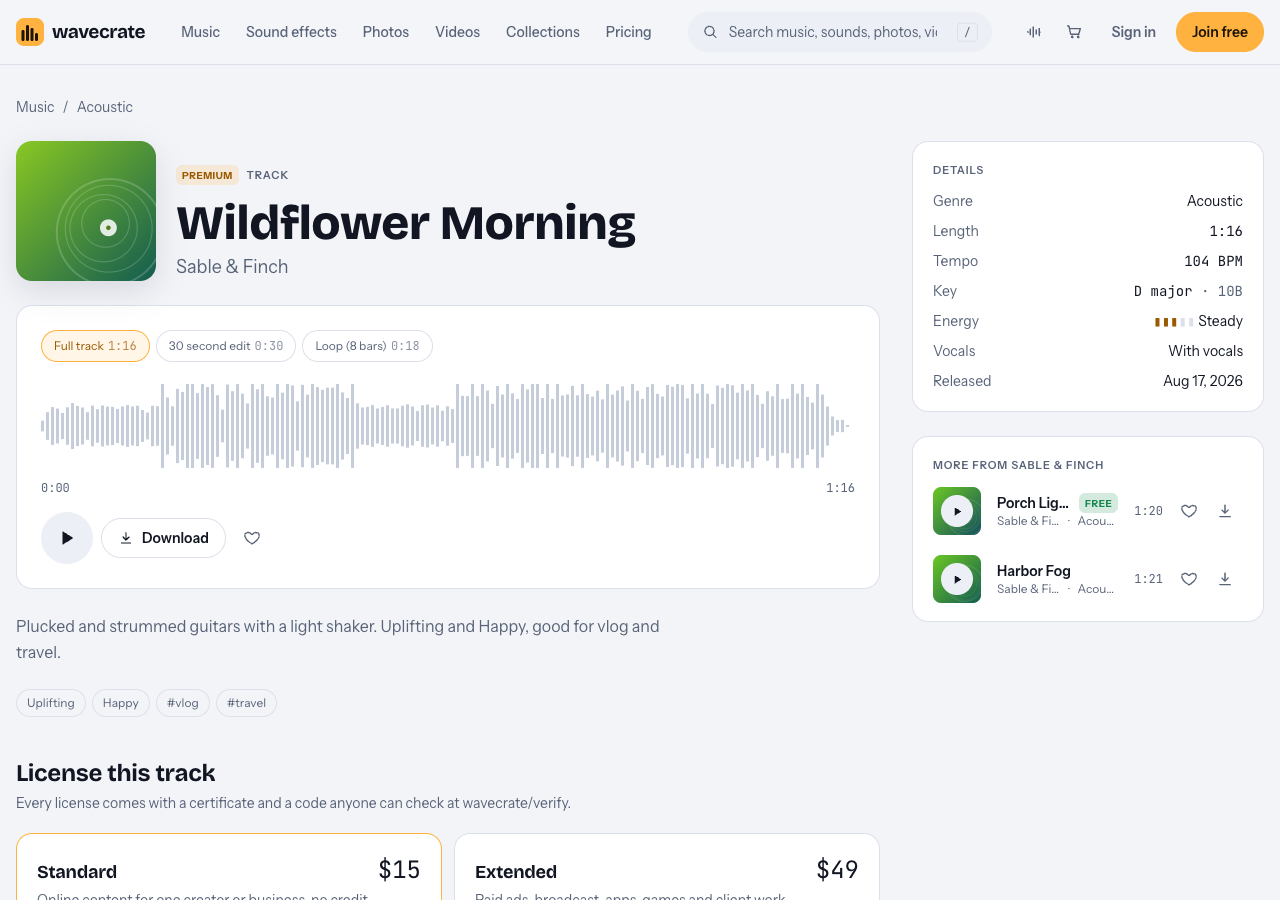
Wildflower Morning, read on 11 October 2026.
Acoustic song types for each part of a travel vlog: intro, montage, B-roll and outro
Most travel vlogs have four kinds of scenes. Each one wants something different from the music.
Intro
You have a few seconds to set the tone. Pick something bright with a clear start. Many Wavecrate tracks come in three versions: a full track, a 30 second edit and an 8 bar loop. The 30 second edit is a handy length for an intro, since you start from a short version instead of trimming a full track. Play it through once to hear how it starts and ends before you build your opening around it.
Montage
A montage of quick shots needs a steady pulse you can cut on. Mid tempo works best. Wildflower Morning at 104 BPM gives you a beat every 0.58 seconds, which leaves plenty of cut points.
B-roll under narration
This is where you talk. Choose an instrumental track with Relaxed or Steady energy. Avoid vocals here. Two voices at once make your viewer work too hard. The loop version is handy: it repeats cleanly, so you can stretch it under a long talking section.
Outro
Slow down. A calm or nostalgic track with a soft ending lets the trip settle. If you use a 30 second edit here, listen to its last few seconds before you commit, and add your own fade if the ending needs one.
Licensing acoustic songs for a travel vlog: one track, three uses
No license can promise a platform will never flag your video. What you can do is use music you have a real license for, and keep proof that is easy to check.
Every Wavecrate download comes with a license certificate and a code. Paste that code into your video description. The verify page shows the licensee, the item, the license type and your registered channels. If you get a claim, the site's advice is to send the platform your license code or certificate link, so a reviewer can confirm it without contacting Wavecrate.
The trap is a track marked Free in a business video. Take Porch Light through three uses, using its page and the license table on the pricing page:
- Your own travel channel. The Free license covers YouTube, TikTok, Instagram, Twitch and podcasts, monetized channels included, with credit text required in your description. A free account gets 3 free downloads a month.
- Your own guesthouse or tour company's channel. That is "your own business and brand content." The Free license does not tick that row, so it needs Standard (listed at $15 on this page), even though the track is marked Free. Standard needs no credit and prints your registered channels on the certificate.
- A hotel or tourism client, or a paid ad. Filming a trip a hotel pays you for is client work, and boosting the vlog is paid advertising. Both need Extended (listed at $49 on this page).
Paid licenses are not on sale yet (Wavecrate says purchases open soon), so those are the listed prices for when sales open; items marked Free, like Porch Light, can already be downloaded with a free account. You do not own the music: a license gives you permission to use it, and Wavecrate keeps the copyright.
Edit to the music: tempo, cuts and volume under your voice
Here is a worked example. Say you are cutting an 8 minute vlog from a weekend on the coast.
- Intro (0:00 to 0:30). Drop in the 30 second edit of Wildflower Morning. Line your title card up with the first strong downbeat. Cut your opening shots every 2 beats, which is about every 1.15 seconds at 104 BPM.
- Arrival and talking (0:30 to 3:00). Switch to an instrumental like Porch Light. Since it is 96 BPM, a beat lands every 0.625 seconds. You will not cut to every beat here. Just start new shots on a downbeat when you can. Lay the loop version end to end to fill the space.
- Food montage (3:00 to 3:40). Bring Wildflower Morning back, or another Mid tempo track. Cut every 4 beats so each dish gets a moment.
- Sunset and outro (final minute). Use a calm, slow track and let the last chord ring out over your end screen.
For volume, keep the music clearly lower than your voice when you speak. Raise it between sentences and in montages, then pull it back down when you talk again. Many editors call this ducking. Listen on phone speakers before you export, since that is how many viewers will hear it.
Tempo matching also helps between tracks. Moving from 96 to 104 BPM feels natural. Jumping from 70 to 130 BPM feels like a jolt, which can work for a scene change but not by accident.
Where to find licensed acoustic tracks for travel videos
On Wavecrate, start in one of three places:
- Music browse with filters. Go to music, choose the Acoustic genre, then set mood and tempo. Try mood uplifting with tempo Mid for montage tracks.
- Collections. The collections page groups items by project; the Vlog essentials collection held both tracks above when read on 10 October 2026.
- Free items. Filter by free downloads if you want to start with tracks that carry a Free license and a credit line.
You can audition fast with the keyboard. On every page, Space plays or pauses, Left and Right skip 5 seconds, Shift with Left or Right jumps to the previous or next item, M mutes and / opens search.
If you publish a lot, Pro is listed at $99 a year (shown as $8.25 a month, billed yearly) or $12 month to month, and is not on sale yet. It gives Standard licenses on the whole catalog, with all versions: full, 30 second edit and loop. Content you publish while subscribed stays covered after Pro ends. Pro does not include Extended, so client work still needs an Extended license. See pricing for the full table.
Frequently asked questions
Should I use acoustic songs with vocals in a travel vlog?
Use vocal tracks for intros, montages and outros where you are not talking. Under narration, pick an instrumental so your voice stays clear.
What tempo works best for a travel montage?
Mid tempo, around 90 to 120 BPM, gives you a steady beat to cut on without feeling rushed. Slower tracks under 90 BPM suit sunsets and quiet endings.
Do I need to credit a Wavecrate track in my description?
Only with the Free license, which requires credit text in your description. Standard and Extended licenses need no credit line.
Is a track marked Free enough for my tour company's channel?
No. On Wavecrate the Free license does not cover your own business and brand content, so it needs Standard; a hotel that pays you is client work, which needs Extended.
Get started
Pick one scene from your next trip. Decide its mood in one word. Then open the music browser, set the Acoustic genre, the mood and a tempo range, and play through the results with the Space and Shift keys until one fits.
Browse Wavecrate: you can join free and download items marked Free now, paid licenses are not on sale yet (purchases open soon), and every download comes with a license certificate and a code anyone can check on its verify page.


Comments
No comments yet.
Sign in or make an account to comment.