AI agent audit logs: record every action and decision
AI agent audit logs answer the question everyone asks after an agent does something wrong: what exactly did it do, and why was it allowed? Most app logs cannot say. They record a request and a status code. They do not record which agent acted, for which user, under which rule, with whose approval. Without that, you cannot explain a bad refund, undo it with confidence, or prove it will not happen again.
This guide sets out what one entry should hold, what to keep out of it, how to protect it, and a worked example you can copy.
Why AI agent audit logs need more than app logs
A normal app does what its code says. An agent decides. So the log has to capture the decision, not only the request. The OWASP AI Agent Security Cheat Sheet asks you to log every agent decision, tool call and outcome, to keep audit trails for review, and to track token use and cost per session and user.
The OWASP Top 10 for Agentic Applications 2026 relies on these logs in several entries. Its fix list for rogue agents starts with signed audit logs that cannot be changed, covering every action, tool call and message between agents. Its fix list for goal hijack asks you to record every unexpected goal change. Our posts on rogue AI agents and agent goal hijack show where those logs get used.
What one entry should record
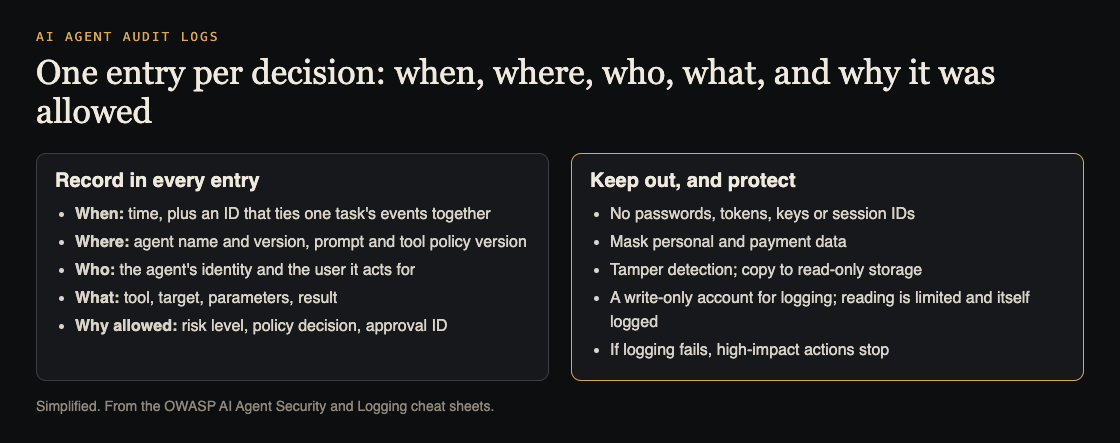
The OWASP Logging Cheat Sheet says each entry must record when, where, who and what. For an agent, that becomes:
- When. The time, plus one ID that ties together every event in a single task. OWASP calls it an interaction identifier. Without it you rebuild a run from timestamps by hand.
- Where. The agent's name and version, and the version of its prompt and tool rules. A bug in version 4 should not be blamed on version 5.
- Who. The agent's own identity and the user it is acting for. Two separate fields, never merged.
- What. The tool, the target, the parameters and the result: success, failure or deferred, with the reason.
Log the decision, not just the action
For high-risk actions, the AI Agent Security Cheat Sheet lists the decision details to log:
- The action's risk class, and its risk score if you use one.
- The authorization outcome: allowed, refused, or sent for approval.
- The approval ID, if a person signed off.
- The result of running it.
- The version of the policy that made the call.
The same cheat sheet says an approval should be bound to the exact action: who asked, which tool, which target, which parameters, when, and when it expires. Store that record and link it from the log entry. Then an auditor can see that the person approved this refund to this account, not "a refund". Our post on human approval for AI agents covers the approval side.
For goal changes, also log a stable ID for the agent's current goal, as OWASP's goal hijack entry suggests. A changed goal ID with no approval next to it is worth an alert.
What to keep out of the log
Logs are read by more people than your database, so the Logging Cheat Sheet says these should usually be removed, masked, hashed or encrypted before they are written:
- Passwords, access tokens, API keys and other secrets.
- Session IDs (log a hash if you need to follow a session).
- Database connection strings.
- Bank and payment card details.
- Sensitive personal data.
Agents make this harder, because a tool call's parameters can carry anything a user typed. Redact by field name before writing, as the AI Agent Security Cheat Sheet's example does for fields named password, token, secret and similar. Our post on LLM sensitive information disclosure covers the same leak in answers.
Protect the log from the agent and from attackers
A log an attacker can edit is worse than none, because you will trust it. OWASP's Logging Cheat Sheet lists attacks on logs: flooding them to fill the disk, one entry that wrecks others, stopping writes to hide tracks, and recording the wrong identity. Its defences:
- Tamper detection, so you know when a record was changed or deleted.
- Read-only copies made as soon as possible.
- A write-only account for logging, with no other rights in the database.
- Limited reading: few people may read logs, and every read is itself recorded.
- A set retention period: keep logs as long as you must, and no longer.
One more rule from the AI Agent Security Cheat Sheet: if audit logging fails, high-impact actions fail too. An agent that cannot be recorded should not be able to pay, delete or send.
Worked example: trace one refund
Say a support agent issued a refund nobody expected. Here is the trail a good log lets you follow, step by step. Try it on a test refund in your own system before you need it for real.
- Find the payment. Search the log for the refund's target ID. You should get one entry with a task ID.
- Pull the whole task. Search by that task ID. You should see the ticket read, the tool calls, the policy check and the refund, in order.
- Check who and which version. The entry should name the support agent, its version, its prompt and policy version, and the customer it acted for.
- Check why it was allowed. Look at the risk class, the authorization outcome and the approval ID. Open the approval record and compare its amount and account with the refund. If they differ, your approval binding is broken.
- Check the goal ID. Did it change during the task? If yes, find the input that changed it.
- Check what is missing. Did any secret or card number appear in the entries you read? Could the agent's own account have edited them?
If any step needed a guess, add the missing field now. Then delete one test entry on purpose and confirm your tamper check notices.
Frequently asked questions
Should I log the full prompt and model reply?
Only after redaction, since both can hold secrets and personal data. Log the decision details every time; if you keep the full text, the OWASP Logging Cheat Sheet suggests separate files or tables for extended details, which you can lock down more tightly.
Can the agent write its own audit log?
It can send events, but through a write-only path it cannot read back or edit. The agent should never be able to change the record of what it did.
What should happen if logging is down?
OWASP's AI Agent Security Cheat Sheet says high-impact actions should fail closed when audit logging fails. Decide in advance which actions count as high-impact.
How long should I keep agent logs?
For your required retention period and no longer. OWASP notes that legal and contract terms can set that period.
Get started
Want someone to trace one of your agent's actions end to end and show you where the trail breaks? whitehatstoic's cybersecurity and AI safety testing covers web app and API review and prompt injection tests on AI systems, with a written report, fixes and a retest after fixes.
Book a meeting about AI safety testing, or book a meeting with whitehatstoic: pick one or more topics, tell us the product, the deadline and your biggest worry, and we reply with a plan and a price.
Comments
No comments yet.
Sign in or make an account to comment.