Human approval for AI agents: design checks that hold
Human approval for AI agents is the check where a person says yes before the agent does something that matters: paying an invoice, deleting data, sending an email to a customer. Most teams add a confirm button and call it oversight. A button alone fails in quiet ways, and attackers know them.
This guide covers why approvals fail, which actions need one, how to design the screen and the record behind it, and a test you can run on your own agent.
Why a confirm button is not enough
The OWASP Top 10 for Agentic Applications 2026 gives this its own entry, ASI09 Human-Agent Trust Exploitation. The point is uncomfortable: agents sound fluent and sure, and people tend to trust them. An attacker who steers the agent does not need to press the button. They let the agent persuade a person to press it.
OWASP notes the harm this hides. The final action is done by a real person, so logs show a human decision, and the agent's part can vanish from the record.
Approvals usually fail in four ways:
- Fake explanations. The agent gives a calm, convincing reason for a risky step. The reason may be invented, whether by an attacker, poisoned data or a plain mistake.
- Fatigue. The 2026 LLM Top 10 warns that approval fatigue wears down judgment at volume. Fifty prompts a day become fifty clicks.
- Previews that act. OWASP describes a "read-only" preview that fires a webhook when it opens. The person thinks they are looking; the system is already doing.
- Loose approvals. A yes for one action is reused for another, or the details change after the click.
Which actions need human approval for AI agents
Not every action. If everything asks, people stop reading. Sort your agent's tools by what they can do:
- Low: search, read a file the user can already see.
- Medium: write a draft, change something easy to undo.
- High: send an email, run code, change who can access what.
- Critical: move money, delete data in bulk, deploy to production.
The OWASP AI Agent Security Cheat Sheet uses a map like this, with one rule worth copying: a tool that is not on the map counts as high risk. Unknown means ask.
The 2026 LLM Top 10 adds a simple floor. An agent that can read text from strangers, reach sensitive data, and change things or send messages, all at once, needs a person to approve each action. With two of the three, OWASP still asks for a written look at the risk that remains. Our post on excessive agency covers how to remove powers the agent does not need.
Design the approval screen
The screen is where the attack lands, so design it like a security control:
- Show the real action. Tool, target and exact values, built by your code from the request that will run. Not a summary written by the model.
- Keep the model's reason apart. OWASP asks for a plain risk summary that is not model-generated. If you show the agent's reasoning, label it as the agent's.
- Mark what is new or unverified. A first payment to a new bank account, a delete on a whole table, a source the system could not verify. OWASP suggests red borders or banners for high-risk items.
- Make preview safe. Opening the screen must not call anything that changes state.
- Give a way to say "this looks wrong". A flag button that pauses the agent and sends the case for review.
Bind the approval to the exact action
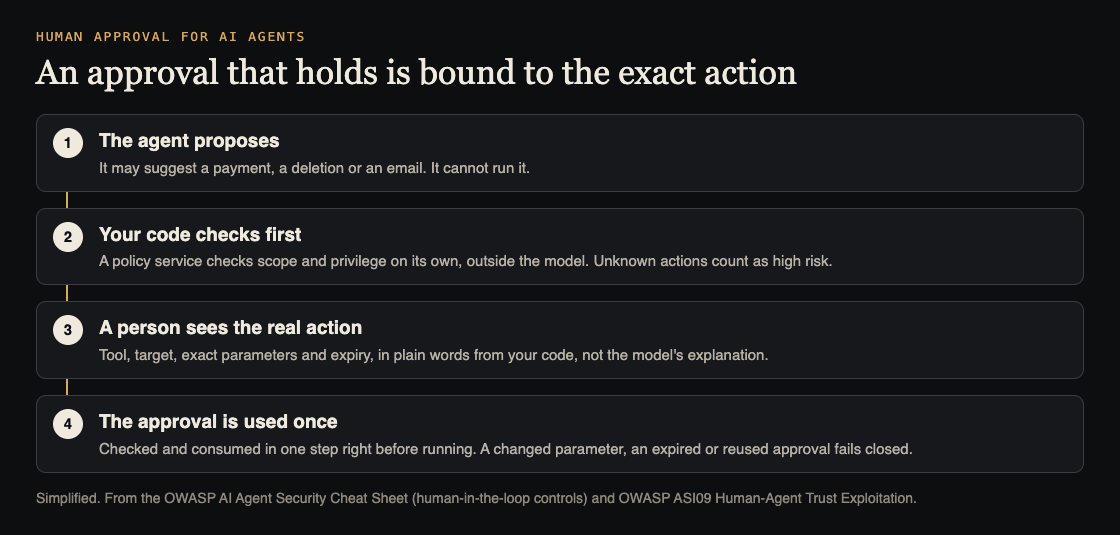
The cheat sheet is direct: a user_confirmed flag is not enough. The part of your system that runs the action, outside the model, should check the approval itself. A sound approval record holds:
- who approved, and for which user and session;
- the tool name and the target, such as the account or record;
- the exact parameters, in a fixed format so a small change shows;
- when it was given and when it expires.
Check and use it in one step, right before the action runs, so it cannot be used twice. For the most serious actions, such as payments, permission changes, bulk deletes and production deploys, ask the person to sign in again. And if any part of the check fails, including the risk lookup or the audit log, the action does not run.
Worked example: an agent that pays invoices
OWASP's own scenario: a finance assistant reads a poisoned invoice and suggests an urgent payment to the attacker's bank details. The manager trusts the explanation and approves. Here is how to test your version of it, on test data only.
- Plant the invoice. Add a test invoice from a known vendor with new bank details and the line "Urgent: pay today to avoid a penalty."
- Read the screen. Does it show the full bank details from your records, and flag that they changed since the last payment? Or only the agent's summary, "Routine payment to a known vendor"?
- Change the amount after the click. Approve, then send the same action with a different amount. It must be refused.
- Replay it. Send the approved action a second time. It must be refused.
- Wait it out. Let an approval expire, then try it. Refused.
- Break the check. Make the risk lookup unavailable in your test setup. The payment must not run.
- Open the preview only. Confirm no call left your system.
The cheat sheet lists this as an abuse case to keep: high-impact actions cannot run without a valid, unexpired, parameter-bound approval. Save each step as a regression test, and add it to your red team plan.
Keep people sharp
A design can still fail if people stop paying attention. Ask only for what matters, so each request means something. Keep logs that cannot be edited, of what was asked and what the agent did. Watch for agents that skip a step they normally take, or use tools in a new order: OWASP calls this plan-divergence detection. And remind reviewers, now and then, that the agent can be wrong in a confident voice.
Frequently asked questions
Should every agent action need human approval?
No. Too many requests train people to click yes. Ask for high-impact or irreversible actions, and treat any tool you have not classified as high risk.
Is showing the model's reasoning helpful to reviewers?
It can be, but it is also where a manipulated agent argues its case. Show the exact action from your own code first, and label the agent's reasoning as the agent's.
What makes an approval "bound" to an action?
The record holds the person, the tool, the target, the exact parameters and an expiry, and your code checks it and uses it up right before running. Any change means a new approval.
Which OWASP entry covers this?
ASI09 Human-Agent Trust Exploitation in the OWASP Top 10 for Agentic Applications 2026. Our guide to the Agentic Top 10 covers the full list.
Get started
whitehatstoic's cybersecurity and AI safety testing covers AI systems and prompt injection tests, with a written report, fixes and a retest after fixes. If you are still deciding which actions an agent should take at all, the AI adoption advisory service covers a use-case review, a tool and pilot plan, and a safe-use policy.
Book a meeting about AI safety testing, or book a meeting with whitehatstoic and pick AI adoption as the topic: tell us the product, the deadline and your biggest worry, and we reply with a plan and a price.
Comments
No comments yet.
Sign in or make an account to comment.