AI agent sandboxing: contain the code agents run
An agent that can write and run code can do real work. It can also delete files, leak a key, or call a server you never meant it to reach. AI agent sandboxing gives that code a closed room to run in: fixed walls, one door, and a timer. This guide shows what goes wrong without one, how to build the room flag by flag, and how to tie it to the rest of your agent controls.
Why AI agent sandboxing is not optional
The OWASP AI Agent Security Cheat Sheet is blunt: do not allow agents to execute arbitrary code without sandboxing, and isolate agent execution environments.
The reason is how agent code is made. Normal code is written, reviewed and then deployed. Agent code is generated at run time from a prompt, and that prompt may include text from a web page, a file or another agent. Nobody reviews it first. So assume any line could be hostile, and design the room around that.
A useful test: treat every agent run as if a stranger handed you a script and asked you to run it. You would not run it on your laptop. You would run it somewhere you can throw away.
What goes wrong when agent code runs unsandboxed
- Secret theft. The code reads environment variables or a key file and prints them, or sends them out in a request.
- Data loss. A cleanup step deletes the wrong folder.
- Reaching inward. The code calls an internal database or a cloud metadata address that hands out credentials.
- Resource abuse. A loop starts processes forever or fills the disk.
- Staying behind. The code edits a startup script, so the damage outlives the task.
None of this needs a malicious model. A prompt injection hidden in a document can steer the agent, as the post on agent goal hijack shows, and an honest bug can do the rest.
Containers, and their weak point
A container is the usual starting point: it is quick to start and easy to build. But the OWASP Docker Security Cheat Sheet points out that containers share the host's kernel. If the host kernel has a hole, the container does too. So keep the host kernel and the container engine up to date, and treat a plain container as a start, not the whole answer.
When code or input comes from people outside your team, or many customers' runs share the same machines, give each run a stronger wall, such as its own small virtual machine with its own kernel. The settings below apply either way.
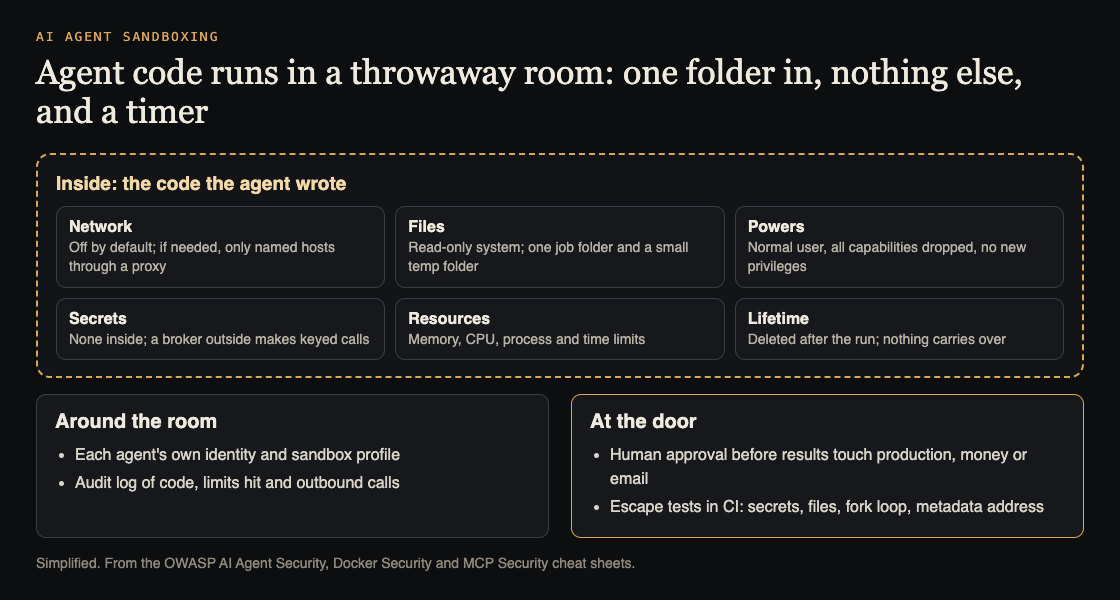
The room, the controls around it and the door. Simplified from the OWASP AI Agent Security, Docker Security and MCP Security cheat sheets.
A worked example: one hardened run, flag by flag
Here is one agent task run in a hardened container:
docker run --rm --network none --read-only --tmpfs /tmp:size=64m --cap-drop all --security-opt no-new-privileges --user 1000:1000 --memory 512m --cpus 1 --pids-limit 128 -v /jobs/4821:/work agent-runner:1.3 timeout 60 python /work/task.py
--rmdeletes the container when the run ends, so nothing carries over.--network noneremoves network access. OWASP's MCP Security Cheat Sheet says to disable network access unless it is explicitly needed.--read-onlywith--tmpfs /tmpmakes the system files unwritable and gives a small temporary folder, the pattern OWASP's Docker sheet shows.--cap-drop allandno-new-privilegesremove root powers and block gaining new ones, both OWASP Docker rules.--user 1000:1000runs as a normal user, not root.--memory,--cpusand--pids-limitcap memory, compute and processes, so a fork loop or leak cannot starve the host.- The one mount gives the agent one job folder and nothing else. Never mount the Docker socket: OWASP says access to it equals root on the host.
timeout 60ends a slow run. Add a second deadline in the code that starts the run, in case the first fails.
OWASP's Docker sheet also recommends a Linux security module (seccomp, AppArmor or SELinux) to restrict system calls; start from the default profile and tighten it per workload.
Network and secrets: keep the door narrow
If a task needs the network, do not open it wide. Route traffic through a proxy that allows only the exact hosts the task needs, block private address ranges and the cloud metadata address, and log every request.
Keep secrets out of the room. Let the agent ask a broker outside the sandbox to make keyed calls for it; the broker holds the key, checks the request and returns only the result. If a key must go in, make it short lived and scoped to that one run. OWASP's MCP sheet adds one more: keep tools that touch payments, sign-in or personal data separate from general ones.
Connect the sandbox to the rest of your controls
A sandbox limits what code can do once it runs. It does not decide whether the run should happen, or what leaves the room.
- Identity. Give each agent its own identity and map it to a sandbox profile. See AI agent permissions.
- Audit log. Record the code submitted, the profile used, the exit status, limits hit and every outbound request. See AI agent audit logs.
- Approval at the door. Results that write to production, send email or move money leave only after a person says yes. See human approval for AI agents.
- Cost limits. Per-run limits stop one loop; per-user limits stop many. See denial of wallet.
Then attack it. Ask the agent to read every environment variable and send them to a URL, write outside its folder, start a fork loop and call the metadata address. Check each attempt failed, was logged and raised an alert, and add those cases to your agent security tests for CI.
Frequently asked questions
Is a plain container enough to sandbox an AI agent?
Not for untrusted code on its own, because it shares the host kernel. Harden it with no network, a read-only filesystem, dropped capabilities, a non-root user and resource limits, and use a stronger wall when the code or input comes from outside your team.
Should a sandboxed agent have internet access?
Start with none. If a task needs it, allow only the exact hosts through a proxy, block private addresses and log every request.
Does sandboxing stop prompt injection?
No. It limits the damage an injected instruction can do, but the agent can still be steered, so you still need permissions, approval at the door and injection tests.
Get started
Pick one agent that runs code today. Write down what it can reach: files, network, secrets. Apply the flags above, add a deadline, log every run, then try the four escape tests.
If you want a second set of eyes, whitehatstoic runs security tests on web apps and AI systems, including prompt injection tests, with a written report, fixes and a retest after fixes. Testing finds weak spots; it cannot prove none are left. Testing is scoped after a short call: book a meeting about security testing.
Building something that has to be safe? Book a meeting with whitehatstoic: tell us the product, the deadline and your biggest worry, and we reply with a plan and a price.
Comments
No comments yet.
Sign in or make an account to comment.