AJAX security: protect the calls your page makes
AJAX security is the work of protecting the calls your page makes in the background and the way it shows what comes back. Your page fetches a cart, saves a setting or loads a feed without a reload, and every one of those calls is a normal web request that a stranger can see, copy and change. This post follows the OWASP Web Frontend Security Cheat Sheet, which was previously named the AJAX Security Cheat Sheet, and turns it into steps a small team can run on its own app.
Start with one rule: all data is untrusted
OWASP opens with a mindset before any single control. All data should be considered untrusted unless it has been explicitly validated and safely handled. The sheet lists where that data comes from: client-side input, API responses, third-party integrations, internal services and microservices, cached responses, browser storage such as localStorage and sessionStorage, and hidden form fields.
That list is wider than most teams expect. The reply from your own API is on it. So is a value you saved in the browser last week. Each one can be changed by the user or by something that got in between, so each one gets checked before you rely on it and handled safely before you show it.
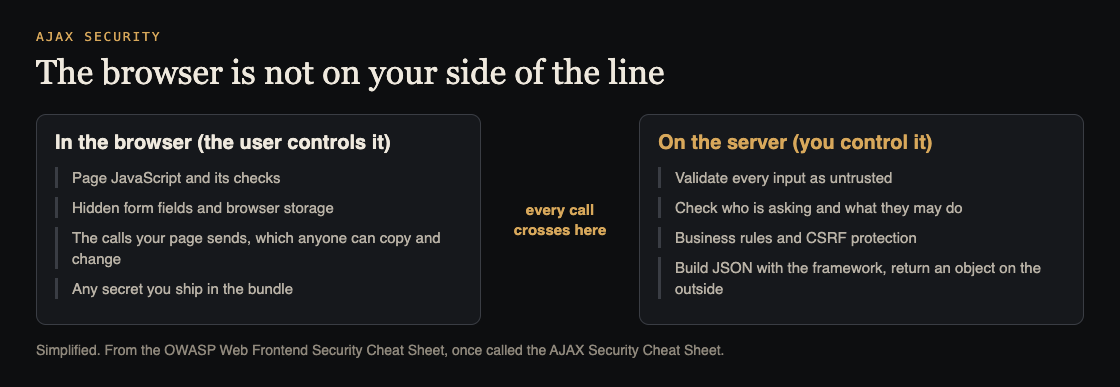
The line every call crosses. Simplified from the OWASP Web Frontend Security Cheat Sheet.
AJAX security starts with innerHTML
The most common AJAX mistake is in the page, not the request. Your endpoint returns some text, and your code writes it into the page with innerHTML. That property makes the browser read the text as HTML. If the text came from a user, it can carry a script.
OWASP gives this as its vulnerable example: setting a page element's innerHTML to data from the server, where the server may have returned an image tag with an onerror handler that runs code. The sheet lists what that can lead to: stolen session cookies, a defaced site, users redirected to bad sites, actions taken on the user's behalf and logged keystrokes.
The sheet's rule is plain: never use innerHTML with untrusted data. It allows two narrow cases:
- Static, hardcoded HTML that is part of your source code and holds no user input, such as a fixed footer line.
- Sanitized HTML, for example the output of a rich text editor, cleaned with a library such as DOMPurify before it goes in.
If you are looking for where this class of bug lives in your own app, the post on XSS testing shows how to find the places where input runs as code.
Use textContent for text
Most of what an API returns for display is plain text: a comment, a name, a title. For that, the sheet points to textContent. It sets the plain text of an element and treats any tags inside as literal characters instead of parsing them, so an image tag shows up as visible text and does nothing.
There is also innerText, which follows the page's styling, for example it skips text in a hidden element. The sheet says to use textContent unless you need that rendered-text behaviour. It also adds a warning that is easy to miss: both are safe for text, but neither protects you when data lands in an HTML attribute, an event handler or a URL. Those need their own care.
If you use React, Vue, Angular or Svelte, the sheet says they update text content for you, so you do not need to call these by hand. The risk comes back when you reach for a raw-HTML feature such as React's dangerouslySetInnerHTML, which needs HTML you trust and have sanitized.
Do not evaluate strings as code
The sheet is blunt about eval(): never use it. It also names new Function() and other tools that run a string as code. Needing eval() usually points to a problem in the design, and it opens the door to remote code execution and XSS. If a server reply is a string that your page then runs, anyone who can change that reply can run code in your user's session.
The same family of advice covers output. When you build HTML, script, CSS, XML or JSON out of data, encode the data for the place it is going, so its meaning stays literal. A name with a quote mark in it should still be a name.
Never rely on the client for security
The user controls everything that runs in their browser. OWASP notes that browser plugins can set breakpoints, skip code and change values. So a check in your page JavaScript is a courtesy to the user, not a defence.
The sheet applies this to two things:
- Security logic. Do not make security decisions in the client. As a fail-safe, if a decision is unclear, make it on the server.
- Business rules. Make sure any important rule is repeated on the server so a user cannot skip it, which could cause unexpected or costly behaviour.
Related to this, never send secrets to the client. Anything sent there can be read or changed by the user. Use TLS for the connection, and remember that browser-side encryption does not protect plaintext or keys from malicious code running in your page. Our post on frontend secrets shows how to check a bundle before it ships.
On the server: your endpoints can be called directly
The sheet's server-side section starts from a fact that explains most AJAX bugs: even if you only expect your own page to call a service, a malicious user can call it directly. So the service must validate its inputs and treat them as under user control. A hidden menu item does not protect the endpoint behind it, and the same goes for a field the form never lets you edit.
Four more server-side points from the sheet:
- Use CSRF protection. The sheet sends you to its Cross-Site Request Forgery Prevention cheat sheet. Our post on CSRF protection covers how to test forms and APIs for forged requests.
- Return JSON with an object on the outside. The sheet marks a bare array at the top level as exploitable, because of JSON hijacking in older browsers. An object at the top is not exploitable, and neither is an object that holds an array inside it.
- Let the framework build your JSON and XML. Building payloads by hand, or writing your own serialization code, can introduce injection bugs, much like building HTML or SQL by hand.
- Validate against a schema. The sheet suggests a JSON or XML schema and a third-party library to check what a web service accepts. Our post on input validation goes through that check for an API.
A worked example: a comments widget
This is an imagined small app, not a real client. A page shows comments under an article. It loads them with a background call and posts new ones with another.
Here is a pass through the sheet's points:
- List the data. The comment text, the author name and the article ID all arrive from outside, so all three are untrusted.
- Fix the display. The page used
innerHTMLto show each comment. Switch it totextContent. A comment holding an image tag now shows as text. - Check where else data lands. The author's website becomes a link. That is a URL context, where
textContentdoes not help, so allow only the link types you expect. - Call the endpoint by hand. Send the post request without the page. Does the server accept an empty comment, a huge one, or a made-up article ID? It should refuse each one on its own.
- Move the rules. The page hid the Send button for comments over 500 characters. Add the same limit on the server.
- Check CSRF. Confirm the post request is protected as the CSRF cheat sheet describes.
- Check the reply shape. The comments list returns an object that holds an array, not a bare array.
This takes an afternoon. The result is a widget that holds up when someone ignores your page and talks to the server straight.
Frequently asked questions
What is AJAX security?
It is the set of habits that protect the background requests a page sends and the way the page shows the replies. The core idea from OWASP is that the user controls the browser, so all data is untrusted until it is checked.
Is textContent safer than innerHTML?
For plain text, yes. It treats tags as literal text instead of parsing them. OWASP adds that it does not protect data placed in attributes, event handlers or URLs.
Do I still need server-side checks if my page already validates input?
Yes. A malicious user can call your services directly, so the server has to validate inputs and treat them as under user control. Page checks only help honest users.
Why should JSON have an object on the outside?
OWASP says a bare array at the top level is exploitable through JSON hijacking in older browsers. Wrapping it in an object avoids that.
Get started
Start with the list of every place your page writes server data into the DOM, then move each one to textContent or a sanitizer. These steps catch common mistakes. They cannot show that an app has no weak spots. If you want a second pair of eyes on your pages and your API, book a call with whitehatstoic. The security testing service covers web app and API review, with a written report, fixes and a retest after fixes, scoped after a short call.

Comments
No comments yet.
Sign in or make an account to comment.