Ambient music for an architecture walkthrough video: a guide
Choosing ambient music for an architecture walkthrough video is mostly about restraint. The space is the subject. The music should set a pace for the camera, fill the silence of an empty render, and then stay out of the way. This guide covers how to pick a track by tempo, energy and mood, how to cut your walkthrough to the beat, and which license fits the video you are actually making. The worked example all the way through is one real track from the Wavecrate catalog, Slow Tide by Mara Quill.
Wavecrate licenses royalty-free music, including slow, calm ambient tracks that sit under a walkthrough, and every download comes with a license certificate and a code anyone can check on its verify page.

Why ambient music suits a walkthrough
A walkthrough is slow by design. The camera glides down a corridor, turns into a room and pauses on a window. Music with a busy melody pulls attention away from the space. Ambient tracks built on soft pads do the opposite. They give a sense of time passing without asking to be noticed.
There is a practical reason too. A rendered interior has no natural sound. Without music, a slow camera move can feel like dead air. A calm bed of sound gives the viewer something to settle into while their eyes do the work.
The main risk is choosing something too eventful. A track that builds to a big drop, or a vocal line that competes with a narrator, fights the pictures. For most walkthroughs you want three things: a slow tempo, a calm energy level, and no vocals.
How to pick ambient music for an architecture walkthrough video
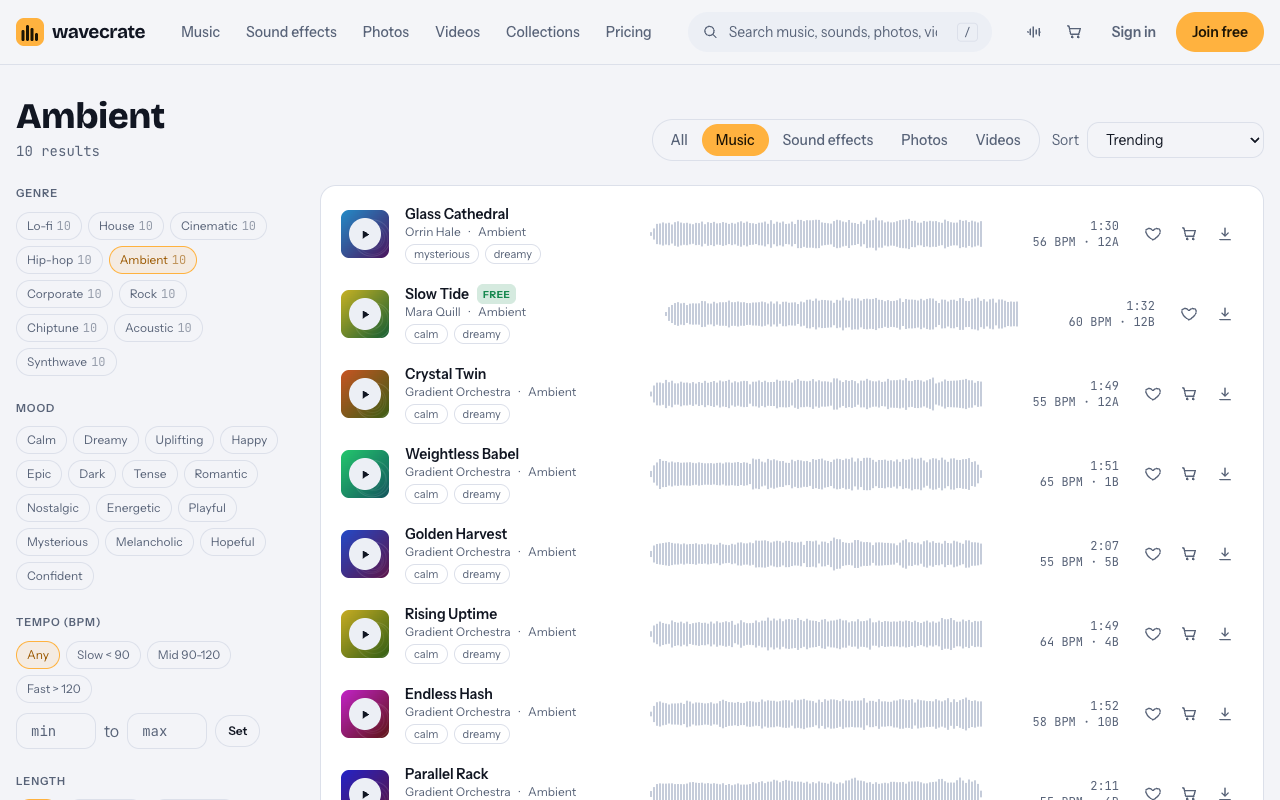
Start with the Wavecrate Ambient music page. When we read it on 11 October 2026 it listed 10 tracks, all between 51 and 65 BPM (beats per minute, the speed of the pulse). That range is slow enough for a gliding camera.
A few of those tracks show the spread you can choose from:
- Parallel Altitude at 51 BPM, the slowest on the page, for long held shots.
- Crystal Twin and Golden Harvest at 55 BPM. Golden Harvest runs 2:07, which helps with a longer tour.
- Glass Cathedral by Orrin Hale at 56 BPM and 1:30, tagged mysterious and dreamy, for a moodier evening render.
- Slow Tide by Mara Quill at 60 BPM and 1:32, tagged calm and dreamy.
- Rising Uptime at 64 BPM and Weightless Babel at 65 BPM, for a slightly quicker cut.
The page also has filters for mood, tempo, energy, key, vocals, length and access. For a walkthrough, set vocals to instrumental and energy to calm first, then narrow by length so the track roughly matches your cut. The access filter shows which tracks are marked Free, which is useful, but as the next sections explain, Free is not always the right license for an architecture video.
Worked example: Slow Tide by Mara Quill
The Slow Tide track page gives everything you need to plan an edit. On the day of writing it read:
- Genre Ambient, marked Free, by Mara Quill, released Sep 24 2026.
- Full track 1:32, a 30 second edit at 0:32, and a loop of 8 bars at 0:32.
- 60 BPM, E major, Calm energy, Instrumental.
The description says it has long evolving pads and a sparse bell melody that leaves plenty of room for voice. That last part matters if your walkthrough has a narrator explaining the plan, the materials or the light. A sparse melody leaves gaps for speech.
The Free marking was true when we read the page. Prices and access can change, so re-read the track page on the day you download, and keep a note of what it said.
Cutting your walkthrough to the beat
Slow Tide makes the beat math easy. At 60 BPM, one beat lasts exactly 1 second. A bar of four beats is 4 seconds, and 8 bars is 32 seconds. That matches the 0:32 loop on the track page.
Here is a simple way to use that in your editor:
- Place the music on the timeline first, starting at zero.
- Plan each camera move to last a whole number of bars, such as 8 seconds (2 bars) for a corridor and 16 seconds (4 bars) for a main room.
- Put your cuts on bar lines, at 4, 8, 12 and 16 seconds and so on, so each change of view lands with the music.
- If the tour is longer than the 1:32 full track, repeat the 8 bar loop under the middle section, joining it on a bar line so the seam is hard to hear.
- For a short social cut, use the 30 second edit instead of trimming the full track yourself.
Keep the music low under any narration. Fade it up slightly in the gaps between sentences and on the final hero shot, then let it ring out rather than stopping dead.
Which license fits your walkthrough
This is where most people get caught out. The same track can need a different license depending on who the video is for and where it runs. Slow Tide shows three music licenses on its page, and the Wavecrate pricing page sets out the same rules in a table. Paid licenses are not on sale yet (Wavecrate says purchases open soon), so the prices below are the listed prices for when sales open, while tracks marked Free, like Slow Tide, can already be downloaded with a free account.
Use 1: a personal channel video. Say you run a personal channel about design and you make a walkthrough of a concept you modelled for fun. The Free license covers online videos and podcasts with credit, on YouTube, TikTok, Instagram, Twitch and podcasts, including monetized channels. Credit text is required in the description, and you get 3 free downloads a month.
Use 2: your studio's walkthrough of its own project. Even though Slow Tide is marked Free, a studio showing off its own work is making business and brand content. On the pricing table, your own business and brand content needs Standard or higher. Standard is listed at $15 per track and covers online content for one creator or business with no credit, including your own business and brand videos. Registered channels are printed on the certificate. If you make videos often, Pro is listed at $99 a year or $12 month to month ($8.25 a month billed yearly), is not on sale yet, and includes Standard on everything. Content you publish while subscribed stays covered.
Use 3: a walkthrough for someone else, or one you pay to promote. If you make the video for a client, such as a developer or the building's owner, that is client work. If you run it as a paid ad, or it is shown on TV, those are paid advertising and broadcast. All of these need Extended, listed at $49 per track. Pro never includes Extended, so these uses need Extended even with Pro.
Whichever license you pick, keep the certificate. Certificates and codes can be checked at the Wavecrate verify page, which is handy if a client or platform asks where the music came from.
Frequently asked questions
Can I use a track marked Free in my studio's portfolio walkthrough?
Not under the Free license. A studio's walkthrough of its own project is its own business and brand content, which needs Standard (listed at $15) or Pro, once paid licenses are on sale. Free is for personal channel videos with credit.
What tempo works best for an architecture walkthrough?
The Ambient tracks on Wavecrate sit between 51 and 65 BPM. Around 60 BPM is easy to edit to, because one beat equals one second and 8 bars equals 32 seconds.
Which license do I need if a developer pays me to make the walkthrough?
That is client work, so it needs Extended, listed at $49 per track. The same applies if the video runs as a paid ad or on TV.
How do I make a short track fit a longer tour?
Use the loop version. On Slow Tide the 8 bar loop runs 0:32, so you can repeat it on bar lines under the middle of the tour and use the full track for the opening and ending.
Get started
Browse Wavecrate: you can join free and download items marked Free now, paid licenses are not on sale yet (purchases open soon), and every download comes with a license certificate and a code anyone can check on its verify page.
Open the Ambient page, filter for calm instrumental tracks, and try Slow Tide or Glass Cathedral against your rough cut. Then note the license that matches who the video is for. Create a free Wavecrate account to download tracks and keep your certificates in one place.


Comments
No comments yet.
Sign in or make an account to comment.