Ambient pads for a yoga class recording: a simple setup guide
If you record a yoga class for YouTube or an online course, a soft bed of sound helps the whole video feel calm and finished. The trick is choosing ambient pads for a yoga class recording that sit behind your voice, last the whole session, and come with a license you can show if someone asks. This guide walks you through a simple setup, from picking tracks to licensing them, with a worked example you can copy.
Why ambient pads work for a yoga class recording
A pad is a long, held sound with no sharp attack. It has no drums to pull students into a rhythm and no melody that competes with your instructions. That matters when people are breathing on a count you set, not a count the music sets. Wavecrate lets you filter music by mood, tempo and energy.

Choosing pads that match each part of the class: arrival, flow, and savasana
Most classes have three emotional zones. Give each one its own sound instead of running a single track for the whole hour.
- Arrival (5 to 10 minutes): settling, centering, first breaths. Pick something calm and a little warm. A gentle room sound can work here too. Wavecrate's ambience sounds include Rain on Window, a short free clip tagged calm and rain, which you can loop softly under the opening breath work.
- Flow (30 to 60 minutes): standing poses, sun salutations, transitions. You want a bit more movement, but still no strong beat. Look for a relaxed or steady energy.
- Savasana and close (5 to 15 minutes): stillness. Go back to the softest, slowest material you have, or let the pad fade almost to nothing.
On Wavecrate you can sort music by mood, and the mood list includes calm, dreamy and hopeful. There is also an Energy filter with levels such as Calm, Relaxed and Steady. A practical approach: filter by mood calm, set energy to Calm or Relaxed, and listen through the results.
The Ambient genre, read on 11 October 2026, held ten tracks between 51 and 65 BPM. Slow Tide, marked Free, is "long evolving pads and a sparse bell melody that leaves plenty of room for voice," described as "good for meditation and documentary," at 60 BPM with Calm energy. The Study and focus collection also holds it, but some of its other tracks are lo-fi with drums, so for savasana stick with the ambient ones.
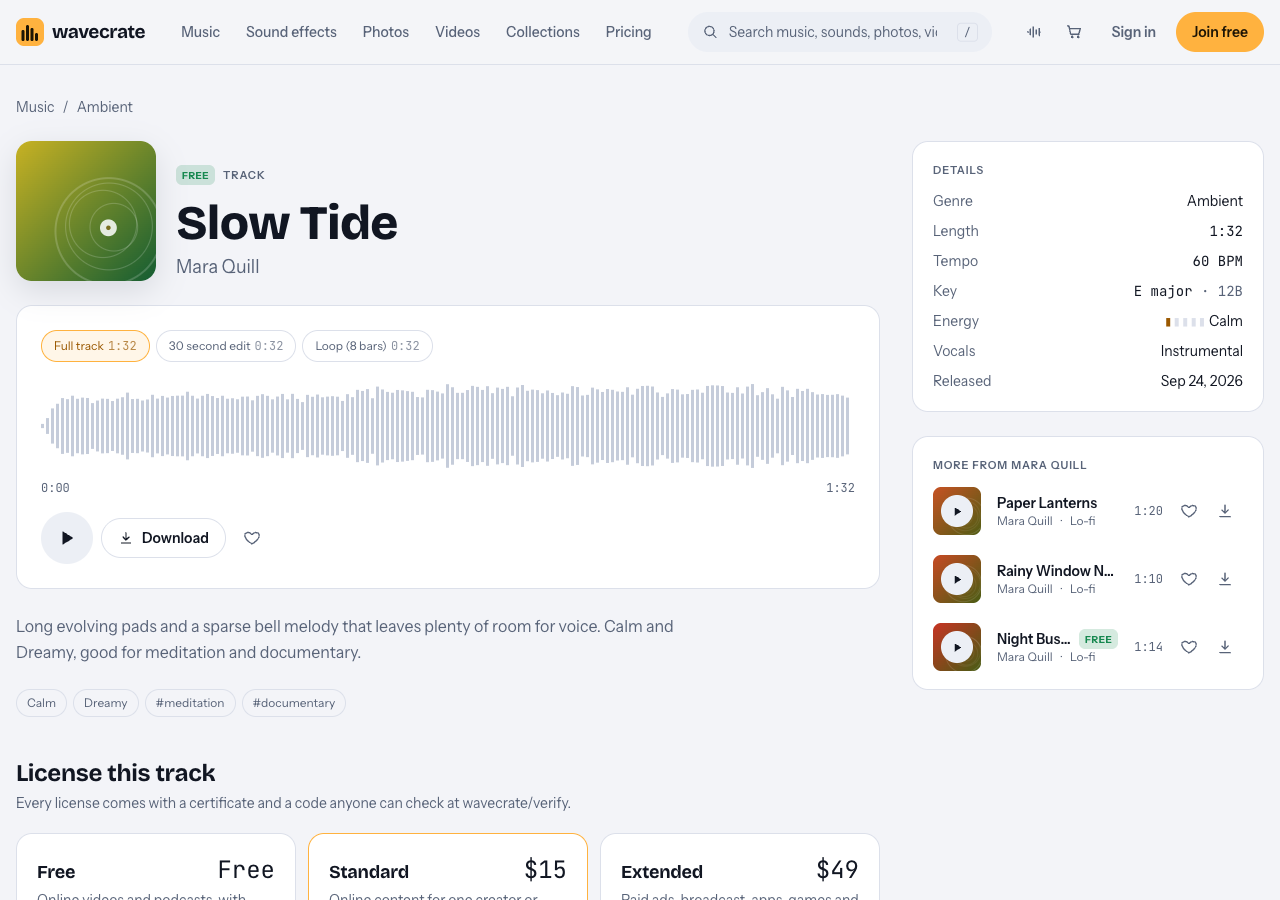
Slow Tide, read on 11 October 2026.
Use the keyboard while you audition. Space plays or pauses, Left and Right skip 5 seconds, and Shift with Left or Right jumps to the previous or next item. You can hear ten candidates in a couple of minutes without touching the mouse.
Picking a key and tempo that will not fight your cues
Your voice has a natural pitch, and you probably use a few spoken patterns over and over: "inhale, reach up," "exhale, fold." If the pad is in a key that clashes with how you speak or with a singing bowl or chime you play live, students feel a small tension they cannot name.
Every Wavecrate track page lists its key, shown both as a note name and a code such as G major · 9B, plus tempo in BPM. Two simple rules:
- Keep every pad in the class in the same key, or a closely related one. Codes that share a number (8A and 8B) or sit one number apart tend to blend. That way your crossfades never jar.
- Go slow. The music tempo filter has Slow (under 90 BPM), Mid (90 to 120) and Fast (over 120), plus a custom range. For yoga, stay in Slow. A 60 BPM pad lines up neatly with breath counts, since one beat is one second.
Mixing pads under your voice so every instruction stays clear
The most common mistake is music that is too loud. In a yoga video, your cues are the product. Here is a simple mix that works in almost any editor.
- Set your voice first. Get it clear and steady before you add anything else.
- Bring the pad in low, then lower it again. When you think it is quiet enough, drop it a little more. Listen on phone speakers and cheap earbuds, since that is where many students will hear you.
- Cut the low end of the pad with a high pass filter so it does not muddy your chest voice.
- Use ducking. Most editors can lower the music automatically when you speak. Keep the duck gentle so the pad breathes, rather than pumping up and down.
- Raise the pad slightly in long holds and savasana, when you are silent, and pull it back as you start speaking again.
A worked example: for a 60 minute vinyasa class, place your voice track, add the arrival pad under the first 8 minutes, the flow pad from minute 8 to minute 50, and the savasana pad from minute 50 to the end. Turn on ducking for the flow section only, because that is where you talk the most.
Looping and crossfading pads to cover a 60 to 90 minute session
Most tracks are a minute or two long. A class runs an hour or more. Looping is how you close the gap.
Wavecrate music tracks come in versions. Track pages list a full track, a 30 second edit, and a loop of 8 bars. The loop is built to repeat, which makes it the easiest building block for a long session. Do the math before you start: 8 bars of 4 beats at 80 BPM is 32 beats, or 24 seconds. A 60 minute flow section therefore needs about 150 repetitions. That sounds like a lot, but most editors let you duplicate a clip in one action.
Two habits keep long loops from sounding mechanical:
- Alternate the full track and the loop. Play the full track once, then the loop for several minutes, then the full track again. The small changes break up the repetition.
- Crossfade between sections over 8 to 15 seconds. Overlap the end of the flow pad with the start of the savasana pad and fade one out as the other fades in. Because you kept them in related keys, the blend sounds smooth.
Some ambience sounds are built for this too. The Lab Room Tone clips are described as looping seamlessly, though their tech flavor suits a studio feel more than a candlelit room. Rain on Window is the gentler choice for a yoga mat.
Licensing ambient pads for a yoga class recording
You never own a stock track. Wavecrate's own words: "You get a license to use it. We keep the copyright." What you get is permission, and each download comes with a license certificate and a code.
Here is how the license levels line up for music and sound effects, based on the pricing page:
- Free license: only on items marked Free. It covers YouTube, TikTok, Instagram, Twitch, podcasts and monetized channels, but you must put credit text in your description. A free account gets 3 free downloads a month.
- Standard license: no credit line needed, and it adds your own business and brand content. Item pages for music tracks list Standard at $15. Listed sound effect prices vary by item; Rain on Window listed Standard at $3.
- Extended license: adds paid advertising, TV, radio and cinema, apps, games and software, and client work. Music track pages list it at $49. Once purchases open, upgrading from Standard costs only the difference.
Paid licenses are not on sale yet: Wavecrate says purchases open soon, so these are the listed prices for when sales open. Items marked Free can already be downloaded with a free account.
Pro is listed at $99 a year or $12 month to month, is not on sale yet either, and gives Standard licenses on the whole catalog. Pro never includes Extended. Videos you publish while subscribed stay covered after Pro ends.
The trap is a track marked Free in a business video. Take Slow Tide through three uses: a class on your own YouTube channel is covered by the Free license with credit text in the description; a class on your own studio's channel, or in a course you sell under your studio's name, is "your own business and brand content", which the Free license does not tick, so it needs Standard (listed at $15 on its page); and classes a studio pays you to film are client work, which needs Extended (listed at $49 on its page). The table does not name course platforms or playing music out loud in a live class, so treat anything it does not name as not covered.
If a claim does show up, the site's advice is to send the platform your license code or certificate link. The verify page shows the licensee, the item, the license type and your registered channels, so a reviewer can check it without contacting Wavecrate.
Frequently asked questions
What tempo should ambient pads be for yoga?
Slow is best. Stay under 90 BPM using the Slow tempo filter; a pad around 60 BPM lines up with breath counts because one beat equals one second.
Can I use free tracks in a monetized yoga video?
Yes, if the item is marked Free. The Free license covers monetized channels, but you must add credit text in your description.
Do I need Extended to film classes for a studio?
Filming for a studio that hires you counts as client work, and on Wavecrate client work is listed under Extended only. Pro does not cover it.
Get started
Start with the Study and focus collection, filter music by mood calm and the Slow tempo, and check the free downloads for items you can try with a credit line. Then read what each license covers on the pricing page.
Browse Wavecrate: you can join free and download items marked Free now, paid licenses are not on sale yet (purchases open soon), and every download comes with a license certificate and a code anyone can check on its verify page.


Comments
No comments yet.
Sign in or make an account to comment.