Attack surface analysis: map what attackers can reach
Attack surface analysis is the work of mapping every place an attacker could get into your app or get data out of it, so you know what to test and protect. The OWASP Attack Surface Analysis Cheat Sheet describes a simple, practical way to do it, aimed at developers as much as security specialists. It focuses on attacks from outside, not on attacks against your users or staff. This guide walks through the method and ends with a first map of one web app.
Attack surface analysis: what it is for
OWASP says the point is to understand the risky areas of an application, make the team aware of what is open to attack, find ways to shrink it, and notice when it changes. In practice, a good map helps you answer three questions:
- Which functions and parts of the system need security review and testing?
- Which high-risk areas need defense in depth, more than one layer of protection?
- When has a change altered the attack surface enough to need a fresh risk assessment?
Security architects and penetration testers usually do this analysis, but the cheat sheet says developers should understand and watch the attack surface as they design, build and change a system.
What counts as your attack surface
OWASP defines it in four parts:
- every path for data and commands into and out of the app;
- the code that protects those paths: connections, authentication, authorization, logging, validation and encoding;
- all the valuable data the app uses: secrets and keys, intellectual property, critical business data and personal data;
- the code that protects that data: encryption, checksums, access auditing and integrity controls.
Over that, lay the types of users who can reach the system, authorized or not. The cheat sheet says to focus on the two extremes: anonymous users who have not signed in, and highly privileged admins.
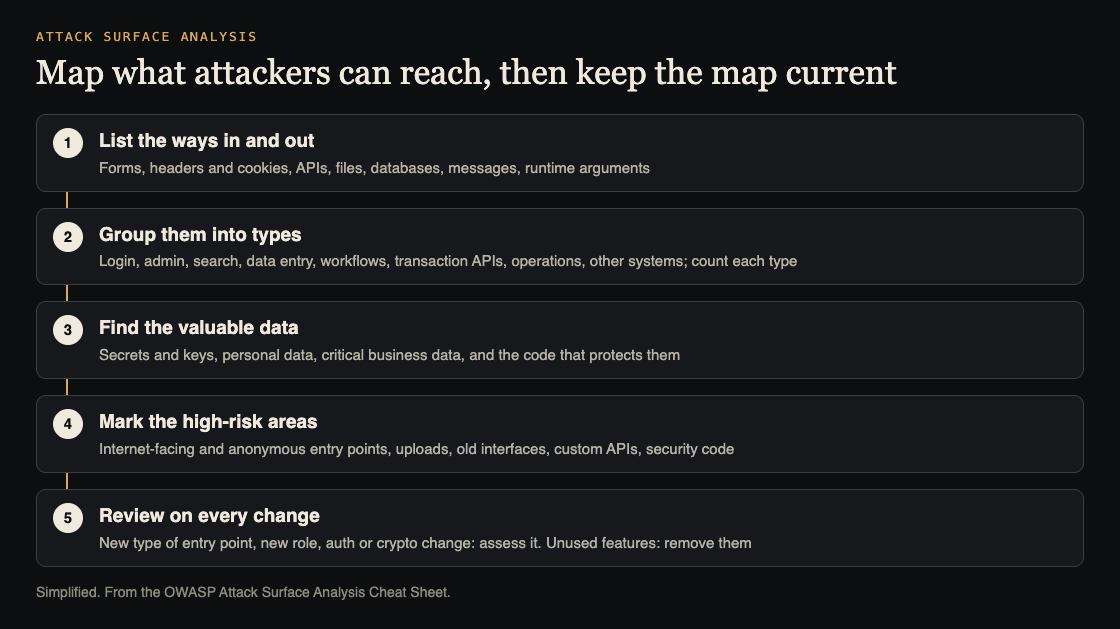
Five steps to a working map. Simplified from the OWASP Attack Surface Analysis Cheat Sheet.
Map the ways in and out
Start with a picture and notes. OWASP suggests spending a few hours reading design documents from an attacker's point of view, then reading the code for points of entry and exit:
- forms and fields in the interface;
- HTTP headers and cookies;
- APIs;
- files, databases and other local storage;
- email and other messages;
- runtime arguments.
The count can reach thousands, so group them by function, design and technology: login, admin interfaces, search, data entry forms, business workflows, transaction APIs, operational interfaces and connections to other systems. Then count how many points fall in each group and pick a few from each to review. OWASP's point is that you do not need to understand every endpoint, only the types and how many of each. That also tells you what a full assessment will take.
Fill in the map two more ways. Scan the app with a crawler such as ZAP to see what is reachable over the web, and walk through the main use cases, from sign-up to placing and changing an order, following where data goes, where it is checked and where it is stored. Finally, list the valuable data, by reading the code and asking the people who build and use the system.
Mark the high-risk areas
With a map in hand, OWASP says to focus on remote entry points, especially those open to anonymous, public access. Its list of usual suspects:
- network-facing and above all internet-facing code;
- web forms and files from outside the network, such as file uploads;
- backward compatible interfaces with old protocols and old code;
- custom APIs, which are likely to have design and implementation mistakes;
- security code itself: cryptography, authentication, authorization and session management.
Then note what compensating controls protect those areas, such as network and application firewalls and intrusion detection. And watch for surface you forgot: OWASP says multiple deployed versions, features kept "just in case", old backup copies and unused code all add to it, and backups of code and data are an important but often ignored part.
For microservices and cloud apps, prioritize the components reachable from an attack source such as internet traffic. They may sit behind proxies, load balancers and ingress controllers, and may scale up without warning; the service-level checks are in microservices security.
Review the map on every change
The map earns its keep after it is drawn. For each change, OWASP asks: what has changed, what are you doing differently, and what holes could you have opened?
Not every change matters equally. The first web page opens the attack surface a lot; another page built the same way, with the same technology, adds little new risk and is easy to scope for testing. A new web API or a new file upload is a different kind of risk, and something that fits no existing group needs a fuller assessment. The cheat sheet singles out changes that always need review: session management, authentication and passwords, authorization and roles, new admin users or functions, encryption and secrets, how validation is done, and major architecture changes.
When you add a role, check its access across data and functions. A deny-by-default access model makes mistakes easy to see; an allow-by-default one needs much more care. Changes to the map should feed your threat model, and the threat model feeds the map.
Surfaces tend to grow, so look for ways to shrink yours: fewer user levels, not storing confidential data you do not need, and turning off features and interfaces no one uses.
Worked example: a first map for one web app
Say you run a web app with a sign-in page, a customer dashboard, a public API, file uploads and an admin panel. Here is a first map in an afternoon:
- Crawl it. Run a crawler such as ZAP against a test copy, signed out and then signed in, and save the list of pages and endpoints it finds.
- Add what a crawler misses. From the code, list webhooks, background job inputs, emails you parse, and the cookies and headers you read.
- Group and count. Put each point in a group: login, admin, search, data entry, uploads, public API, operations, other systems. Write the count beside each.
- List the valuable data. Secrets and keys, customer personal data, payment records, anything that would hurt to lose. Note which code protects each.
- Mark the hot spots. Circle anything reachable without signing in, the uploads, the public API, the admin panel and the sign-in and session code.
- Clean up. Find old API versions, unused features and old backups. Remove what you can, and protect the backups you keep.
Keep the map with the code, and update it in the same pull request as any change that adds a new group, a new role or touches security code.
Frequently asked questions
How is attack surface analysis different from threat modeling?
Attack surface analysis maps where an attacker could get in or out and what is worth taking. OWASP describes the two as linked: changes to the attack surface should trigger threat modeling, and threat modeling informs the map.
Do I need to list every endpoint?
No. The cheat sheet suggests grouping endpoints by type, counting each type and reviewing a few cases from each, which also shows when the risk has changed.
How do I make my attack surface smaller?
OWASP suggests simplifying, such as fewer user levels, not storing confidential data you do not need, turning off unused features and interfaces, and removing old versions and backups you do not protect.
Get started
Run the crawl and the grouping this week; the map is useful even when rough. If you want an outside team to test the high-risk areas you find, whitehatstoic's cybersecurity and AI safety testing covers web app and API review, with a written report, fixes and a retest after fixes. No test can promise to find every weakness; the work is scoped after a short call.

Building something that has to be safe? Book a meeting with whitehatstoic: tell us the product, the deadline and your biggest worry, and we reply with a plan and a price.
Comments
No comments yet.
Sign in or make an account to comment.