Authorization checks: decide who may do what, every request
Signing in proves who someone is. It does not say what they may do. The server has to answer that second question again on every request, and that is what authorization checks are for. This post follows the OWASP Authorization Cheat Sheet and turns it into steps a small team can run on its own app.
OWASP puts it plainly: an authenticated user is often not authorized to do everything the system can technically do. A regular user and an admin are both signed in, but they are not allowed the same things.
Most failures are not clever attacks. A check is missing on one endpoint, or it looks at the wrong thing, or the app trusts a value the browser sent. The cheat sheet notes that Broken Access Control was ranked the most concerning web security vulnerability in OWASP's 2021 Top 10. It also calls horizontal privilege escalation, where one signed-in user reads another user's data, an especially common weakness.
If you want a way to test for these flaws on your own app, read our broken access control testing guide. This post is the other half: how to build the checks so the tests find less.
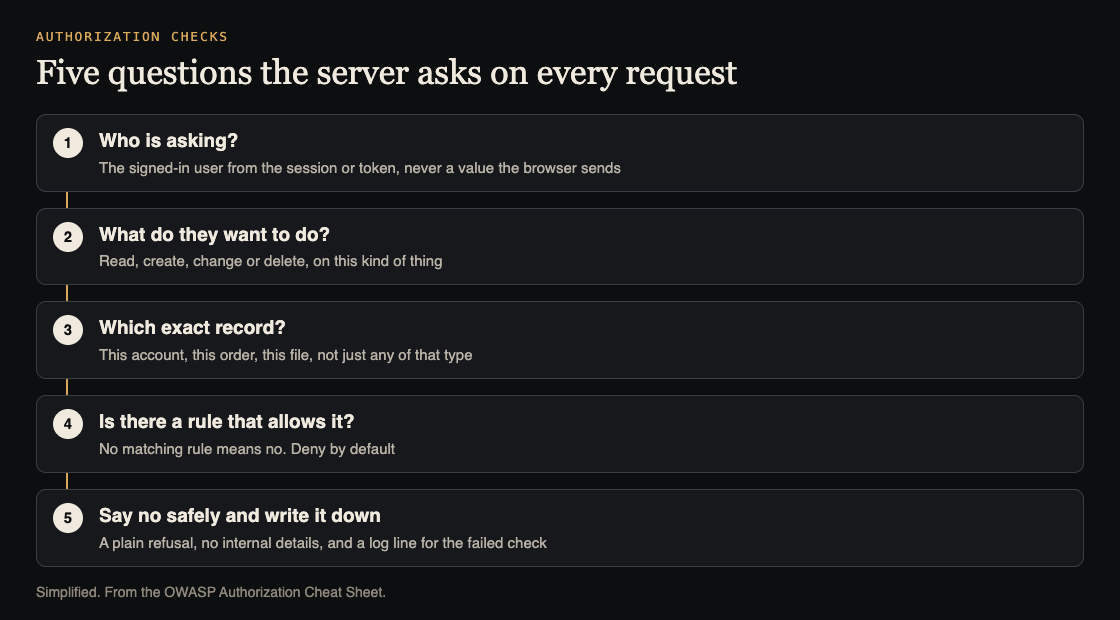
Five questions the server asks on every request. Simplified from the OWASP Authorization Cheat Sheet.
Start with least privileges, and deny by default
Least privileges means each user gets only the minimum access needed to do their job. OWASP says to apply it in two directions. Across, an accountant and a sales rep sit at the same level but need different data. Up and down, a head of sales needs more than the people on the team.
The design advice fits in an afternoon:
- List the types of user, the resources the app exposes and the actions possible on them, such as read, write and update.
- For every pairing of user type and resource, decide what the user may do, if anything.
- After launch, review permissions now and then for "privilege creep", where people hold more than the design gave them.
One practical reason to start tight: OWASP points out that it is easier to grant a permission later than to take one away from people who are used to having it.
Pair that with a second rule. An app can never stay neutral about a request. It always ends up allowing or denying. The safe design is to deny when no rule says yes. OWASP's reasoning is that logic errors happen, especially when the rules are complex, so you should not rely on explicit rules matching every possible request.
Two habits follow. For each new feature, you should be able to say why a permission was granted. And set the behavior in your own configuration instead of trusting a framework's defaults, which can change.
Run authorization checks on every request
This is the rule that matters most. OWASP says permissions must be validated on every request, whether it came from an AJAX script, from server-side code or from any other source. Checking most requests is not enough: an attacker only needs to find one way in, and a single missed check can expose a resource.
The way to make that realistic is to stop writing the check by hand in every handler. The sheet recommends technology that lets you configure checks globally, such as filters or middleware, instead of applying them method by method. Then a new endpoint starts out checked.
The same goes for the place of the check. Never rely on checks in the browser. They are fine for a nicer screen, such as hiding a button, but client-side logic is easy to bypass. OWASP says the decisive check must run on the server, at a gateway or in a serverless function.
Pick a model that fits: roles, attributes or relationships
There are three common ways to decide access:
- Roles (RBAC): permissions belong to roles, and users inherit them.
- Attributes (ABAC): the decision looks at attributes of the user, the object and the situation, such as job role, project name or time of day.
- Relationships (ReBAC): the decision looks at how the user relates to the thing, for example only the person who created a post may edit it.
OWASP says ABAC and ReBAC should typically be preferred over roles alone. Its reasons: roles do a poor job of "this user may edit only their own records", which is a horizontal access rule. Roles also multiply, and they fit poorly when several customers share the same resources. The sheet admits roles are often simpler to set up at first, and says that benefit fades as the system grows.
Do not trust IDs in the URL
Many apps put an internal ID in the address, like /accountTransactions?acct_id=901. The cheat sheet asks what happens when a user changes 901 to 523. Does the app refuse because of a failed access check, or only because that account was not found? If nothing checks ownership, the user sees someone else's data. OWASP files this under CWE-639, a form of insecure direct object reference.
Hiding or randomizing IDs is generally not sufficient by itself, says OWASP. The fix is control over the object:
- Avoid exposing the identifier when you can find the object from the signed-in user, for example through the server-side session.
- Check access on every request for the specific object, since access to one object of a type does not mean access to every object of that type.
Our IDOR prevention post goes deeper on this one, and the multi-tenant security post covers the case where many customers share one app.
Cover files, and fail safely
Static files are easy to forget. Uploaded invoices and exports sit outside the database. OWASP says static resources belong in the access control policy. Some can be public. Others need a strict set of conditions. If you keep them in cloud storage, use the storage provider's own access settings, and where you can, protect files with the same logic that protects the rest of the app.
Then plan for the check to say no. Failed checks are a normal event in a protected app. OWASP's advice:
- Handle every failure and exception, however unlikely it seems.
- Centralize the handling of failed checks.
- Make sure a failure cannot leave the software in an unstable state that leads to a bypass.
- Keep system logs and debugging output out of error messages.
Often a plain message or an HTTP status code is all that is needed. See our error handling post for what an error page should leave out.
Log failed checks, then test them
Logging is how you notice that someone is trying doors. OWASP asks for consistent formats that can be parsed, a thought-out amount of detail, clocks and time zones that agree across systems, and, if you can, one central place for logs. It warns that too little and too much logging are both weaknesses.
Then write tests. The sheet asks for unit and integration tests that check whether access is denied by default, whether the app ends safely when a check fails, and whether your policies are enforced. It is honest about the limit: these tests catch the easy flaws, and do not replace a dedicated security test.
Worked example: a small invoicing app
Imagine a small invoicing app (an imagined case, not a client). It has three kinds of user: an owner, a bookkeeper and a client who can view their own invoices.
- Write the table. Rows are user types, columns are actions on invoices. The owner can read, create, change and delete. The bookkeeper can read, create and change. The client can only read, and only their own. Anything not listed is a no.
- Put the check in one place. Add middleware that runs before every invoice route. It reads the user from the session, never from a field in the request, and looks the action up in the table.
- Add the ownership rule. For a client, the middleware also checks that the invoice belongs to them. Changing
/invoices/523to/invoices/524now gets a refusal, not someone else's invoice. - Protect the PDFs. The stored PDF is served through the same check, not from an open storage address.
- Refuse safely. A failed check returns a plain "not allowed" and writes a log line with the user, the action and the invoice ID, with no stack trace in the response.
- Test it. One test per cell of the table, plus a test that a client cannot read another client's invoice and a test that a new route with no rule is refused.
Frequently asked questions
What is the difference between authentication and authorization?
Authentication checks who you are. Authorization checks what you may do. OWASP stresses that an authenticated user is often not allowed to access everything the system can technically do.
Is hiding a button enough?
No. OWASP says client-side checks are fine for user experience but easy to bypass, so the decisive check must run on the server, at a gateway or in a serverless function.
Should we use roles, attributes or relationships?
OWASP says attributes and relationships should typically be preferred, because roles struggle with rules like "only your own records". Roles can still be one attribute among others.
Can tests replace a security test?
No. Unit and integration tests catch low-hanging flaws quickly, but OWASP says they do not substitute for a dedicated security test or a penetration test.
Get started
Start with the table of user types, resources and actions, then move the checks into one place. If you want a second pair of eyes on your sign-in and permission rules, book a call with whitehatstoic. The security testing service covers web app and API review, with a written report, fixes and a retest after fixes, scoped after a short call. We cannot promise a test finds every weakness, but we can show you where to look first.

Comments
No comments yet.
Sign in or make an account to comment.