Band rehearsal problems: a shared list for the band
Every band has a handful of band rehearsal problems that show up week after week. The bridge falls apart. The bass amp hums. Nobody remembers whether you agreed to drop the second verse. This post shows you how to keep band rehearsal problems on a shared list for the band, so you can fix each one once and stop arguing about it from memory. The worked example uses Problem Graph, a problem and solution journal that draws itself as a map.
Why the same band rehearsal problems keep coming back
Rehearsal is loud and short. You hit a problem, someone says "let's look at that later," and the next song starts. By the following week, five people remember five different versions of what went wrong and what you decided to try.
The problem is not effort. It is memory. A fix you tried and dropped looks new again a month later, so you try it again. A fix that worked gets forgotten when the person who suggested it misses a rehearsal. Writing it down breaks that loop. So does writing down what failed, not just what worked.
Common band rehearsal problems worth writing down
You do not need to log everything. Log what repeats or what costs you real rehearsal time. Good candidates:
- Tempo drift. A song speeds up in the chorus or drags in the outro.
- Messy transitions. Nobody is sure who cues the bridge or how many bars the break lasts.
- Arrangement confusion. Two versions of a song exist in people's heads.
- Volume and mix. Vocals get buried, or the drummer cannot hear the bass.
- Gear faults. A cable crackles, a pedal cuts out, a monitor buzzes.
- Setlist flow. Two songs in the same key back to back, or a tuning change that kills momentum.
- Scheduling. Late starts, missing members, not enough time on new material.
If a problem comes up twice, it goes on the list. That rule keeps the list short and useful.
What to record for each problem: song, section, symptom, owner
Vague entries like "Low Tide is bad" help nobody. A useful entry answers four questions in one line:
- Song: which track.
- Section: verse, chorus, bridge, outro, or the transition between them.
- Symptom: what you actually hear. "Rushes" or "drops a beat" beats "feels off."
- Owner: who is going to try the next fix.
So instead of "Low Tide is bad," you write: Low Tide, chorus 2: tempo rushes, drummer owns it. In Problem Graph, one line is enough for a problem. It lands on the graph the moment you press Enter.
Then you attach what you try. Each solution starts as an idea. You mark the one you are trying, and after rehearsal you record the outcome as worked, partly, or failed. For the Low Tide example, that might look like this:
- Count in with a click at 92 bpm: partly. Better start, still rushed by chorus 2.
- Bass player watches the hi-hat in the chorus: failed. Too much to watch while singing backing vocals.
- Drummer plays to a click in one ear for the whole song: worked.
Keep the failed one on the list. As the Problem Graph home page puts it, a solution that failed stays on the map as a failed solution, "and that is exactly what the next person needs to know." When a new member joins and suggests watching the hi-hat, you already know how that went.
Problem Graph also has requirement nodes. Use them for what a fix needs, such as "click track routed to drummer's in-ear" or "second monitor." That way, when a fix only works with certain gear, the gear stays attached to it.
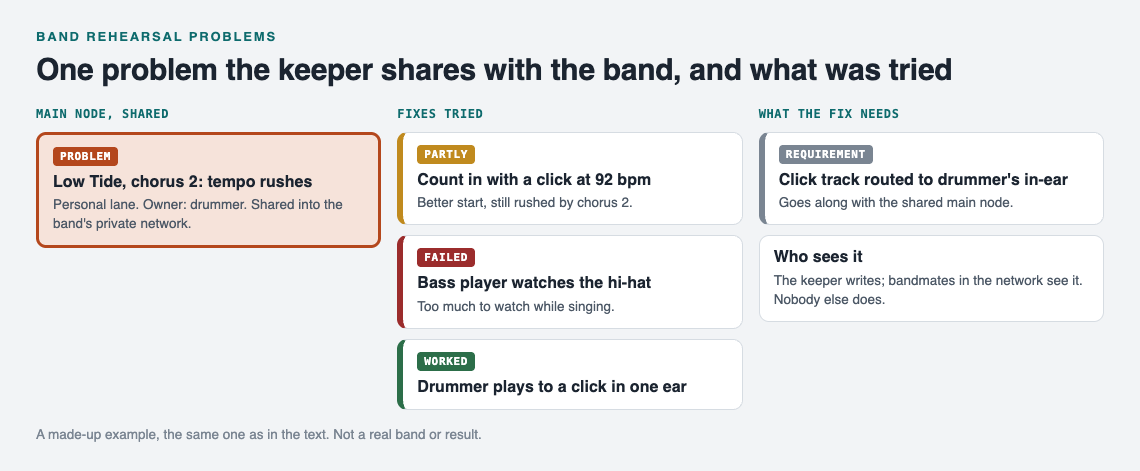
A made-up example: the keeper shares one main node with the band.
Setting up band rehearsal problems: a shared list for the band
Here is the setup, step by step. One person does it. Call them the list keeper.
- Create an account. Anyone can browse the public network without one, but adding problems needs a username and a password.
- Write your first problem. Pick a lane. Problem Graph has four: personal, work, expert and scientific. A hobby band fits personal. A working band that gets paid for gigs might fit work. Pick one and stay consistent.
- Mark it as a main node. Only a main node can be shared. When you share it, its solutions, their outcomes and the requirements they need go along with it.
- Create a private network. Name it after the band. You get an invite code.
- Send the invite code to your bandmates. Anyone with the code can join, so send it only to the band, not to a public group chat.
- Share each main node into the network. Members see it. Nobody else does.
One detail matters here. A problem you only link to a main node stays home, like the rest of your private graph. So if you want the band to see "PA hum on channel 3," make that its own main node and share it. Do not just hang it off another problem and assume it travels.
Be clear about what this setup gives you. Bandmates in the network can see the shared problems, the fixes tried and the outcomes. Problem Graph does not describe comments, chat or notifications, so plan on one keeper who updates the list and on talking through changes at rehearsal.
Your bandmates can switch between the map and the List view in the app, and filter by Mine, Network or All shared. On a phone in a rehearsal room, the List view can be quicker to read.
Running rehearsal with the list: before, during, and after
Before
Open the list ten minutes before you start. Filter to Network. Pick two or three open problems to work on today. Note which fix each owner is trying. This turns "let's run it a few times" into "let's test the click in one ear on Low Tide."
During
Do not type during a song. The keeper jots a word or two on paper or in a phone note: "LT ch2 ok," "Ember bridge lost again." That takes three seconds and nobody stops playing.
After
Within a day, the keeper turns those notes into outcomes. Mark each fix worked, partly or failed. Add new problems in one line each. Link problems that belong together. If the Ember bridge and the Low Tide chorus both fall apart when the drummer cannot hear the bass, link them. Patterns show up on a map that never show up in a list. You might find three "tempo" problems all trace back to one monitor mix.
You can also ask Problem Graph for suggestions. The AI proposes new solutions grounded in what worked for others on similar problems. Treat these as ideas to try at the next rehearsal, not as answers.
Turning fixes into habits: tempo, gear, setlists, and scheduling
A fix that worked once is not a habit yet. Once something has worked two or three rehearsals in a row, move it out of "problem" territory and into how you play.
- Tempo. When a click fix works, write the bpm into the solution itself. "Click at 92" is useful. "Use a click" is not.
- Gear. Log each gear fault as its own problem with the fix attached, like a car problems log. The second time a cable crackles, you know which cable it was last time and whether replacing it worked.
- Setlists. When you reorder songs to fix flow, record why. "Moved Ember after Low Tide: avoids retuning between songs." Next time someone wants to swap them, the reason is on the map.
- Scheduling. Late starts are a problem like any other. Try a fix, record the outcome. "Load-in 30 minutes earlier: worked" settles the argument better than anyone's memory.
The same rule applies to every fix. If it failed, leave it there and mark it failed. The graph remembers so you do not have to.
Frequently asked questions
Who in the band should own the problem list?
Pick one keeper, for example whoever already handles setlists or booking. They create the network, share the main nodes and record outcomes after each rehearsal. Each individual problem still gets its own owner, the person trying the next fix.
How do we log problems without stopping rehearsal?
Jot two or three words on paper or a phone note during the session, then enter them properly afterward. In Problem Graph, one line is enough for a problem, so the after-rehearsal update takes minutes.
Should gear and equipment issues go on the same list?
Yes, but give each one its own problem line. If they cause musical problems, like a monitor fault behind a tempo issue, link them so the connection shows on the map.
How is this different from a sports team or event problem list?
The setup is the same: a private network, an invite code, and shared main nodes. What changes is what you record. A coach's shared list tracks drills and positions, and an event planning list tracks one-off failures, while a band list keeps returning to the same songs and sections every week. A community garden list works the same way for a group sharing one space.
Get started
Start with the problem that cost you the most time at your last rehearsal. Write it as song, section, symptom, owner. Attach the first fix you will try. If you want to see how a graph looks before you commit, open the app and press "Load example set" on an empty graph. When it makes sense, mark your problem as a main node, create the band's network and send the code.
Try Problem Graph: it is free, and you can look around the public network without an account. Write one problem down in a line and attach the first thing you will try.
Comments
No comments yet.
Sign in or make an account to comment.