Best first moves in 2048: how to open a game
The best first moves in 2048 are the ones that keep your biggest tile in one corner and your free squares together. That is how you open a game right, and in 3D 2048 it matters even more, because the front face of the cube has only nine squares. This guide shows you a simple opening you can use from move one, which swipe to hold back, and when a twist does more for you than another slide.
Why your first 20 moves in 2048 matter
3D 2048 is the 2048 puzzle on a cube you turn like a Rubik's cube. Each of the six faces is 3 by 3, so there are 54 squares in all. You slide tiles on the front face, and every slide or twist adds a new 2 or 4. Those new tiles land on a random empty square of the front face while it has room.
That means the front face is the whole game at the start. Nine squares fill up fast. In test games played by a script with slides only, the front face got stuck somewhere between move 28 and move 46. One of those games had a 32 tile at move 23 and was frozen by move 46, with the other five faces still empty.
So your first 20 moves decide whether you reach move 40 with a tidy face or a jammed one. Small habits now save the game later.
Pick your corner before the first swipe
A new game starts with two tiles on the front face. Before you touch anything, pick one corner of that face as home for your biggest tile. This guide uses the bottom left. If you prefer another corner, mirror every direction below.
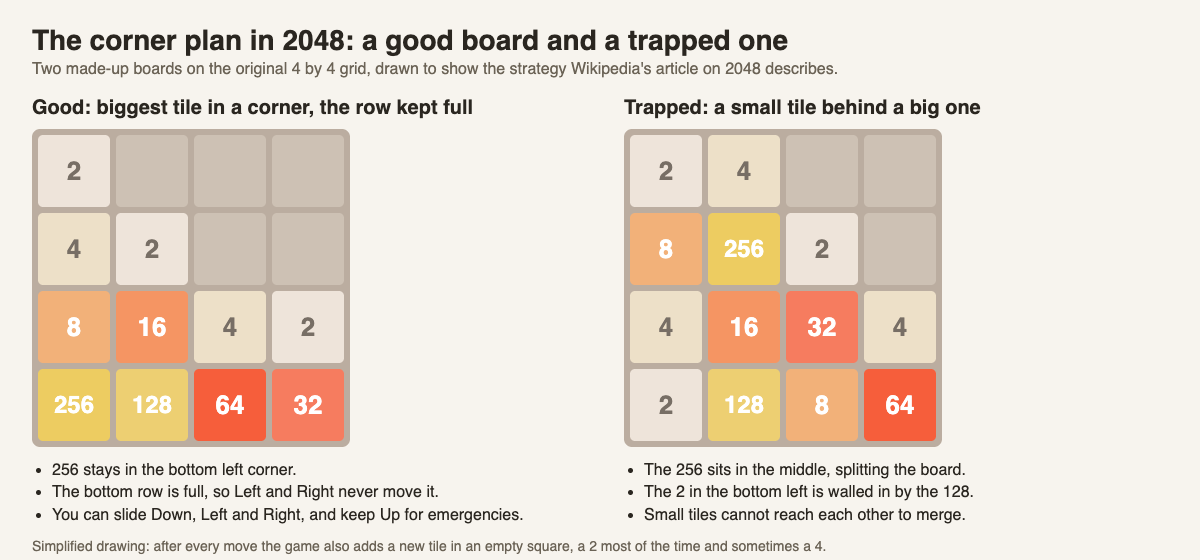
Why a corner? Wikipedia's 2048 article) describes the same plan for the flat game: keep the largest tile in one corner, with other large tiles filling its row. A tile in a corner can only be pushed out by two of the four swipes. A tile in the middle can be pushed by any of them. On a 3 by 3 face there is very little space, so a big tile drifting around blocks merges for everything else.
One more thing to check at the start: the new tiles. A new tile is a 2 nine times out of ten and a 4 the rest of the time. When the game's own random number code was run for 10,000 new games, 1,909 started with at least one 4. A 4 at the start is normal. Just slide it toward your corner like anything else.
Best first moves in 2048: the two-direction opening
Here is the opening, step by step. You can swipe the front face, or use the arrow keys or W A S D.
- Press Down. Tiles drop to the bottom row.
- Press Left. Tiles slide toward the bottom left corner.
- Repeat Down, Left, Down, Left for as long as both directions move something.
Two equal tiles merge into their sum when they meet. A tile made by a merge does not merge again in the same slide, so a row of 2, 2, 4 pushed left gives 4, 4, not 8. That is fine. The next Left makes the 8.
The aim of these two directions is simple. Your big tiles collect in the bottom row, heaviest on the left. Your new tiles appear in the empty squares above and to the right, where they can merge on their way down.
Here is a worked example. Say the face shows a 2 in the top right and a 2 in the middle. Down drops both into the bottom row. Left merges them into a 4 in the bottom left corner. Your score goes up by 4, and the move counter reads 2. Each move also added a new tile somewhere on the face. Down again pulls them to the bottom row next to your 4.
When to use the third direction and which swipe to avoid
Sooner or later neither Down nor Left will move anything. The game tells you so: "Nothing moves that way. Try another way, or twist a row."
Use Right as your third direction. It moves tiles along their rows and lifts nothing out of the bottom row, so your corner tile stays in that row even if it slides one square along. Follow it at once with Left to push it back.
Hold back Up. If you are anchored in the bottom left, Up is the swipe that lifts your corner tile out of the bottom row and leaves an empty square under it. A new tile can then land in that gap, and your biggest tile is stuck in the middle of the face.
In the script's luck test, the order Down, Left, Right, Up was tried against the order Up, Right, Down, Left on the same starting cube. The first order lasted to move 32, the second to move 28. Two more new games with the first order lasted to moves 37 and 42. That is one game each and luck plays a part, so treat it as a hint, not proof. It does match the idea that a steady order with Up last keeps you going longer.
Building the edge row: keeping your biggest tile anchored
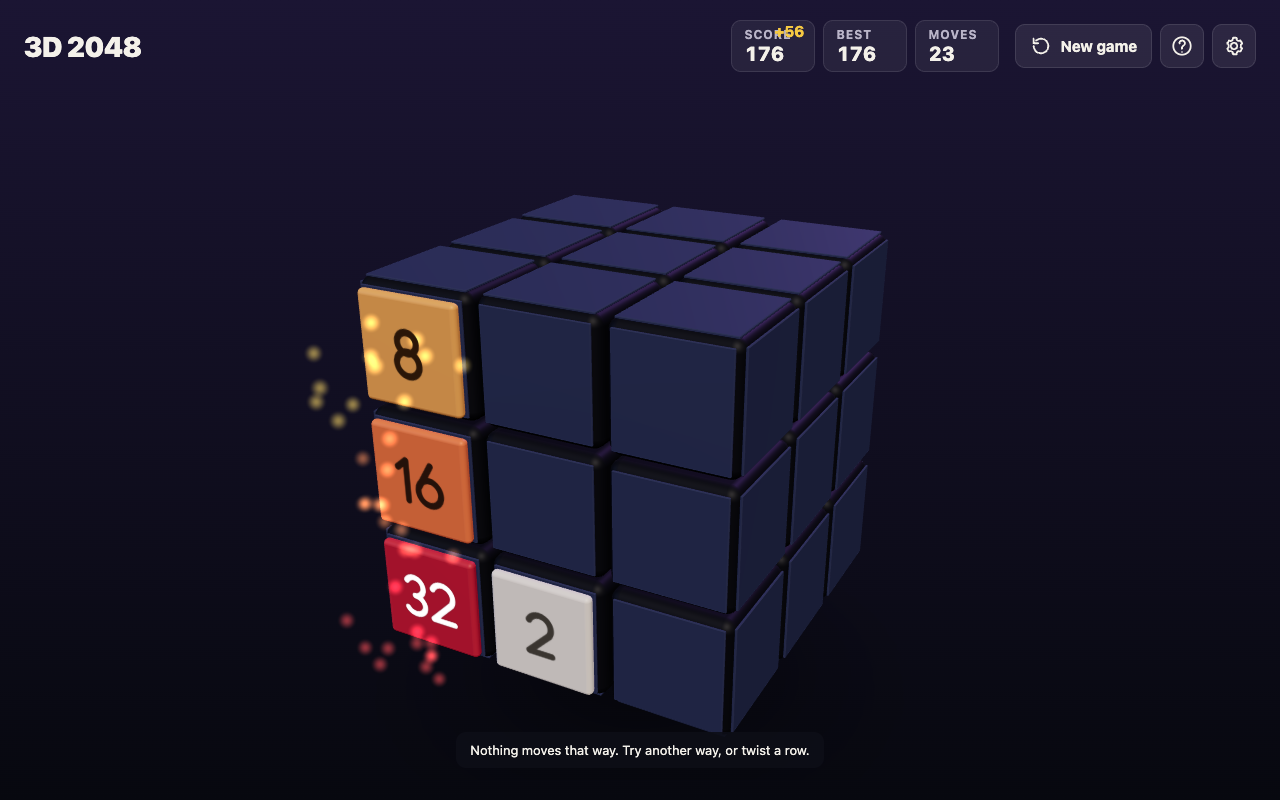
Your bottom row is the backbone. Try to keep it in order from left to right: biggest in the corner, then smaller, then smaller. For example 32, 16, 8. When a matching tile drops beside the 8, it merges, then the 16 can merge, and so on toward the corner.
Use twists instead of a bad swipe. This is where 3D 2048 differs from the flat puzzle. When the front face is stuck, you can twist. Drag a row on the right face sideways, or a column on the top face. That layer turns a quarter and carries its tiles to the next face. A twist counts one move and adds a new tile, and it needs one empty square somewhere on the cube for that tile. If the front face is full, the new tile goes to an empty square on another face. If the whole cube is full, the game says: "The cube is full. Merge two tiles on a face to make room before you twist."
Pick a twist whose layer does not hold your corner tile, so the corner stays put while the twist brings a new match or an empty square onto the front. Turning the whole cube first, which is free, lets you see what a twist would bring round; turn back before you slide.
In a scripted test game that twisted whenever the front was stuck, it reached 64 at move 36 with every tile still on the front, and 128 at move 118 in the bottom left corner of the front face. The slides-only game, by contrast, had a 32 tile at move 23 and was stuck for good at move 46, with the other five faces empty.
Edge merges help your corner. Edge merges are on unless you switch them off in Settings. A slide toward an edge of the front face also merges the tile at that edge with an equal tile just over the edge on the next face, and the new tile stays on the front. With a bottom left anchor, every Down and Left pushes toward edges next to your corner, so an equal tile just over those edges can feed straight into it. See 2048 edge merges for a worked example.
Common opening mistakes that end games early
- Swiping in all four directions at random. Each swipe adds a tile. Random swipes add tiles without building anything.
- Pressing Up to get out of a jam. It frees the face for one move and costs you your corner. Try Right, or a twist, first.
- Letting the whole cube fill up. A twist needs one empty square somewhere on the cube. A full front face is fine, since the new tile can land on another face, but once all 54 squares are full you must merge before you can twist again.
If you do get stuck, read what to do when no moves are left. The game ends only when all 54 squares are full and no two equal tiles sit side by side, on a face or across an edge. The game's own advice for next time is to keep room on one face so a twist can still bring tiles round to their match.
Frequently asked questions
What are the best first moves in 2048 on a cube?
Pick a corner of the front face, then alternate two swipes toward it, such as Down and Left. Use Right as a third direction and save Up for last, or twist a row instead.
Does turning the cube use up a move?
No. Turning the whole cube adds no points, counts no move and adds no new tile. Slides and twists each count one move.
Where do new tiles appear?
On a randomly picked empty square of the front face, or on any empty square once the front face is full. Each new tile is a 2 nine times in ten, otherwise a 4.
Can I stop after my opening and come back later?
Yes. Your game, best score and settings are saved on the device you play on. See how to save a 2048 game and finish it later.
Do I need an account to play?
No. You can play without an account. Signing in is optional.
Get started: practice your opening in 3D 2048
Open the game, pick your corner, and play your first ten moves with only Down and Left. Note your move count when you first need Right. Then try the same game again and twist the top row instead of pressing Up when you get stuck. Press H or ? any time to see How to play.
Play 3D 2048: it is free and plays in your browser on a computer or a phone.
Comments
No comments yet.
Sign in or make an account to comment.