Brainstorm solutions alone: get past the first idea
When you brainstorm solutions alone, the hardest step is the second idea. The first one shows up fast, feels obvious, and quietly blocks everything behind it. This guide shows you how to brainstorm solutions alone and get past the first idea with a simple routine: define the problem, set a quota, force new angles, map causes, then test one idea and park the rest. We will use one running example the whole way through so you can copy the steps.
Why the first idea blocks you when you brainstorm solutions alone
Your first idea is often one you have met before: the advice a friend gave you, or the fix you tried last year. It can feel right because it is familiar.
In a group, someone else may say a different idea out loud. Alone, nobody does, so you need a process that plays that role.
Here is the example we will use. Say you keep missing the 7:40 train to work. Your first idea is "set an earlier alarm." Maybe that is the answer. But you have probably tried it, and you are still running for the platform. That is a sign the first idea is not enough.
Define the problem before you brainstorm solutions
A vague problem makes a weak brainstorm. "Mornings are a mess" gives you nothing to aim at. Write the problem down in one line, and make it specific enough that you would know if it were solved.
- Vague: "I am always late."
- Better: "I miss the 7:40 train about three days a week."
The better version tells you what success looks like: catching the train. It also hints at a pattern (some days, not every day), which is worth digging into later.
In Problem Graph, this is the first move. You type the problem in one line, put it in a lane (personal, work, expert or scientific), and it lands on the graph the moment you press Enter. Our example could go in personal or work. Pick one; you can link across lanes later.
Set a quota: write ten ideas before judging any
A quota is a simple trick for solo brainstorming. Decide on a number before you start, and do not stop or evaluate until you hit it. Try ten. The first few may come easily. Ideas five through ten are where you start to stretch, and that stretch is the point.
For the train problem, a quota of ten might look like this:
- Set an earlier alarm.
- Pack your bag the night before.
- Lay out clothes the night before.
- Eat breakfast at work instead of at home.
- Put the phone in another room until you are dressed.
- Take the 7:55 train and ask to shift your start time.
- Cycle to the station instead of walking.
- Go to bed 30 minutes earlier.
- Keep keys and wallet in one bowl by the door.
- Work from home on the days you usually miss it.
Some of these are dull. Some are bad. That is fine. You are collecting, not choosing. If you judge each idea as you write it, you will stop at three.
In the app, each of these becomes a solution attached to the problem. You add them as ideas first. Nothing has to be marked as tried or tested yet, so the list can be as rough as you like.
Use constraints and reversals to force new angles
If you stall before ten, change the question instead of staring at the blank line. Two techniques do most of the work.
Constraints
Add a rule that rules out your usual answers. Each rule pushes you somewhere new.
- "What if I could not change when I wake up?" This kills the alarm idea and forces you to look at the 40 minutes between waking and leaving.
- "What if it had to cost nothing?" Bike purchase is out. Packing the night before is in.
- "What if I only had five minutes a day to fix it?" You get small habits, like the key bowl.
Reversals
Flip the problem. Ask how you would make it worse, then invert each answer.
- "How could I guarantee I miss the train?" Check messages in bed. Search for keys every morning. Decide what to wear while dressing.
- Invert: phone out of the bedroom, one fixed place for keys, clothes chosen the night before.
Reversals suit solo work: you know how your own mornings go wrong.
If you still feel stuck, Problem Graph has an option to ask for suggestions. The AI proposes new solutions grounded in what worked for others on problems like yours. Treat these as more raw material for your list, not as answers. They are proposals, and you still decide which ones are worth testing.
Map causes so each solution targets a real problem
Now look at your list and ask: what is actually causing this? A 5 whys example shows one way to dig. Your ten ideas probably point at different causes. Some aim at sleep. Some aim at the morning routine. Some dodge the problem entirely by changing the train.
Write the causes down as their own short problems:
- "I go to bed after midnight on weeknights."
- "I lose 10 minutes finding things in the morning."
- "I scroll my phone before getting up."
Then link them to the main problem. In Problem Graph, you can link problems that belong together, even across lanes. The late nights might sit in personal. The train might sit in work. Linked on the map, you can see that one cause feeds several problems. The home page puts it this way: patterns show up on the map that never show up in a list.
This step also helps you sort your ten ideas. "Earlier alarm" fails if the real cause is going to bed late. "Phone in another room" might fix both the scrolling and the late nights.
Some solutions also need something before they can work. Cycling needs a bike. Shifting your start time needs a yes from your manager. The app's map key includes a requirement node for exactly this, so you can note what a solution depends on before you commit to it.
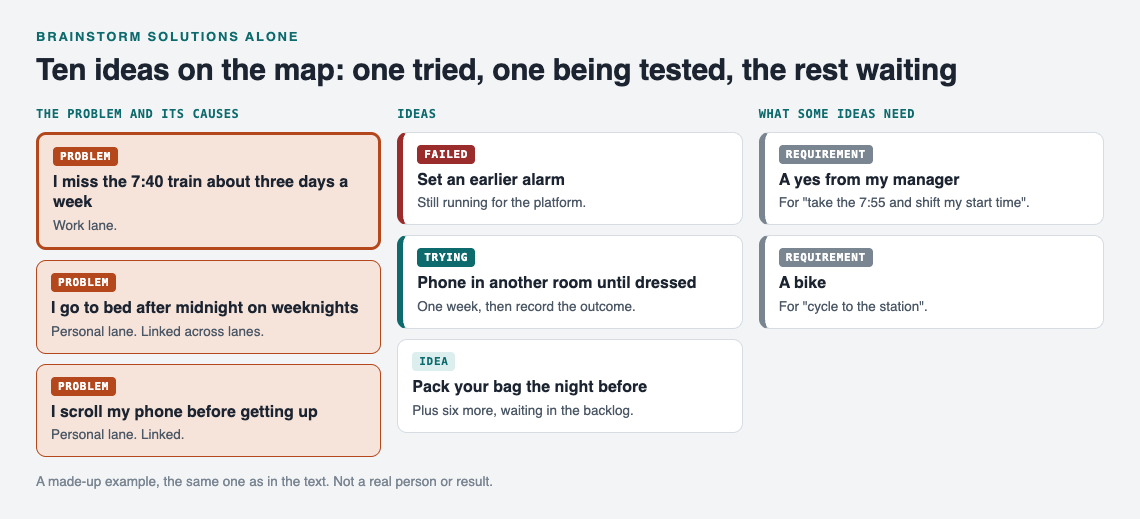
A made-up example: the ten ideas on the map, with the causes they aim at.
Pick, test, and park the rest in an idea backlog
Choose one idea to try first. Pick the one that targets your biggest cause and costs the least to test. For the train, "phone in another room" is a good start. It is free and aims at two causes at once.
Mark it as the one you are trying. Give it a week. Then record what happened: worked, partly, or failed. Be honest. If you caught the train four days out of five, that is "partly," not "worked." The post on trial and error covers testing one change at a time.
The other nine ideas do not get deleted. They stay attached to the problem as untested ideas. That is your backlog. If the first fix fails, you do not start over; you pick the next one. There is more on keeping a backlog of fixes you have not tested yet.
Failed solutions stay on the map too. Problem Graph's home page says it plainly: a solution that failed three times stays on the map as a failed solution, and that is exactly what the next person needs to know. That next person may be you, six months later, about to try the earlier alarm again.
Your graph is private by default. Only you see it, and it follows you to any phone or computer you log in on. If you later want others to see a problem, you can mark it as a main node and share it into a private network by invite code, or put it out in public. For solo brainstorming, private is all you need.
Frequently asked questions
How many ideas should I brainstorm alone?
Set a quota of about ten before you judge any of them. The first few may be familiar ideas; the stretch after them is the point.
Is solo brainstorming better than group brainstorming?
Neither is always better. Alone, you avoid going along with the loudest voice, but you lose the push that other people's ideas give you, so you need tools like quotas, constraints and reversals to replace it.
What if all my ideas seem bad?
Go back and check the problem statement, because vague problems produce vague ideas. Then map the causes; a bad idea may be aimed at the wrong cause.
How do I stop judging ideas while I brainstorm?
Separate the two steps on purpose: collect first, choose later. Writing each idea down as an untested entry, rather than a decision, makes it easier to add weak ones without arguing with yourself.
Get started
Pick one problem that keeps coming back. Write it in one line. Add ten ideas before you judge any. Link the causes, test one fix, and record the result honestly. The rest wait in your backlog.
If you want to see how a graph looks before you start your own, the app page has a "Load example set" button that fills an empty graph with sample problems, and a List view beside the map. You can open it at problemgraph.vlvd.net/app. It runs in your web browser and works on your phone.
Try Problem Graph: it is free, and you can look around the public network without an account. Write one problem down in a line and attach the first thing you will try.
Comments
No comments yet.
Sign in or make an account to comment.