Browser extension security: build extensions users can trust
Extension security matters because a browser extension sits closer to your users than almost any other software you ship. Depending on what it asks for, it can see every tab, every page and every form they fill in. If your company builds one, users are trusting you with all of that. This guide walks through the OWASP Browser Extension Security Vulnerabilities Cheat Sheet and turns it into a review you can run on your own extension.
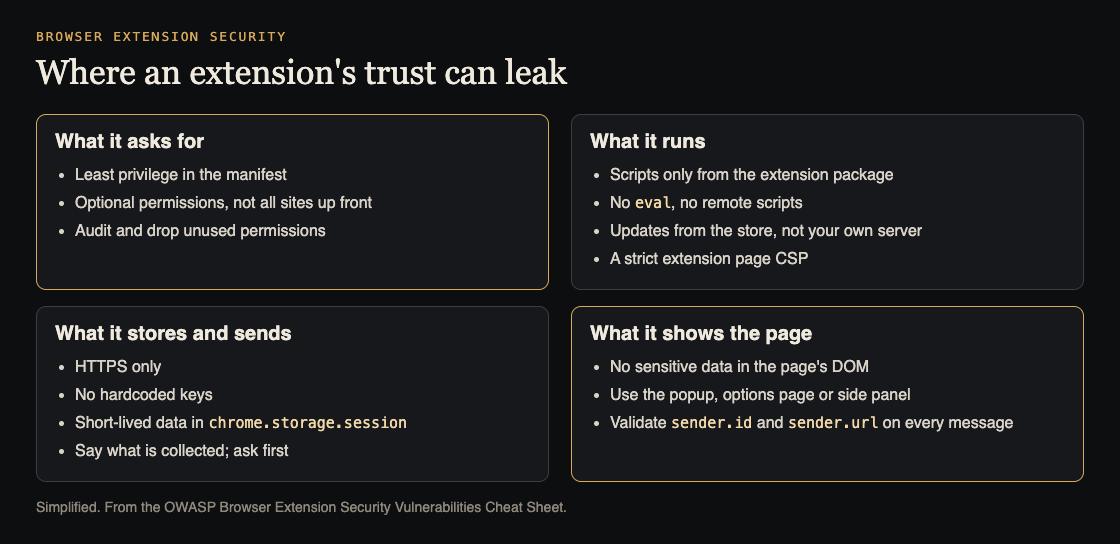
Four places an extension's trust can leak. Simplified from the OWASP Browser Extension Security Vulnerabilities Cheat Sheet.
Extension security starts with permissions
OWASP's first item is permissions overreach. Extensions often ask for more than they need, such as access to every tab, the browsing history, and every website. If the extension is ever compromised, all of that goes with it.
The cheat sheet's advice:
- Least privilege. Ask only for permissions the extension truly needs today.
- Optional permissions. Ask for extra access when a feature needs it, instead of everything at install time.
- Separate site access. In Manifest V3, website access goes in
host_permissionsoroptional_host_permissions. A pattern that matches every site over HTTP and HTTPS is the overreach OWASP shows as its example. - Regular audits. Remove permissions that features no longer use.
Open your manifest.json and ask of each permission: which feature needs this, and would it still work with less?
Never run code you did not ship
Three of OWASP's items share one theme: the extension should only run code that came in its own package.
- Code injection. An extension that loads a script from a remote address can be made to run whatever that address serves. Avoid
eval()andinnerHTML, and prefer the extension messaging APIs to injecting scripts into pages. - Malicious updates. The cheat sheet's example fetches an "update script" from a server and runs it with
eval. Anyone who controls that server, or the connection to it, controls every install. Rely on updates through the extension store, sign updates, and check integrity before running anything fetched. - Cross-site scripting. Writing user input with
innerHTMLlets injected markup run. UsetextContent, sanitize with a well-tested library when you must render HTML, and use a Content Security Policy to block inline scripts. Our guide to XSS testing shows how to look for it.
Keep a strict Content Security Policy
OWASP notes that Chrome enforces a default and minimum Content Security Policy for Manifest V3 extension pages, even when the manifest sets none. The risk is weakening it.
Set content_security_policy.extension_pages in the manifest, load scripts from the extension package, keep inline scripts blocked, and limit other resource types to what the extension uses. The cheat sheet's example policy allows scripts only from the extension itself and blocks plugins.
One difference from websites: OWASP says not to apply the usual nonce or hash advice for web pages to Manifest V3 extension pages, because their allowed script sources are already restricted. For ordinary web pages, our post on Content Security Policy covers those options.
What the extension stores and sends
Storage and network traffic are where user data leaks quietly.
- HTTPS only. OWASP's examples send browsing activity and API calls over plain HTTP, where they can be read or changed in transit. Use HTTPS for every outside call, and validate what comes back before using it.
- Collect less, and say so. Limit what you collect, explain it in a privacy policy, ask for consent before collecting or sending personal data, and let users opt out.
- Storage is not encrypted. Do not keep tokens or other sensitive data in
localStorageor extension storage for longer than needed. - Use session storage for short-lived secrets.
chrome.storage.sessionkeeps data in memory and is not exposed to content scripts by default. Clear it when you are done. OWASP is clear that this does not protect against a compromised extension or device. - No hardcoded keys. Anything in the extension's code can be read by anyone who installs it. Our post on secrets management covers where keys belong instead.
- Dependencies. Audit the libraries you bundle, and prefer actively maintained ones.
Keep sensitive data out of the web page
This is the part most teams miss. A content script runs alongside the web page, and OWASP describes two ways data leaks from there.
The page can read its own DOM. If your extension writes a user's name, email, financial details or chat history into the page, the page's own scripts can read it and send it away. That holds whether you build the markup by hand or with a framework. A Shadow DOM is not a fix: page scripts can query an open one, and other extensions can reach even a closed one. Show sensitive data in the extension's own popup, options page or side panel instead.
The page can rewrite JavaScript itself. Content scripts normally run in an "isolated world", separate from the page. But an extension can also run code in the page's "main world". There, a malicious page can overwrite built-in objects and functions, so the extension's code hands data straight to the attacker. OWASP's advice is to keep sensitive data out of the page's context entirely and pass only what is needed, such as "valid" or "not valid" rather than the token itself. Even postMessage can be overwritten in that context, and OWASP warns against tricks that try to recover the original functions.
Check every message to the background
Extensions pass messages between low-trust parts (content scripts, the popup) and the high-trust background service worker. If the background does whatever any message asks, a compromised page can talk a content script into requesting secrets or privileged actions.
OWASP's rules for the background:
- Treat every incoming message as untrusted input.
- Check
sender.idequals your own extension's ID. - Check
sender.urlorsender.originto limit which extension pages or content scripts may ask for what. - Allow-list the actions and their parameters.
The cheat sheet quotes Chrome's own guidance that content scripts are less trustworthy than extension pages. Design as if the page around a content script is hostile, because sometimes it is. Our post on HTML5 security covers the same origin checks for postMessage on ordinary web pages.
Worked example: review one extension in a day
- Manifest. List every permission and host pattern. For each, name the feature that needs it. Move anything not needed at install into optional permissions.
- Code sources. Search for
eval,innerHTML,createElement('script')and anyfetchwhose response is run as code. Each is a finding. - Policy. Read
content_security_policy.extension_pages. Inline scripts must stay blocked and scripts must come from the package. - Network. List every outside address the extension calls. All must be HTTPS. Compare what is sent with what the privacy policy says.
- Storage. Dump what the extension stores. Tokens and personal data move to
chrome.storage.session, or out entirely. Search the code for hardcoded keys. - Pages. Find everywhere a content script writes to the page. Anything sensitive moves to the popup or side panel.
- Messages. Read each
onMessagelistener in the background. Each should checksender.id, checksender.url, and allow-list its actions.
Frequently asked questions
Does Manifest V3 make an extension secure by default?
No. Chrome enforces a minimum Content Security Policy for extension pages, but OWASP's list still applies: permissions, storage, data shown to pages and message checks are up to you.
Can I store an API token in extension storage?
OWASP says extension storage is not encrypted. Avoid persisting sensitive data; keep short-lived secrets in session storage and never hardcode keys in the code.
Is a closed Shadow DOM enough to hide data from a page?
No. OWASP notes that other extensions can reach a closed Shadow DOM. Show sensitive data in the extension's own popup, options page or side panel.
Get started
Open your extension's manifest.json today and write the feature next to each permission. Any line without one is your first change.
whitehatstoic's cybersecurity and AI safety testing includes a web app and API review, a written report with fixes, and a retest after you apply them, scoped after a short call. No test finds every weakness, but a second pair of eyes on an extension's permissions and message handlers is quick to arrange.

Building something that has to be safe? Book a meeting with whitehatstoic: tell us the product, the deadline and your biggest worry, and we reply with a plan and a price.
Comments
No comments yet.
Sign in or make an account to comment.