Business logic flaws: test the rules your app trusts
Business logic flaws are bugs where your app does exactly what the code says, but the code trusts users to follow rules nobody enforced. Nothing is injected and nothing crashes. A user skips a step, repeats one, changes a price or sends two requests at once, and your app lets it happen. This post gives you five habits and a one-afternoon test plan, taken from the OWASP Business Logic Security Cheat Sheet.
What business logic flaws are
OWASP describes these as flaws in the way an application implements its intended workflow. The code does what the developer told it to do, but that does not match what the business needs. A user pays a negative price, stacks coupons nobody planned for, or wins a race against the server's own bookkeeping.
Take a checkout. The server gets a product ID, a quantity and a coupon code. Every input is valid, so input checks pass. But if the total is calculated from a price the browser sent, one user can pay one cent for a television. No amount of input validation helps, because the input looks perfect.
Generic scanners often miss these flaws because they do not know your business rules. OWASP says to combine tools with review and testing that checks the intended process. That means you need to write the rules down first.
Work out every value that matters on the server
The sheet calls this the single most effective habit: if a value in the request affects price, access, ownership or state, assume the client made it up and work it out again from trusted data.
- Prices and totals. Accept product identifiers and quantities only. Look up the price and compute the total in your own code.
- Discounts. Accept a coupon code, check it on the server and apply the discount on the server. Never accept a "discount amount" or "total" field.
- Identity and role. The acting user comes from the server-side session or token, never from a field the user can edit.
- Ownership. Check it on every request. Each request is independent and must be allowed on its own, not because an earlier request loaded the object.
The same sheet warns that a field "not editable in the UI" is fully editable at the HTTP layer. That includes hidden and disabled form fields. For the ownership side in depth, see the post on stopping users reading each other's records.
Treat multi-step flows as a state machine
Sign-up, checkout, approvals and password reset are often built as pages the UI walks a user through. If the UI is the only thing enforcing the order, anyone who calls each endpoint directly can skip, repeat or reorder steps.
OWASP's pattern is simple:
- When the flow starts, create a record on the server with an initial state, such as
awaiting_email_verification. - Each step checks the current state, does its work and moves to the next valid state.
- A request for a step that does not match the current state is rejected.
- The last action, such as submit order or approve, runs only from the exact state it needs.
Do not keep the current step in a hidden field or a cookie. The client can set it to anything. Mark one-time actions, such as a signup bonus or a voucher, complete in storage and treat a second attempt as an error. Give half-finished flows a deadline so they do not pile up.
Stop races on check-then-act steps
Any step that reads a value, decides, and then writes is a possible race. Two requests can both read the old value, both decide the same thing and both write. OWASP lists the usual victims: a balance checked and then debited, a coupon checked and then marked used, a slot checked and then booked.
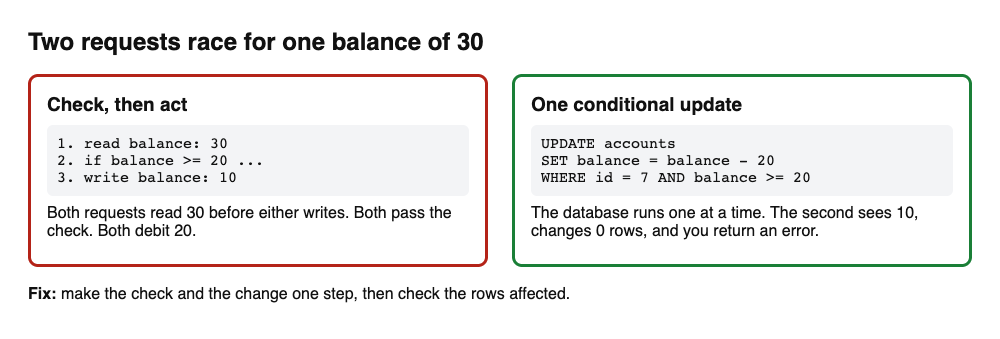
The sheet gives these fixes:
- A conditional update, such as
UPDATE ... WHERE balance >= amount. Check how many rows changed; zero means the check failed. - An explicit row lock (
SELECT ... FOR UPDATE) inside a transaction, so the second caller waits. - A serializable transaction, where the database rolls back one of two competing requests.
- A unique constraint for one-per-user bonuses, so the database rejects the duplicate.
- Idempotency keys for external actions such as charging a card, with the provider's own rules for reuse.
Do not tell yourself the window is too small to hit. The sheet notes that concurrent request tools can land dozens of requests within a millisecond of each other. If the window exists at all, assume someone can use it.
Check the rule, not only the role
Many business logic bugs are authorization bugs in disguise. The user has the general permission to use a feature, but the specific action breaks a rule nobody thought to check. OWASP's examples: a manager can approve expense reports but not their own, and a user can cancel an order but not after it has shipped.
So ask "can this user do this to this object, in this state, right now?" and keep that check close to the operation it guards. Also list every way to reach a sensitive operation. A careful check on an admin endpoint does nothing if a public endpoint, a new API version or a webhook handler triggers the same operation with no check. The posts on testing broken access control and confirming what users approve go further on each.
Validate for meaning, not just format. A quantity can be a positive whole number and still exceed your stock. Fields can each be valid and wrong together, such as a check-out date before the check-in date. Write down the legal combinations and enforce them on the server.
Test the rules in one afternoon
You cannot test a rule you have not written down. OWASP suggests writing invariants in plain English and then naming what enforces each one. If the answer is "the UI" or "the user won't try that", the rule is not enforced.
Here is a plan for one flow, such as checkout or sign-up:
- Write 5 sentences that start with "No user can". For example: "No user can redeem a coupon twice." "No user can finish checkout without a paid order." "No user can approve their own request."
- Name the enforcer of each sentence: the line of server code or database rule that stops it.
- Break the order. Call later steps first, repeat finished steps and go backwards.
- Break the values. Send zero, negative and very large numbers, another account's IDs and a changed price.
- Break the timing. Send the same request twice at once, from two tabs or two devices.
- Turn each failure into an automated test named after its sentence, so it cannot return.
A worked example: a "send credits" feature has the rule "a user can only send credits they have". With a balance of 30, you send 50 and it is refused. Good. Then you send two transfers of 20 at the same moment. Both go through and the balance is negative. The single-request check works, but the check and the change are two steps. The fix is the conditional update above, plus a test that fires two requests together and asserts the balance never drops below zero.
For more ways to find the gaps, the post on writing tests from an attacker's view pairs well with this plan, and threat modeling for a small team helps you find the rules to write down.
Protect features that give away value
Referral bonuses, promo codes, signup credits, free trials and anything that sends messages are abuse magnets. OWASP names the patterns to design against: one person making many accounts, referring themselves, stacking coupons, resetting a free trial and wearing down features that send email or make outside requests.
Its controls are practical. Give each such feature its own rate limit, because a limit at the edge is not enough. Use signals stronger than an email address, which is cheap to make in bulk. Log every credit, promo and bonus with who triggered it, who got it, the IP and the time. Put caps at more than one level, for example per account and per payment method. Simple thresholds on per-user, per-IP and per-device rates catch most automated abuse, and when one fires, fix the control that should have stopped it.
Frequently asked questions
How is a business logic flaw different from a normal bug?
A normal bug is code doing something other than what you meant. A logic flaw is code doing what you meant, when what you meant left a way to abuse it. Both need fixing, but logic flaws are harder to find with tools.
Can an automated scanner find business logic flaws?
Not reliably. OWASP says scanners often miss them because they lack your business rules, though some patterns, such as weak workflow enforcement, can be found. Pair tools with review and tests of the intended process.
Where should I start?
Start with anything that handles money, identity or permissions. Pick one flow, write the "No user can" sentences and try to break each one with a second account and parallel requests.
Does passing these tests mean my app is safe?
No. Tests find the weaknesses they cover, not every weakness. Retest after fixes and keep the automated checks running on every change.
Does whitehatstoic test for business logic flaws?
whitehatstoic tests web apps and AI systems for weak spots, with a written report and fixes and a retest after the fixes. Describe your flows when you book, and the scope is set after a short call.
Get started
Pick one flow today and write five "No user can" sentences for it, then try to break each one. If you want a second pair of eyes, book a meeting with whitehatstoic: tell us the product, the deadline and your biggest worry, and we reply with a plan.
The source for this post is the OWASP Business Logic Security Cheat Sheet.
Comments
No comments yet.
Sign in or make an account to comment.