Calm music for a meditation app: how to choose and license it
Picking calm music for a meditation app is harder than it sounds. A track that feels relaxing on a playlist can feel busy when someone lies still with their eyes closed. The license is just as easy to get wrong, because music inside an app is not the same as music in a video. This guide covers both: how to judge a track by ear and by its numbers, and which license an app needs.
What makes music calm enough for meditation
Meditation music has one job: support attention without pulling on it. Your listener is noticing their breath or their body, and anything that asks to be noticed works against that.
- No surprises: no sudden hits, drops or key changes.
- No build: the end should feel like the start. A track that climbs to a big finish is made for a trailer, not a body scan.
- No hook: a tune people hum later is good for a brand and bad for a breathing exercise.
- Soft edges: pads and slow textures fade into the background; sharp drums do not.
Wavecrate, the music library used as the example in this guide, lists each track's tempo, energy and vocals, which makes these four checks quicker before you even press play.

Finding calm music for a meditation app by its numbers
You can shortlist before you listen. On Wavecrate's music page, each track lists its tempo, key, energy and whether it has vocals, and the filters narrow by mood, tempo, length and energy. A starting set for meditation:
- Mood: calm or dreamy.
- Tempo: Slow (under 90 BPM), or a custom range if you want to go lower.
- Energy: Calm or Relaxed.
Then read the description, because the numbers do not tell the whole story. Quiet Resolve is 80 BPM with Relaxed energy, so it passes the filters, but its page says "Strings, low brass and timpani building toward a big finish." That build would jolt someone out of a sleep session. The filter got you close; the description told you no.
Slow Tide is the opposite: 60 BPM, energy Calm, instrumental, "Long evolving pads and a sparse bell melody that leaves plenty of room for voice. Calm and Dreamy, good for meditation and documentary."
Matching music to the kind of session
Plan by session, not by "relaxing music" in general. The Study and focus collection ("Low-key beats and pads that stay out of the way of your thinking") shows the range in one place.
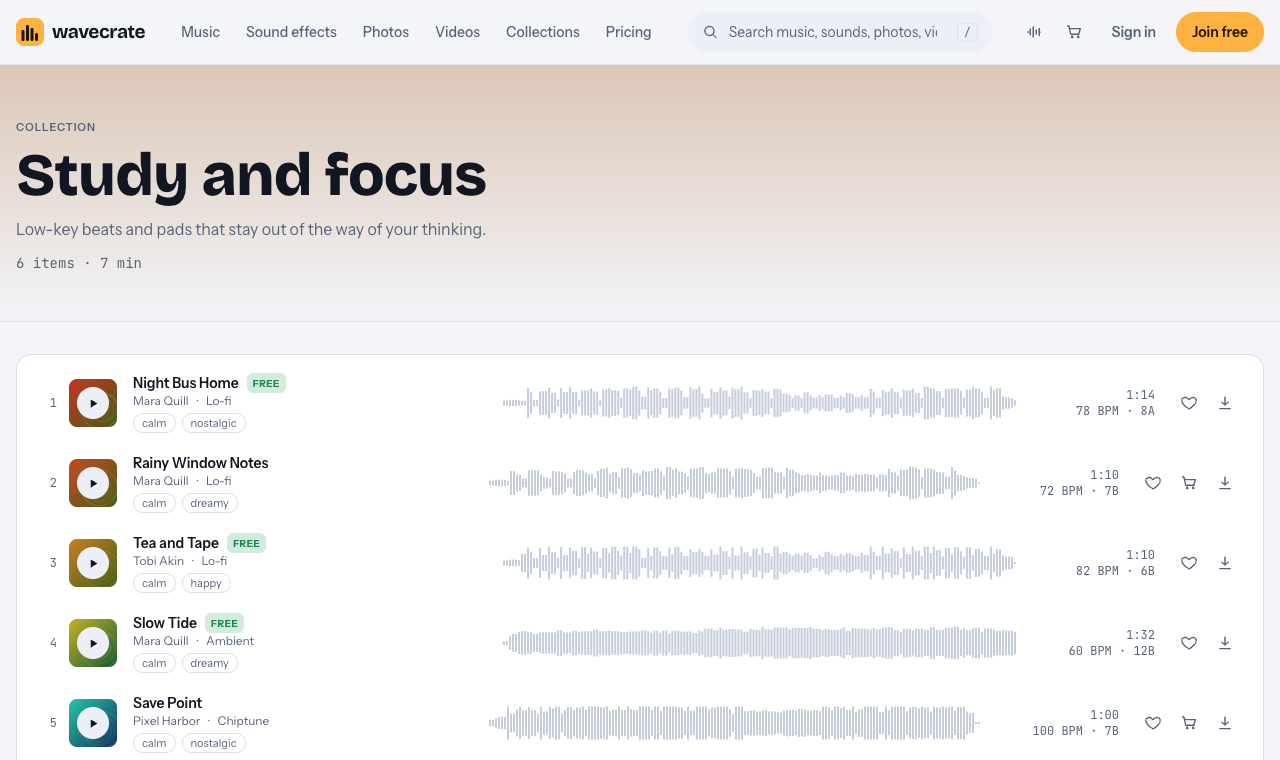
- Sleep: the slowest and flattest, with no beat. Slow Tide, at 60 BPM, is the profile to look for.
- Breathing: a steady, slow pulse can help people pace their breath. Rainy Window Notes (72 BPM) and Night Bus Home (78 BPM) are calm lo-fi tracks.
- Focus: a little more movement is fine if nothing jumps out. Tea and Tape is a calm lo-fi track at 82 BPM.
- Body scan: long, with the least melody. Pair a slow pad with a soft bed such as Rain on Window, an eight second rain ambience.
Avoid strong styles in core sessions. Save Point is listed calm, but it is chiptune at 100 BPM, and its bright tones stand out; it may suit a playful kids' mode instead.
Looping for long sessions
Tracks are much shorter than a session: Slow Tide's full track is 1:32. A 20 minute sleep session has to repeat the audio, so the loop point must be invisible. Wavecrate tracks come as a full track, a 30 second edit and an 8 bar loop. One approach:
- Play the full track once as an opening.
- Switch to the loop for the long middle.
- Fade out over the last 30 to 60 seconds instead of stopping hard.
Listen to the whole loop many times over before you ship it. When auditioning, press Space to play and Left or Right to skip 5 seconds, which is the fastest way to hear whether a track builds later.
Volume and testing
Keep music well under any spoken guidance, and match loudness across tracks so one session does not start louder than the last. Test on cheap earbuds and a phone speaker at bedtime volume, where a track can turn harsh or muddy. Then test with people: give five or six the same session with two tracks and ask which one they noticed less, and whether anything startled them. The track people forget is usually the right one.
Which license an app needs
This is where app builders slip. The license cards on a track page say:
- Free, only on tracks marked Free: online videos and podcasts (YouTube, TikTok, Instagram, Twitch, podcasts, monetized channels), with credit text in the description.
- Standard: no credit, and your own business and brand videos. Slow Tide listed it at $15.
- Extended: paid ads, broadcast, client work, and "Apps, games and software". Slow Tide listed it at $49.
Paid licenses are not on sale yet: Wavecrate says purchases open soon, so those are the listed prices for when sales open. Tracks marked Free can already be downloaded with a free account.
So music that plays inside your app needs Extended, even on a track marked Free. Pro (listed at $99 a year, or $12 month to month, and not on sale yet) gives Standard only, so it does not cover music in an app either. The pricing page says that, once purchases open, Standard can be upgraded to Extended for the difference.
Worked example: one track, three places
Say you are building a sleep feature and choose Slow Tide, marked Free on the day this was written (read the page on the day you download, because items change). Follow it through three places:
- A guided session video on your personal channel, with credit in the description: the Free license covers online videos with credit.
- A promo video for the app on your company's channels: your own business video, so Standard (listed at $15) or Pro.
- Inside the app's sleep session: apps are Extended only (listed at $49). Neither Free nor Pro covers it.
For the rain bed, Rain on Window listed Extended at $9, so prices differ by item; read each page. You get a license, not ownership: Wavecrate keeps the copyright. Every download comes with a certificate and a code, and anyone can check the code on the verify page to see who holds the license, for which track and what it covers. Keep each code next to its file in your app's project.
Frequently asked questions
What tempo suits meditation music?
Slow, with the slowest kept for sleep. Wavecrate's Slow filter covers under 90 BPM, and a custom range lets you go lower.
Can I use a track marked Free in my meditation app?
Not inside the app. The Free license covers online videos and podcasts with credit; apps are Extended only.
Does Pro cover music in my app?
No. Pro gives Standard licenses only, and apps, games and software need Extended.
Should meditation music have vocals?
Usually not, since words compete with spoken guidance. Each track page lists whether it is instrumental.
Get started
Filter for calm, Slow and Calm energy, read each description for a build, test your shortlist at bedtime volume, and plan on Extended for every track inside your app.
Browse Wavecrate: you can join free and download items marked Free now, paid licenses are not on sale yet (purchases open soon), and every download comes with a license certificate and a code anyone can check on its verify page.


Comments
No comments yet.
Sign in or make an account to comment.