Camera shutter sounds for a photography portfolio reel
Camera shutter sounds for a photography portfolio reel do one job: they tell the viewer "this is a photograph" before they read a caption. Used well, a click gives a slideshow a pulse. Used badly, it sounds like a phone app. This guide shows how to place and mix one, and what to do when your sound library does not have one.
One honest note first. Wavecrate has no camera shutter sound. On 2026-10-15 a search for "shutter" in its sound effects returned no matches. The rest of this post gives you the craft, then the closest sounds the catalog does have, with their licenses.
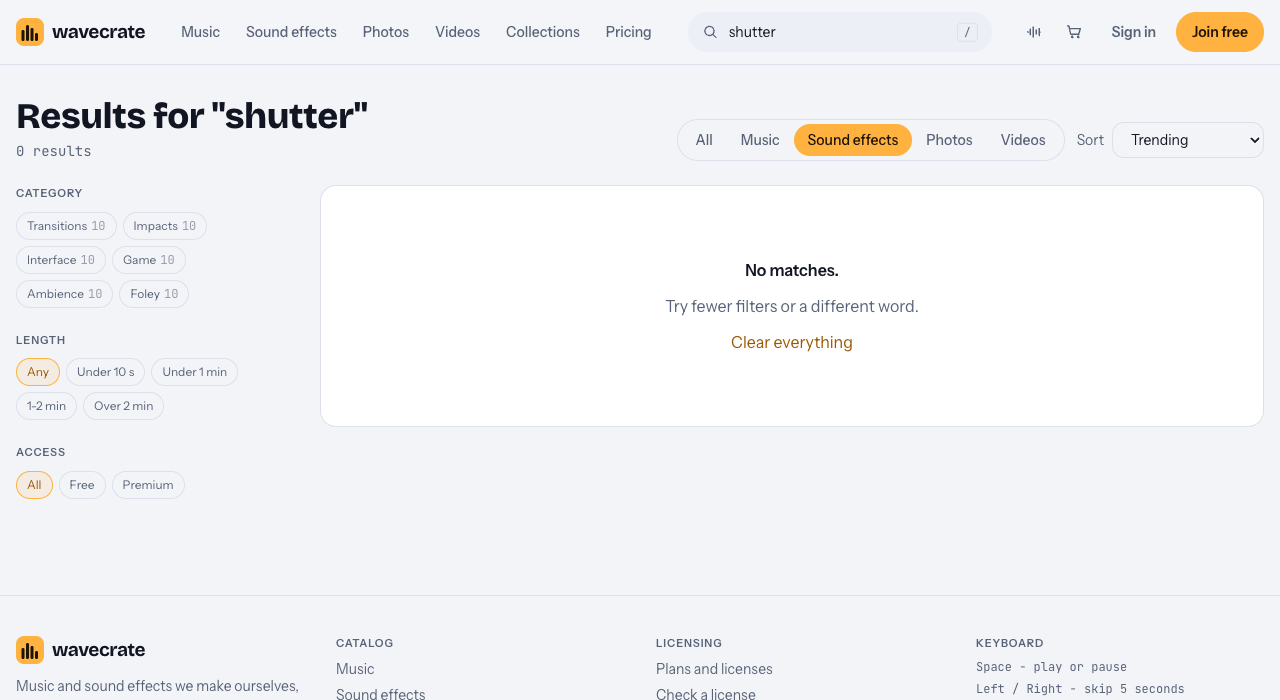
Searching Wavecrate sound effects for "shutter" on 2026-10-15: no matches.
Why a click works in a portfolio reel
A reel of stills is silent by nature. Music carries the mood, but music alone does not say where each image begins. A short click does. It marks the moment of capture, and viewers link it to the skill you are selling: taking the photo.
It is also a rhythm tool. Every cut gets a hard edge, so the edit feels deliberate. Twelve images with twelve clicks reads as a sequence. Twelve images with no sound design reads as a folder of files.
Pick the click that matches your camera
Photographers notice mismatches, so choose a sound that suits the kind of camera you want the viewer to imagine.
- A DSLR has a two-part sound: a mirror flip, then the shutter. It is a heavy "ka-chunk" that suits sports, events and wildlife.
- A mirrorless camera with a mechanical shutter is lighter and drier. It suits street, travel and documentary work.
- A film camera is a softer clack. It suits a nostalgic, film-look reel.
- A phone makes a designed click. That is fine for a clean, modern feel, as long as you do not mix it with a film camera's wind-on lever.
If you are unsure, pick the quieter, neutral option. A soft click rarely looks wrong.
Match the click to your pace, track and subject
Start with the pace of the pictures. Fast action work wants a tight, punchy click. Slow, quiet work wants one soft click with space around it.
Then choose the music, because its tempo decides your cut rhythm. Wavecrate lets you filter music by mood, tempo, key and energy, and the tempo filter offers Slow (under 90 BPM), Mid (90 to 120) and Fast (over 120). A slow cinematic track suits a quiet click. A fast one suits a crisp click on every second beat.
Last, match the subject. A wedding reel does not need the punch a sports reel does.
Sync the click to your cuts and beats
There are three common ways to place it.
- Click on the cut. Put the click on the first frame of each new image. This is the default and it works.
- Click on the beat. Cut to the beats of your track, then put the click on those cuts. At 96 BPM one beat is 0.625 seconds, so a new image every two beats arrives every 1.25 seconds.
- Click, then reveal. Show a black frame, play the click, then reveal the photo. It feels like a viewfinder moment.
Whichever you pick, nudge the click a frame earlier or later and listen. Even three frames of drift is noticeable.
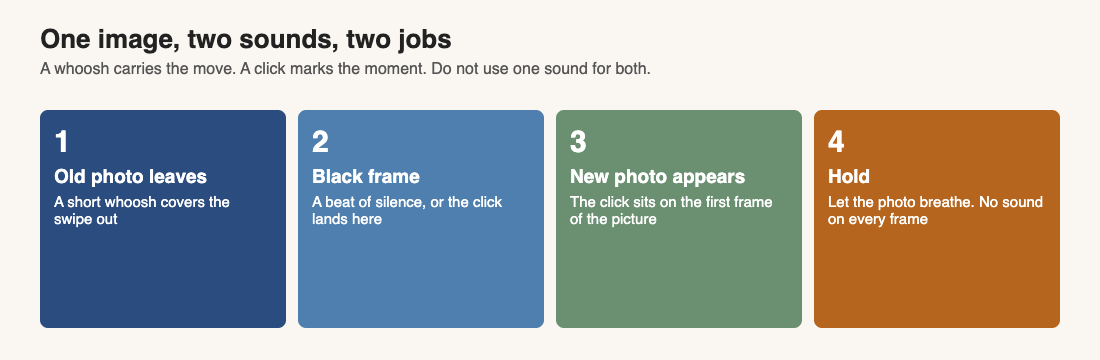
One image change, two sounds: a whoosh for the move, a click for the capture.
A click is not a transition, so give the movement its own sound. In Wavecrate's Transitions category, Air Cut Whoosh (a one-second sound "for transition and swipe moments") and Downward Swoosh were both marked Free on 2026-10-15. Use the whoosh for the motion and the click for the capture.
Mix it so the photos stay the star
- Volume: keep the click audible but below the music peak. Check it on a phone speaker, since that is where most reels are watched.
- Layering: a single click can feel thin. Add a very short, soft thump under it, and keep both layers on the same frame.
- Reverb: a shutter is a dry sound. Use almost none, or a long tail will sound like a hall.
- Stereo: keep it centered, so it feels like the viewer's own camera. A light pan for images sliding in from the side can add polish. Do not pan every click.
- Variation: the same file twenty times sounds robotic. Nudge the pitch a little, or alternate two takes.
Mistakes that make a reel sound cheap:
- A click on every frame of a fast montage. It turns into noise, so skip some.
- Clicks louder than the music.
- A long tail. A shutter is short, so trim it.
- Mixing camera types, such as a film wind-on lever followed by a phone chime.
- Using a bright notification chime as a click. It sounds like an app, not a camera.
Camera shutter sounds for a photography portfolio reel: what Wavecrate has instead
Wavecrate's sound effects come in six categories: Transitions, Impacts, Interface, Game, Ambience and Foley, with ten sounds in each. None of them is a camera. Here are the closest, all read on 2026-10-15, and what they are honestly good for:
- Soft UI Click, in Interface, marked Free. Its page calls it "a clean, ready-to-drop interface sound for button and tap moments". It reads as a soft digital tap, so it suits a clean, modern reel rather than a film-camera feel.
- Mouse Clicks, Medium, Bright, in Foley, marked Free. It is computer mouse clicks, double clicks, scrolling and dragging. It fits a screen-recording style reel, not a true shutter.
Be straight with yourself about the trade. A mouse click is not a shutter, and a photographer watching your reel may notice. If a real shutter sound matters to your brand, record your own or find one elsewhere, and read its license as carefully as you would here.
Which license a portfolio reel needs
Every Wavecrate download comes with a license certificate and a code anyone can check on the verify page, with no account needed. Here is how the sound effect licenses read on the pages above:
- Free: only on items marked Free. It covers online videos and podcasts, including YouTube, TikTok, Instagram and Twitch and monetized channels, with credit text in the description. A free account gets 3 free downloads a month.
- Standard: online content with no credit, and your own business and brand videos. A reel that promotes your own photography fits that wording. Soft UI Click showed Standard at $3 and Mouse Clicks, Medium, Bright showed $5, so prices differ by item.
- Extended: paid ads, broadcast, apps, games and client work. Soft UI Click showed Extended at $9 and Mouse Clicks at $19.
Here is a worked example. You cut a 30-second reel for your own site and your social pages. You use Soft UI Click, marked Free on 2026-10-15, so you put the credit text in the description and you are covered for the online post. Then you add the reel to your studio's own page, which is your own business content, and the Free license does not name that, so Standard at $3 is the safer fit. A client later asks to run the reel as a paid ad: that is Extended. Read each item's page on the day you download, because items can change between Free and Premium.
Pro covers Standard licenses only, so it never covers paid ads or client work. See the pricing page for the plans. Wavecrate's pages do not mention portfolios or live screenings, so treat anything they do not name as not covered.
Frequently asked questions
Does Wavecrate have camera shutter sounds?
No. A search for "shutter" in its sound effects found nothing on 2026-10-15. Catalog contents change, so search again before you decide.
Do I need Extended for a portfolio reel?
Not for your own work online, going by the item pages: Standard covers online content and your own business videos. Paid ads and client work need Extended.
Do I have to credit the sound?
Only under the Free license, which asks for credit text in the description. Standard needs no credit.
How many clicks should a reel have?
Fewer than you think. Click on the hero images and let the rest breathe.
Should the click match my actual camera?
It helps. If you are unsure, use a soft, neutral click.
Get started
Pick your track first and note its tempo, then place one clean click per hero image and test it on a phone speaker. Join Wavecrate free to get 3 free downloads a month, each with a license certificate and a code anyone can check.
Comments
No comments yet.
Sign in or make an account to comment.