Carpool problems: one shared list for the drivers
A carpool can hit the same snags again and again. Someone is late, a booster seat goes missing, a driver gets stuck with three Fridays in a row. If the group chat has not fixed your carpool problems, this post shows you how to keep those problems on one list the drivers can see, with what you tried and whether it worked, so you stop solving the same thing every month.
Why carpool problems keep repeating in the group chat
A group chat is a stream. A problem shows up on Monday, gets five replies, and scrolls away by Wednesday. Nobody writes down what was decided. Nobody records whether it worked.
So the same issue comes back. The 7:40 pickup was too tight in September. Someone moved it to 7:30. In January a new driver joins, nobody tells them, and you are back to late arrivals and the same argument.
The fix is not more messages. It is a place where each problem sits on its own line, with the solutions you tried attached and an honest outcome next to each one. When the problem comes back, you look it up instead of starting over.
The most common carpool problems drivers run into
Look for some version of these:
- Late pickups. One stop always runs over, and the whole route slips.
- Uneven driving load. Someone keeps swapping out, and someone else keeps covering.
- Car seats and boosters. The right seat is in the wrong car on the wrong day.
- Last minute cancellations. A sick kid or a sick driver at 7 a.m., and no backup.
- Gas and cost. Longer routes, unequal mileage, and quiet resentment about who pays more.
- Rules in the car. Snacks, screens, music, seatbelts, who sits in front.
- After school changes. Practice moves, a game is added, and the afternoon plan breaks.
None of these are hard on their own. They get hard because they repeat and nobody remembers what was already tried.
What belongs on a shared carpool list
A good carpool list holds three kinds of things. Problem Graph uses the same three: problems, solutions, and requirements.
- Problems: one line each. "Tuesday pickup at the Okafor house runs 10 minutes late."
- Solutions: what you will try or have tried. "Move Tuesday pickup to 7:30." Each one gets an outcome: worked, partly, or failed.
- Requirements: what a solution needs to work. "Second booster seat kept in Dana's trunk."
Keep failed solutions on the list. If moving the pickup earlier failed because one family could not make it, that is exactly what the next driver needs to know before suggesting it again.
What does not belong: chatter, jokes, the weekly "who's driving" reminders. Keep the list for things that went wrong and what you did about them. The same idea works for other shared groups, like a shared problem list for a band or one list for a whole house move.
How to log a carpool problem in under a minute
Here is a worked example in the Problem Graph app, which runs in your phone's browser.
- Write the problem in one line. Type "Kids late to school on Tuesdays" and put it in the personal lane. It lands on the graph when you press Enter.
- Add the solutions you are considering. "Move Tuesday pickup to 7:30." "Swap the order: Okafor house last." "Text the driver at 7:20 if not ready."
- Mark what you know and what you are trying. Say moving the pickup to 7:30 already failed, because one family could not make it: mark it failed. Then pick "Swap the order" and mark it as the one you are trying this week.
- Add any requirement. If the new order means Dana's car carries four kids, add "Dana's car needs the third row up on Tuesdays."
- Link related problems. If "Thursday pickup also slips" is on your graph, link the two. Patterns show up on the map that you would miss in a list.
That is the whole log. One line for the problem, one line per solution. You can fill in the outcome next week.
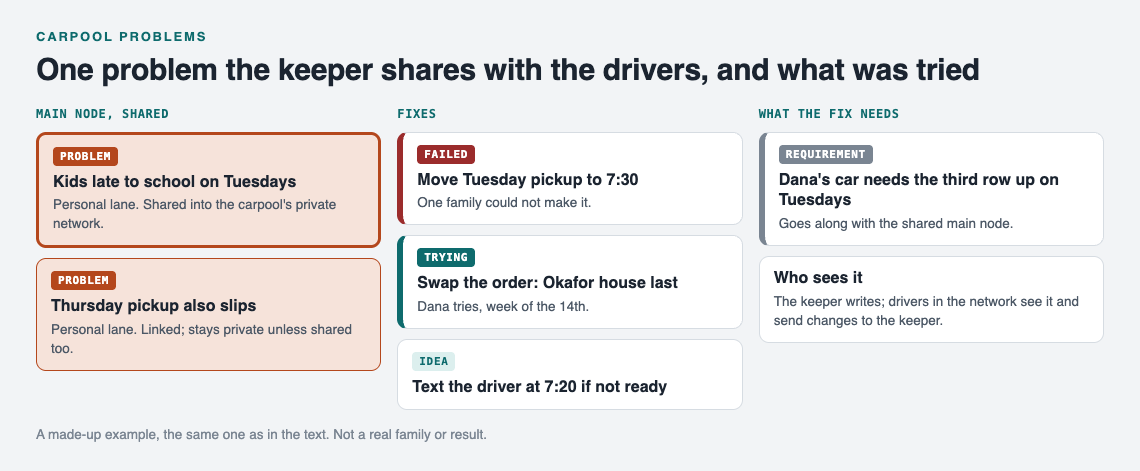
A made-up example: one shared carpool problem and what was tried.
Sharing it with the other drivers
Your problems are private by default. Only you see them. To show them to the drivers, create a private network, give the drivers the invite code, and share a main node into it.
One detail matters here. Only a problem marked as a main node can be shared. When you share it, its solutions, their outcomes, and the requirements they need go with it. A problem you only link to it stays private on your own graph. So if you want the drivers to see "Kids late to school on Tuesdays," mark that problem as a main node and share it into the carpool network. Do the same for each problem you want the group to see.
Also keep in mind that the app says anyone with the invite code can join. Send the code to the drivers directly, not to a big school group.
Assigning an owner and closing the loop on each issue
A problem with no owner stays open forever. Give each one a name.
The simplest way is to put it in the solution line itself: "Swap the order, Okafor house last (Dana tries, week of the 14th)." Now anyone looking at the map knows who is testing it and when.
Closing the loop means recording the outcome:
- Worked: the kids got there on time three Tuesdays running.
- Partly: on time twice, late once when it rained.
- Failed: still late, and the Okafors now wait outside in the cold.
If it failed, leave it on the graph as failed and add the next solution. Do not delete it. The graph remembers so you do not have to, and a failed attempt saves the group from trying it a second time.
Keep one person on the graph. Other drivers send that person a one line problem, and the keeper logs it and shares it. That avoids duplicate entries and keeps the list clean.
A weekly five-minute review that keeps the carpool running
Pick a fixed time, like Sunday evening. Open the app and switch to the List view beside the map. Filter by Network to see only what the carpool can see.
Then go through three questions:
- What is being tried right now? For each solution marked as trying, record an outcome if you have one.
- What is new? Log any problem that came up in the chat this week, in one line.
- What keeps linking together? Switch to the map. If "late Tuesdays," "late Thursdays," and "rainy day delays" all cluster around one house, the real problem might be the route, not the days.
Five minutes is enough when each entry is one line. If you like seeing problems laid out like this at home too, read about visual management at home.
Getting ideas when you are stuck
If none of your solutions work, you can ask for suggestions. The AI proposes new solutions grounded in what worked for others on problems like yours. Treat these as proposals to test, not answers. You can also look at similar problems other people have made public, in any lane, and borrow a solution into your own graph with one tap. It keeps a link back to where it came from.
If your group plans trips together too, the same habit helps there. See how to log what went wrong on each trip.
Frequently asked questions
How many drivers can share one carpool problem list?
The app does not state a member limit for a private network. Anyone you give the invite code to can join, so share it only with the drivers.
What if a parent never checks the list?
Do not depend on them checking it. Have one person keep the graph, and bring up open problems at the weekly review or in a short message pointing to the one item that affects them.
Should kids be able to add problems to the carpool list?
That is your call as a group. Adding a problem takes an account with a username and a password, so kids could tell a parent instead, and the parent logs the problem in one line.
How do we handle cost and gas money disputes fairly?
Log the dispute as its own problem, like "Gas cost uneven between long and short routes," and attach each proposed split as a solution. Record the outcome of each one, so the group can see which split was tried and how it went instead of arguing from memory.
Get started
Start small. Open the app, write down the one carpool problem that came up most this month, and add the first fix you will try. Mark it as a main node, create a private network, and send the invite code to the other drivers. Next week, record the outcome.
If you want to see how a graph looks before you begin, an empty graph offers a "Load example set" button. The same approach also works for bigger shared plans, like wedding planning across two families.
Try Problem Graph: it is free, and you can look around the public network without an account. Write one problem down in a line and attach the first thing you will try.
Comments
No comments yet.
Sign in or make an account to comment.