Chiptune tracks for a pixel art game devlog: pick and license
If you are looking for chiptune tracks for a pixel art game devlog, you need two things. You need a track that fits your footage and leaves room for your voice. And you need the right license for each place the track ends up. That second part is where most devs slip. A devlog video and the game itself are two different uses, and they need two different licenses. This guide walks through both, using the Chiptune music on Wavecrate as the example.
Why chiptune tracks for a pixel art game devlog work
Chiptune is music built from simple, retro-sounding waves. It shares a look and feel with pixel art. When a viewer sees chunky sprites and hears bright square-wave leads, the sound tells them what kind of game this is before you say a word.
Devlogs are also full of short clips: a jump, a new enemy, a menu that finally works. Short, simple melodies carry a viewer across those cuts without making a two second clip feel heavy.
Wavecrate, the music library used as the example in this guide, has a Chiptune category with tempo and mood shown for each track, and every download comes with a license certificate and a code.

What the Chiptune category on Wavecrate has
On 11 October 2026, the Chiptune music page listed 10 tracks. Three are by Pixel Harbor:
- Save Point: calm and nostalgic, 1:00, 100 BPM.
- Level Select: playful and happy, 1:00, 140 BPM, marked Free.
- Boss Rush: tense and energetic, 1:00, 160 BPM.
The other seven run from about 1:47 to 2:20 and from 103 to 159 BPM. Open Balance, Parallel Reactor and Neon Insight were also marked Free that day.
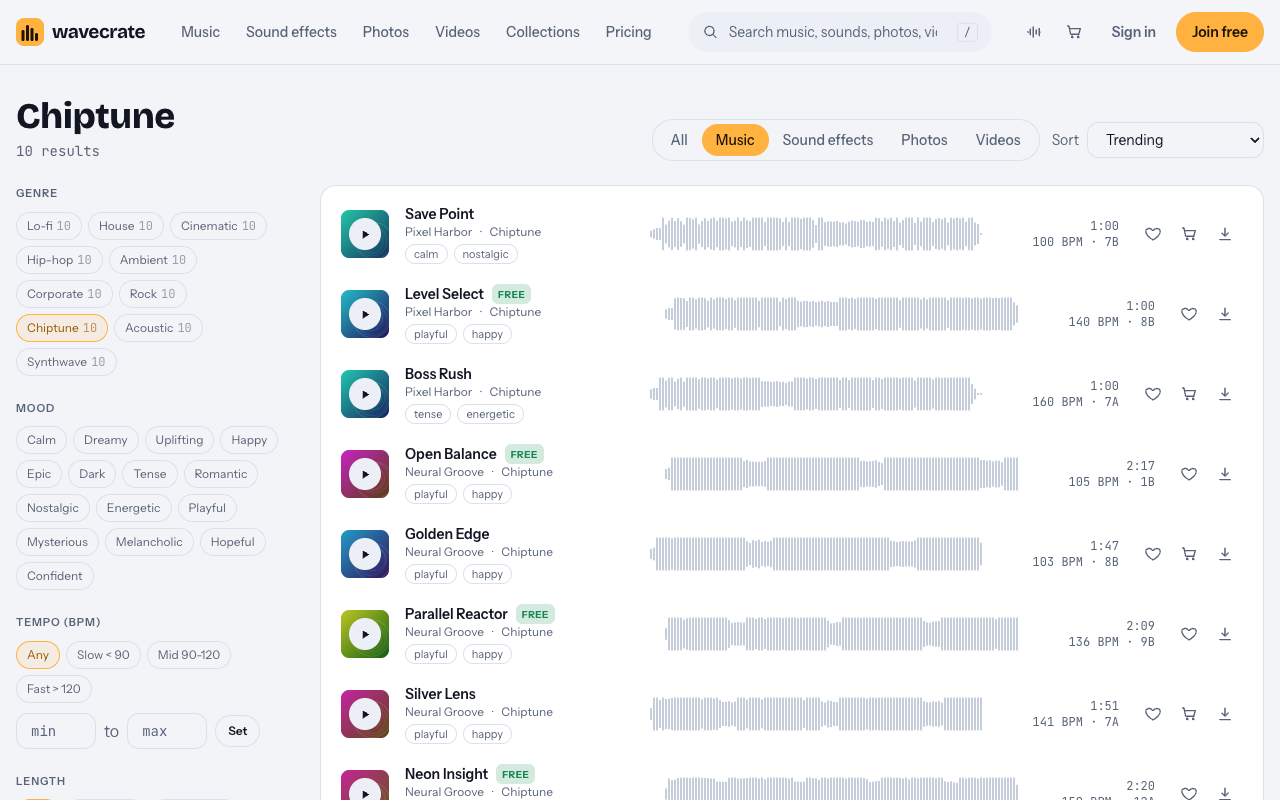
The page has filters for tempo, energy, key, vocals, length and access. The tempo filter has three bands: Slow (under 90 BPM), Mid (90 to 120) and Fast (over 120). The access filter lets you show All, Free or Premium tracks.
How to pick a devlog track by tempo and mood
Most devlogs are narrated. So the best track is often not the most exciting one. It is the one that leaves room for you.
- Talking sections. Start in the Mid band. Save Point at 100 BPM is calm enough to sit under your voice.
- Progress montages. Go Fast. Level Select at 140 BPM is playful and keeps a run of quick clips moving.
- Boss fights and hard bugs. Boss Rush at 160 BPM is tense and energetic. Use it for short bursts, not under long explanations.
- Vocals. Use the vocals filter. An instrumental track will not fight your narration.
Pick one track as your channel's "theme" and reuse it across episodes. Viewers start to link that sound with your game.
Fit the music to your footage
Each track page offers versions. Level Select's page lists the full track (1:00), a 30 second edit (0:31) and an 8 bar loop (0:14).
Use the loop for long talking sections. Repeat it as many times as you need and cut on the end of a loop, not in the middle of a phrase.
A little beat math helps you cut cleanly. At 140 BPM, one beat lasts 60 divided by 140, about 0.43 seconds. With four beats to a bar, 8 bars are 32 beats, about 13.7 seconds. That matches the 0:14 loop. If you cut your clips on multiples of 0.43 seconds, your edits land on the beat.
Under narration, turn the music down while you speak and bring it back up between lines. Your voice is the main event.
Worked example: one track, three uses
Here is Level Select taken through three uses. It was marked Free on the day of writing. Items on Wavecrate can change between Free and Premium, so read the Level Select page again on the day you download it.
Use 1: a devlog on your own channel, with credit
You post a devlog to your own YouTube channel and put the credit text in the description. The Free license covers this. Its card on the track page says: online videos and podcasts, with credit; YouTube, TikTok, Instagram, Twitch and podcasts; monetized channels; credit text required in the description. A free account gets 3 free downloads a month.
Use 2: no credit, or a video for your studio's brand
Now say you do not want a credit line. Or the video is for your own studio's brand, not just your personal channel. The Free license does not tick "Your own business and brand content". So you need Standard.
Paid licenses are not on sale yet: Wavecrate says purchases open soon, so the prices in this guide are the listed prices for when sales open. Tracks marked Free can already be downloaded with a free account.
A Standard music license was listed at $15 on the track page. Its card says: online content for one creator or business, no credit needed; all online platforms, monetized; your own business and brand videos; registered channels printed on the certificate. Standard is also included with Pro.
Use 3: the track inside your game, or in a paid trailer ad
This is the big one. You like Level Select so much that you put it in your game's title screen. That is no longer online content. It is "Apps, games and software". On the pricing page music table, that row is Extended only.
The same is true if you pay a platform to promote your trailer. Wavecrate's pages do not define "paid advertising" further, so treat a promoted trailer as a paid ad. That is Extended too.
An Extended music license was listed at $49 on the track page. Its card says: paid ads, broadcast, apps, games and client work. This holds even though the track is marked Free. The Free label covers online videos with credit, not your game build. And Pro does not cover it: Pro gives Standard licenses only, never Extended.
Short version: devlog on your channel = Free with credit (or Standard). Brand video or no credit = Standard or Pro. In the game or in a paid ad = Extended, every time.
Licenses, credits and copyright claims
You do not own a track you license. Wavecrate's site says: "You get a license to use it. We keep the copyright." The U.S. Copyright Office also notes that a recorded song can hold two separate works: the musical work and the sound recording.
Every license comes with a certificate and a code. Anyone can check that code on the verify page without contacting Wavecrate.
If a video gets a copyright claim, the pricing page's answer is: "Send the platform your license code or certificate link." It does not promise what the platform will decide. Keep your code for every track, and keep a note of which video or build uses which license.
If you use Pro, note the date rule: content you publish while subscribed stays covered. Plan your devlog uploads with that in mind.
Pro is listed at $99 a year (about $8.25 a month), or $12 month to month, and is not on sale yet. It gives the Standard license on everything, with no credit needed.
Frequently asked questions
Can I use a Free chiptune track in my game?
Not on the Free license. Putting a track in a game is "Apps, games and software", which is Extended only, even for a track marked Free.
Does Pro cover music in my game?
No. Pro gives Standard licenses only, which cover online content. Games, apps and paid ads need Extended.
Do I need to credit the artist in a devlog?
Only on the Free license, which requires credit text in the description. Standard and Pro need no credit.
What length should I use under narration?
Try the 8 bar loop and repeat it. Level Select's loop runs 0:14, and you cut on its end to stay on the beat.
Get started
Browse Wavecrate: you can join free and download items marked Free now, paid licenses are not on sale yet (purchases open soon), and every download comes with a license certificate and a code anyone can check on its verify page. Pick a theme for your devlog from the Chiptune tracks, and note which license each use needs before you ship. Join Wavecrate free to start with the tracks marked Free.


Comments
No comments yet.
Sign in or make an account to comment.