Choir problems: what the section keeps tripping on
A choir can have a short list of spots that go wrong week after week. The altos come in late at bar 34. The tenors go flat on the same leap. Everyone gasps for air in the middle of a phrase. If you want to fix choir problems like these, you first have to write those spots down. Then you can see which ones repeat, try a fix, and check whether it held. This post shows you how to keep that record in a few seconds per problem and turn it into a list your whole section can use.
Why choir problems keep coming back
Rehearsal time is short. The director stops, the section sings the passage twice, it sounds better, and everyone moves on. A week later the same passage falls apart again. It is easy to forget it was a problem last time, and what helped.
Three plain reasons can be behind it:
- A week is a long gap. A fix that worked on Tuesday can be lost by the next Tuesday if nobody practiced it or marked it.
- Fixes are tried but not recorded. You know you sang it slowly once. You do not know whether that helped, partly helped, or did nothing.
- Problems look separate when they are linked. A late entrance and a ragged cutoff two bars earlier can be one problem: the breath plan is wrong.
A written log solves the first two. A map that lets you link problems solves the third.
The usual spots a section trips on: entrances, intervals, breaths, diction, and page turns
This post sorts section problems into five groups, so you can name a problem quickly when it happens.
- Entrances. Coming in late or early, especially after rests, after another section's line, or on an off beat.
- Intervals. Wide leaps, chromatic steps, and notes that clash with the part next to you.
- Breaths. No agreed breath plan, so the section breathes in different places, or all at once in the wrong one.
- Diction. Final consonants that land at different times, vowels that do not match, words that blur in fast text.
- Page turns. A turn in the middle of a phrase can cost you the first note on the next page. This is a logistics problem, not a singing one, and it is easy to fix once someone writes it down.
How to log a choir problem in under a minute: bar number, voice part, what went wrong
A good entry has three parts: where it happens, who it happens to, and what goes wrong. Keep it to one line. For example:
Bar 34, alto 2: late entrance after the two beat rest.
That is enough. In Problem Graph, you type that line and press Enter, and it lands on your graph right away. You also pick a lane: personal, work, expert or scientific. For a choir you sing in for fun, personal fits. If you are a paid section leader or the director, work may fit better.
Next, attach what you will try. Add each idea as a solution. When you actually try one, mark it as trying. After the next rehearsal, record the outcome: worked, partly, or failed. A worked example for the bar 34 problem might look like this:
- Solution: count the rests out loud during the previous phrase. Outcome: partly.
- Solution: take the pitch from the soprano note on beat 3 of bar 33. Outcome: worked.
Keep the failed and partly results. A fix that did not work is useful information. It stops you from trying it a third time, and it tells the next person what not to waste a rehearsal on.
Spotting patterns across rehearsals before they reach the concert
After four or five rehearsals, you will have a dozen problems. This is where linking matters. In Problem Graph you can link problems that belong together, even across lanes. Say your log has these three lines:
- Bar 18, tenors: phrase ends weak.
- Bar 22, tenors: late entrance.
- Bar 41, tenors: flat on the high E.
Linked on the map, they may point at one cause. Perhaps the tenors run out of air in long phrases, then grab a breath where they should be coming in, then sing the high note with no support. One problem to add: "Tenors have no agreed breath plan for the second verse." The three original spots hang off it. Fix the breath plan and you may fix all three.
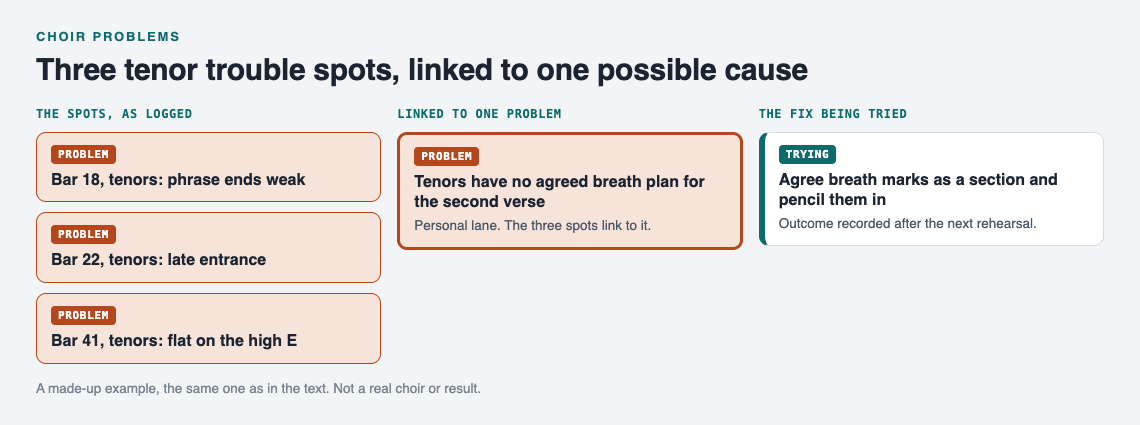
The tenor example on the graph. A made-up choir, not a real section or result.
A list hides this. A map shows it. You can also switch to the List view in the app when you just want to read through everything in order. The same approach works for any repeated trouble, from logging commute delays and what you changed to rehearsal notes.
Look at your graph a week before the concert. Any problem without a solution marked worked is your priority list for the last rehearsals.
Matching each problem to a fix: sectionals, slow passes, marked scores, and listening tracks
Each group of problems tends to have a small set of fixes that suit it. Here is a starting map.
Sectionals
Best for intervals and part independence. When a section cannot hold its line against the others, it needs time singing that line alone, then with one other part, then with everyone.
Slow passes
Best for diction and fast text. Sing the passage at half speed, place every consonant together, then bring the tempo up in steps. Log the tempo where it falls apart. That number tells you where to practice.
Marked scores
Best for breaths, entrances, and page turns. Agree on breath marks as a section and pencil them in. Circle the cue note before an entrance. For a bad page turn, decide who turns early or copy the next page's first line onto the bottom of the current page.
Listening tracks
Best for learning notes between rehearsals. If a section keeps missing the same interval, singers can practice it at home with a part track and come back ready.
When you attach a fix in Problem Graph, you can also ask the app for suggestions. Its AI proposes new solutions based on what worked for others on problems like yours. Treat these as ideas to try, not answers. Test one at the next rehearsal and record the outcome like any other fix.
Sharing one list with the director, section leader, and singers
Your own log is useful. A shared one is more useful, because the director hears the whole choir, the section leader hears the section, and each singer hears the person next to them.
Problem Graph keeps everything private by default. Only you see it, and it follows you to any phone or computer you log in on. To share, you mark one problem as a main node. Only a main node can be shared. When you share it, its solutions, their outcomes, and the requirements they need go with it. A problem you only link to it stays private, like the rest of your graph.
For a choir, a simple setup is:
- The section leader keeps the list. Each trouble spot the section needs to see becomes its own main node, such as "Bar 34, alto 2: late entrance after the two beat rest," with its fixes and outcomes.
- The section leader creates a private network and gives the invite code to the altos and the director. Anyone with the code can join, so share it only with the people you mean to.
- Each main node is shared into the network. Members see it. Nobody else does.
- After each rehearsal, the section leader updates the outcomes: worked, partly, or failed. Singers tell the leader what they noticed.
This is the same pattern as one shared list for the carpool drivers or one list for both families planning a wedding: one place, a small group, a clear record of what has been tried.
You can also make a main node public, so anyone in the app can link their own problems to it and borrow solutions that worked. When someone borrows a solution, it keeps a link back to where it came from. A public list of common choir trouble spots and the fixes that held could help other sections facing the same piece.
Frequently asked questions
How do I tell if a problem is mine or the whole section's?
Ask the singers on either side of you whether they hit the same spot, or record the section on a phone and listen back. If one voice is off, log it in your private graph. If most of the section is off, tell the section leader so it goes on the shared list.
What should a section leader bring to the director?
Bring the problems where the section tried at least one fix and it failed or only partly worked. Give the bar number, the voice part, and what has been tried, so the director can pick a new approach instead of repeating an old one.
How many rehearsals before a fix should be working?
There is no fixed number, but if a fix is marked partly or failed two rehearsals in a row, try a different one. Recording each outcome makes that call easy, because you can see the history instead of guessing.
Get started
Start with the one spot your section missed at the last rehearsal. Write the bar, the part, and what went wrong in one line. Attach the fix you will try next time. After that rehearsal, mark the result. In a few weeks you will have a map of what the section keeps tripping on and what actually helped. If the app is empty when you open it, the Load example set button shows you how a filled graph looks.
Try Problem Graph: it is free, and you can look around the public network without an account. Write one problem down in a line and attach the first thing you will try.
Comments
No comments yet.
Sign in or make an account to comment.