CI/CD security: lock down your build pipeline
CI/CD security is about the system that turns a commit into a running product. Your build pipeline reads your source code, holds your deploy keys and pushes to production with little or no human in the loop. The OWASP CI/CD Security Cheat Sheet calls pipelines an appealing target for exactly that reason. This guide walks through its checks, adds GitHub's own advice where your pipeline runs on GitHub Actions, and ends with a review of one release workflow.
CI/CD security: why the pipeline is a target
A pipeline adds attack surface in people, process and technology: the code repository, the automation server, the deployment steps and the machines that run the builds. OWASP points to the OWASP Top 10 CI/CD Security Risks as the map. Among them:
- Insufficient flow control: code can reach production without the checks it should pass.
- Inadequate identity and access management, and insufficient credential hygiene: too many people and jobs hold too much access, for too long.
- Dependency chain abuse: a build pulls in an attacker's package.
- Poisoned pipeline execution: an attacker changes what the pipeline runs.
- Improper artifact integrity validation and insufficient logging: nobody can prove what was deployed, or notice when it changed.
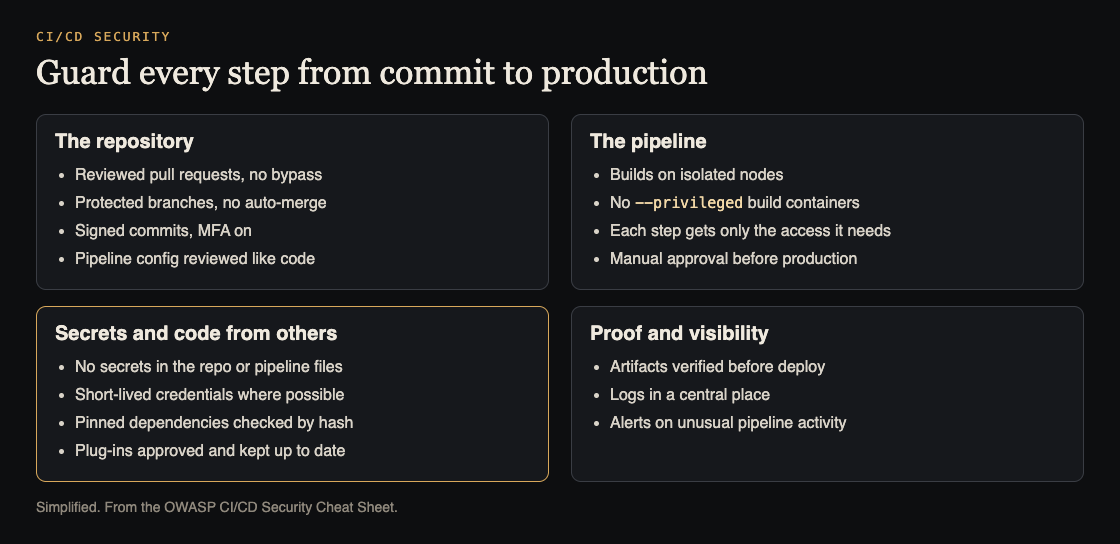
Four areas to check. Simplified from the OWASP CI/CD Security Cheat Sheet.
Lock the repository first
Everything downstream trusts what lands on your main branch, so start there. OWASP's repository settings:
- avoid auto-merge rules;
- require pull request review before merging, and make sure nobody can bypass it;
- use protected branches and require signed commits;
- turn on multi-factor sign-in wherever it is offered;
- do not hand out default permissions; limit outside contributors, forking of private repositories and the ability to make a repository public.
The pipeline's own config file deserves the same care. OWASP says to keep it under version control and, if it sits beside the code, to review it before any merge, because changing that file changes what the pipeline does.
Isolate builds and gate production
The automation server needs hardening of its own, whichever product you use. The cheat sheet asks for builds on isolated nodes, TLS 1.2 or later between the repository and the CI system, IP restrictions where possible, and code, dependency and infrastructure scanning in the pipeline. Two rules stand out:
- Manual approval before production. A person reviews and approves before the deploy step runs.
- No privileged build containers. If steps run in Docker, avoid the
--privilegedflag; the reasons are in Docker security.
On GitHub Actions, GitHub adds a warning about runners: self-hosted runners should almost never be used for public repositories, because anyone can open a pull request and run code on them.
Keep secrets out of code, logs and other pipelines
OWASP's secrets rules come in two halves. First, make secrets hard to steal: never hardcode them in repositories or CI config, scan for them with tools such as git-leaks or git-secrets, remove them from images and compiled binaries, and never print them to the console, write them to logs or leave them in shell history. Second, make a stolen secret less useful: prefer temporary credentials, and add IP or other limits so a valid credential still fails from the wrong place. The full habits are in secrets management.
Then apply least privilege, deny by default. Each pipeline identity gets only the permissions its job needs. Pipelines with different sensitivity do not share credentials, and the operating system account that runs a pipeline is not root. GitHub's guidance fits here: anyone with write access to a repository can read all its secrets, and the default GITHUB_TOKEN permission should be read-only for contents, raised only for the jobs that need more.
Identities also need a lifecycle. OWASP suggests one central identity provider, no shared accounts, and an inventory of every pipeline identity with its owner, when it was last used and what it can do. A forgotten identity is an easy way in.
Pin what you pull in, and vet plug-ins
Dependency chain abuse starts before the pipeline runs. OWASP says to make dependency references immutable: pin versions, check each downloaded package against a known good hash through your lock file such as package-lock.json, and enforce that lock file in the build. Use a single private feed where you can, scoped packages against dependency confusion, and commit the file that controls those settings, such as .npmrc. Keeping the pins current is the other half; see dependency updates.
Third-party actions count too. GitHub's secure use reference says pinning an action to a full-length commit SHA is the only way to use it as an immutable release. Plug-ins and integrations get the same scrutiny as any software you buy: only a few people may install them, and each one is checked for its vendor, its security history, how widely it is used, whether it is maintained and what settings it changes. Remove the ones you no longer need.
Prove what you ship, and watch the pipeline
Integrity checks run from commit to deploy: signed commits, hash-checked packages and signed build outputs, using tools such as Sigstore. OWASP notes that signing is not an absolute guarantee, since the signing process can itself be attacked.
Logs make attacks visible. Log in a format machines can parse, never log passwords, tokens or keys, and send the logs to a central system with alerts for unusual activity. Expect some false alarms and some misses, and keep refining the alerts.
Worked example: reviewing one release workflow
Say your repository has a release workflow on GitHub Actions that runs when someone pushes a tag, builds a container image and deploys it with a cloud key stored as a repository secret. Review it like this:
- Who can start it? Anyone who can push a tag. Protect release tags and the main branch, and require review so code reaches main only through a reviewed pull request.
- Who approves production? Nobody. Add a manual approval step before the deploy job, per OWASP's flow control advice.
- What can the token do? Set the workflow's default
GITHUB_TOKENpermission to read-only for contents, and grant write only to the job that publishes the image. - What does the cloud key allow? If it can do anything in the account, replace it with a credential limited to this one deploy, short-lived if your provider supports it.
- What runs in it? Pin each third-party action to a full-length commit SHA, and confirm the build uses the lock file.
- Do other workflows reach it? Search for
pull_request_targetandworkflow_run. GitHub warns that these privileged triggers, combined with checking out an untrusted pull request, can expose secrets and write access.
Make one change at a time, run a release in a test environment after each, and record what you changed in the pipeline's own history.
Frequently asked questions
What are the OWASP Top 10 CI/CD Security Risks?
A list of the most common pipeline risks, numbered CICD-SEC-1 to CICD-SEC-10, from insufficient flow control to insufficient logging and visibility. The OWASP cheat sheet gives the mitigations for them.
Is pinning third-party actions to a commit SHA necessary?
GitHub calls a full-length commit SHA the only way to use an action as an immutable release. A tag is more convenient, but GitHub says to use one only when you trust the action's creator.
Does code signing make my pipeline safe?
No. OWASP lists signing as one integrity control and notes the signing process itself can be exploited, so pair it with locked repositories, approvals and logs.
Get started
Pick your release workflow and run the six questions above this week. If you want an outside review of the app your pipeline ships, whitehatstoic's cybersecurity and AI safety testing covers web app and API review, with a written report, fixes and a retest after fixes. whitehatstoic's full-stack development builds apps from database to deploy. No test can promise to find every weakness; the work is scoped after a short call.

Building something that has to be safe? Book a meeting with whitehatstoic: tell us the product, the deadline and your biggest worry, and we reply with a plan and a price.
Comments
No comments yet.
Sign in or make an account to comment.