Cinematic music for a documentary or short film: a guide
Picking cinematic music for a documentary or short film is less about finding a "big" track and more about finding the right one for each scene. A good cue tells the audience how to feel without telling them what to think. This guide covers what makes a cue work on screen, how to place it in your edit, and what a license actually needs to cover before your film goes out into the world.
Wavecrate licenses royalty-free music, sound effects, photos and videos, and every download comes with a license certificate and a code anyone can check on its verify page.

What cinematic music for a documentary or short film does
"Cinematic" usually means music that grows over time. It starts small, adds layers, and arrives somewhere. Strings, low brass and timpani are the classic tools, but a single piano or a held synth pad can feel just as cinematic if it builds with purpose.
Three things separate a film cue from background music:
- Shape. A cinematic cue has a clear start, a rise and a landing point you can cut to.
- Space. It leaves room for dialogue and sound. Busy melodies fight with voices.
- Restraint. It holds back until the picture earns the payoff.
When you audition tracks, play them under your actual footage, not on their own. A cue that sounds thin in your headphones can feel perfect under an interview.
Documentary vs short film: how the music job differs
In a documentary, music supports real people. Your subjects are telling the truth as they see it, and heavy scoring can make that feel staged. Music in a doc often sits underneath, carries the viewer between scenes, and steps back when someone speaks. When subjects talk about something painful, the material is already emotional, and the music should listen more than it talks.
In a short film, music is part of the storytelling. You have maybe ten minutes to build a world, so a cue can do more work: set a genre in the first shot, carry a time jump, or land the final beat. Short films can take bigger swings, like a full trailer-style build into a reveal.
Matching mood, tempo and instrumentation to your story
Start with the scene, not the track. Write one line for each sequence that needs music: what is happening, how the viewer should feel, and how long it runs. Then search with those words.
On Wavecrate you can filter music by mood, tempo, key and energy. The cinematic music genre is a good starting point. Here is a worked example using tracks that page listed on 10 October 2026.
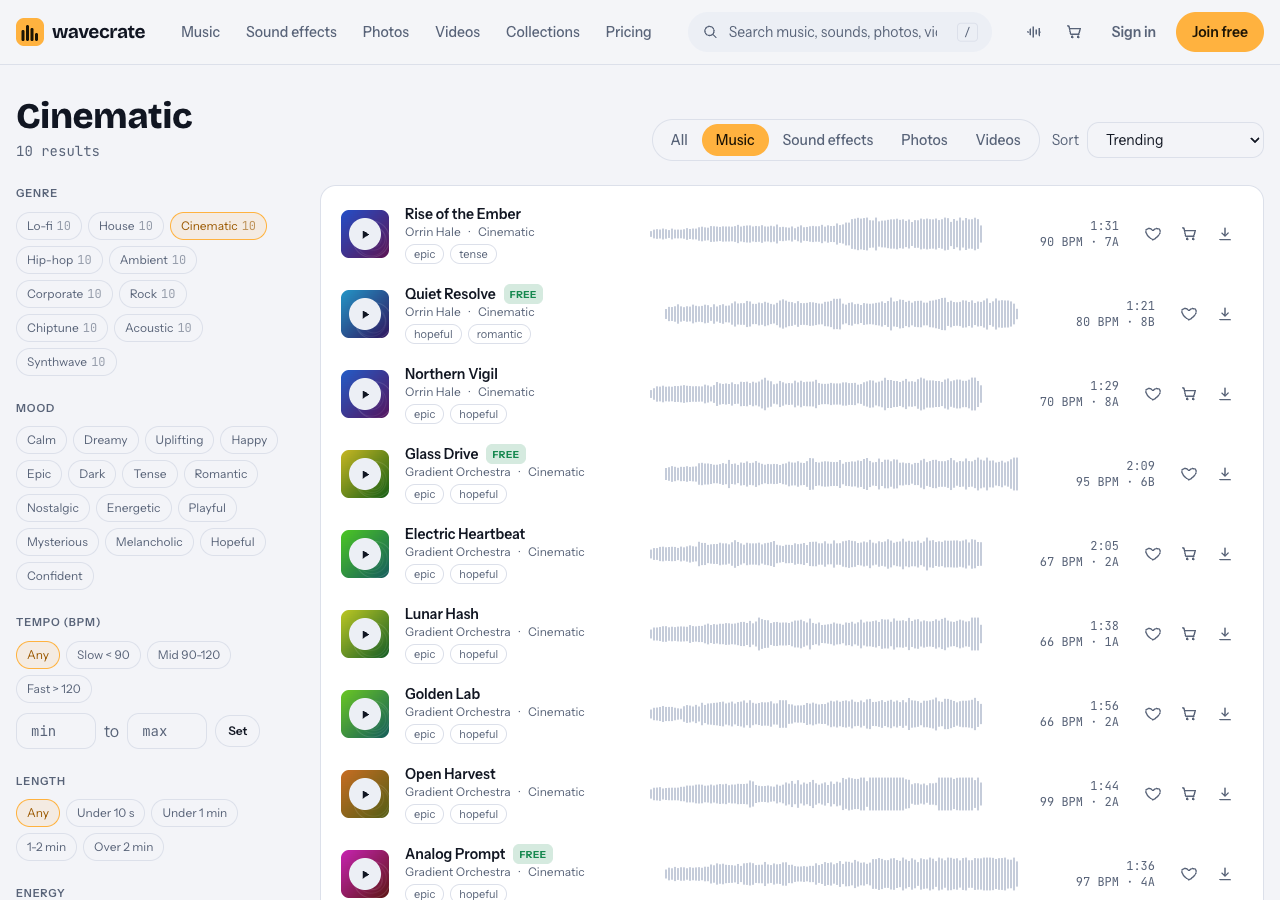
The Cinematic genre on 10 October 2026.
Worked example: a three-scene documentary
- Opening: a quiet morning, your subject introduces themselves. You want hopeful and calm. Filter by mood "hopeful" and the Slow tempo band (under 90 BPM). Quiet Resolve fits: it is marked Free, runs at 80 BPM in C major, energy Relaxed, and its page says it is good for wedding and documentary.
- Middle: the hard part of their story. You want weight without drama. Northern Vigil sits at 70 BPM in A minor, energy Steady, described as epic and hopeful and good for documentary and trailer. The minor key darkens the tone while the slow tempo keeps it patient.
- Climax, the turning point. If your story has a real peak, Rise of the Ember is listed as epic and tense at 90 BPM in D minor with energy Intense. Use it only if the footage can carry that much.
Notice the keys. C major, A minor and D minor sit close together, so moving between these cues feels natural rather than jarring. Track pages show the key next to the tempo, which makes this kind of planning quick.
You can also use keyboard shortcuts while you audition: Space plays or pauses, Left and Right skip 5 seconds, and Shift with Left or Right jumps to the previous or next item. Skipping ahead to hear where a cue lands saves real time.
Placing cues in the edit: openings, transitions, silence and endings
Where a cue starts and stops matters as much as which cue you pick.
Openings
Bring music in on a cut or a visual change, not in the middle of a sentence. If your opening shot holds for a while, let natural sound play first and introduce the music a few seconds later.
Transitions
Music is the easiest way to bridge locations or time. Overlap the next scene's cue under the last seconds of the current one. Many Wavecrate tracks come in three versions: a full track, a 30 second edit and a loop. The 30 second edit is handy for a montage bridge, and the loop lets you extend a bed under a long interview without a hard edit.
Silence
Silence is a choice, and often the strongest one. Dropping the music right before an important line makes the audience lean in. Real silence on screen can sound like a mistake, though, so lay a room tone under it. The ambience sounds include Lab Room Tone, 37 Second, Warm, marked Free, "a quiet research lab with soft air, equipment hum and a monitor beep, looping seamlessly".
Endings
Cut to the music's natural end, not the other way round. If the cue resolves at 1:21 and your last shot ends at 1:15, trim earlier in the track or extend the shot. A cue that stops mid-phrase feels unfinished. For a reveal or a title card, a single hit from the impact sounds can mark the moment.
Which license your film needs
A license lets you use a track; it does not make it yours. Wavecrate says: "You get a license to use it. We keep the copyright." Where the film will be shown decides which license you need:
- Free, only on items marked Free: "YouTube, TikTok, Instagram, Twitch and podcasts" and monetized channels, with credit text in the description. A free account gets 3 free downloads a month.
- Standard: "All online platforms, monetized", no credit, plus your own business and brand videos. The Northern Vigil page lists it at $15.
- Extended: adds paid advertising, TV, radio and cinema, apps and games, and client work. The Northern Vigil page lists it at $49.
Paid licenses are not on sale yet (Wavecrate says purchases open soon), so these are the listed prices for when sales open. Items marked Free, like Quiet Resolve, can already be downloaded with a free account.
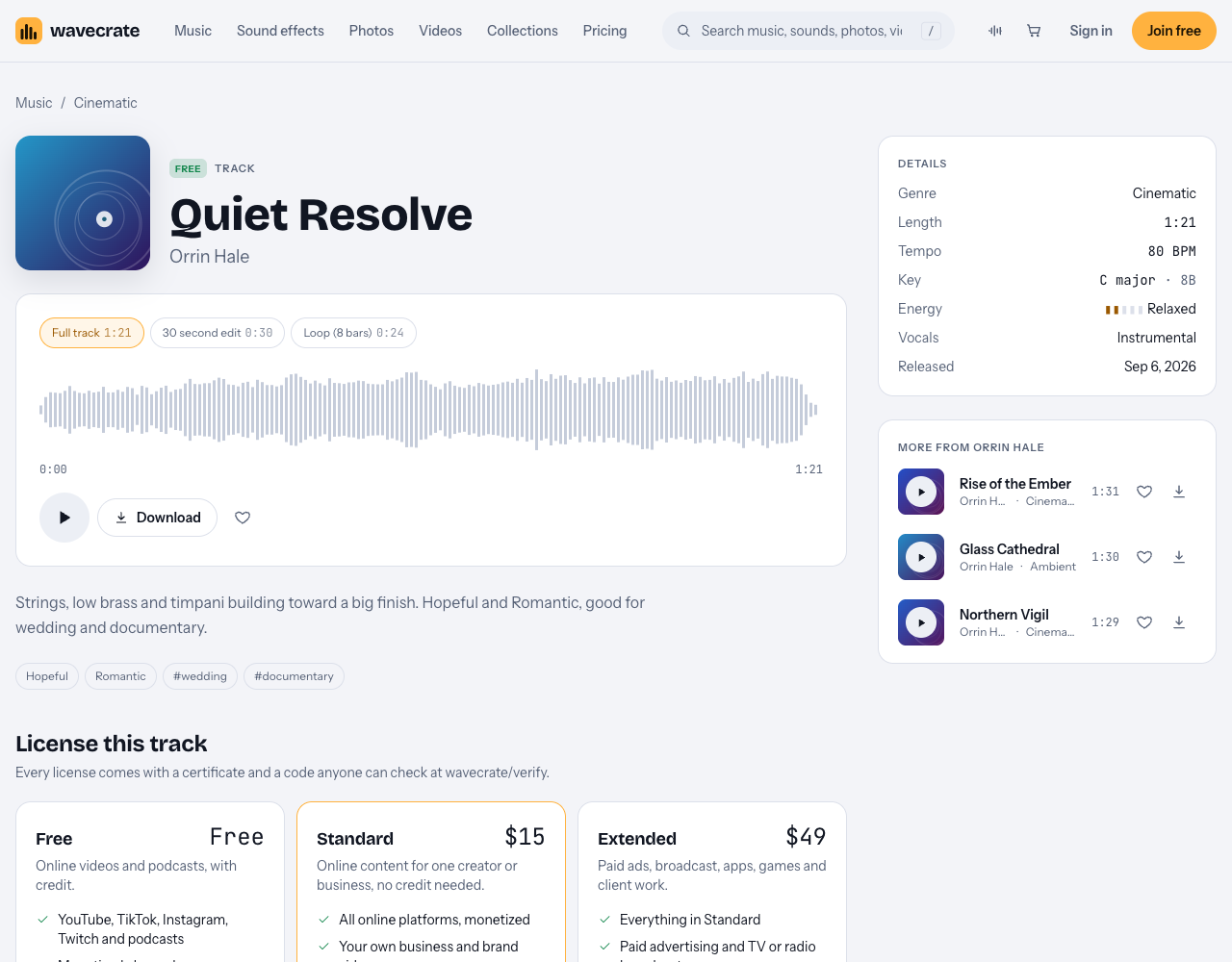
Quiet Resolve is marked Free, but the Free card lists only some online platforms.
Take Quiet Resolve from the worked example:
- Your documentary on your own YouTube channel, with credit text in the description: the Free license covers it.
- The same film on a platform the Free card does not name, or without a credit line: Standard covers all online platforms ($15 listed on its page, or Pro once it is on sale).
- A film made for a client, sold to TV, or shown in a cinema: Extended only ($49 listed on its page).
Festivals are the grey area. Wavecrate's license table names cinema under Extended but says nothing about festival or event screenings, and the site has no terms page to settle it. Treat a festival screening as not covered by Free or Standard until you have it in writing.
Every download comes with a certificate and a code. Anyone, including a programmer or a distributor, can enter the code on the verify page and see the licensee, the item and the license type, with no account. Keep those codes in your film's paperwork folder.
Where to find cinematic tracks without blowing your budget
Film budgets are tight, and music often gets cut first. A few ways to keep costs under control:
- Start with free items. Quiet Resolve is one cinematic track marked Free. Remember the credit line, and check the platform is on the Free card.
- Weigh Pro. The pricing page lists Pro at $99 a year or $12 month to month, with Standard licenses on the whole catalog. Content you publish while subscribed stays covered. Pro does not include Extended, so a cinema or broadcast release still needs Extended licenses. Pro is not on sale yet, so it is one to plan around for when purchases open.
- Upgrade only what you need. The pricing page says that once purchases open, if you hold a Standard license and later land a broadcast deal, the Extended license will cost only the difference.
Frequently asked questions
Does a Wavecrate license cover a festival screening?
The license table names cinema under Extended but does not mention festival or event screenings, so treat a festival screening as not covered by Free or Standard.
How much music should a documentary have?
There is no fixed amount. Use music where it moves the story forward or bridges scenes, and let interviews and natural sound carry the rest.
Should I use a composer or library music for a short film?
A composer can write to your exact cuts, which helps if timing is complex. Library music is usually faster and cheaper, and versions like a 30 second edit or loop make it easier to fit to picture.
What tempo works best for emotional documentary scenes?
Slower tempos usually suit reflective scenes because they leave room for speech. Wavecrate's tempo filter marks Slow as under 90 BPM, and its documentary-tagged cinematic tracks Quiet Resolve and Northern Vigil sit at 80 and 70 BPM.
Get started
Write your scene list, then filter the cinematic genre by mood and tempo to build a shortlist. Audition each cue under your footage, check the key, and pick the version that fits your cut. Before you download, match the license cards to where your film will be shown.
Browse Wavecrate: you can join free and download items marked Free now, paid licenses are not on sale yet (purchases open soon), and every download comes with a license certificate and a code anyone can check on its verify page.


Comments
No comments yet.
Sign in or make an account to comment.