City skyline pictures for an event poster: pick, crop and print
Good city skyline pictures for an event poster do most of the work before you type a single word. The skyline tells people where the event is and what the night will feel like. This guide shows you how to pick a skyline shot, check that it will print sharp, crop it so your headline fits, and stay inside the license you actually hold.
Wavecrate licenses royalty-free photos, including city skylines in 4K, and says on each page what a license covers in print, and every download comes with a license certificate and a code anyone can check on its verify page.

What city skyline pictures for an event poster need
A poster is read from across a room or a street. That changes what you need from a photo.
- A clear silhouette. The tops of the buildings should read as one strong line against the sky. Busy foregrounds with cars, wires and signs get lost at a distance.
- Empty space. Open sky or calm water gives you a place for the event name, date and venue.
- A strong color story. One or two main colors make it easy to pick type colors that stand out.
- Enough pixels. Posters are big. A photo that looks great on a phone can fall apart on an A3 sheet.
Where to find skyline photos you are allowed to use
The safest source is one that tells you what each license covers in writing. On Wavecrate, open the photos browse page and pick the City and architecture category. You can filter by orientation, color, resolution, mood and access (All, Free or Premium). On 11 October 2026 that category listed 10 pictures: three skylines over water by one photographer (City Skyline at Dusk, Blue Hour Downtown and Midnight City Lights) and seven illustrated city scenes.
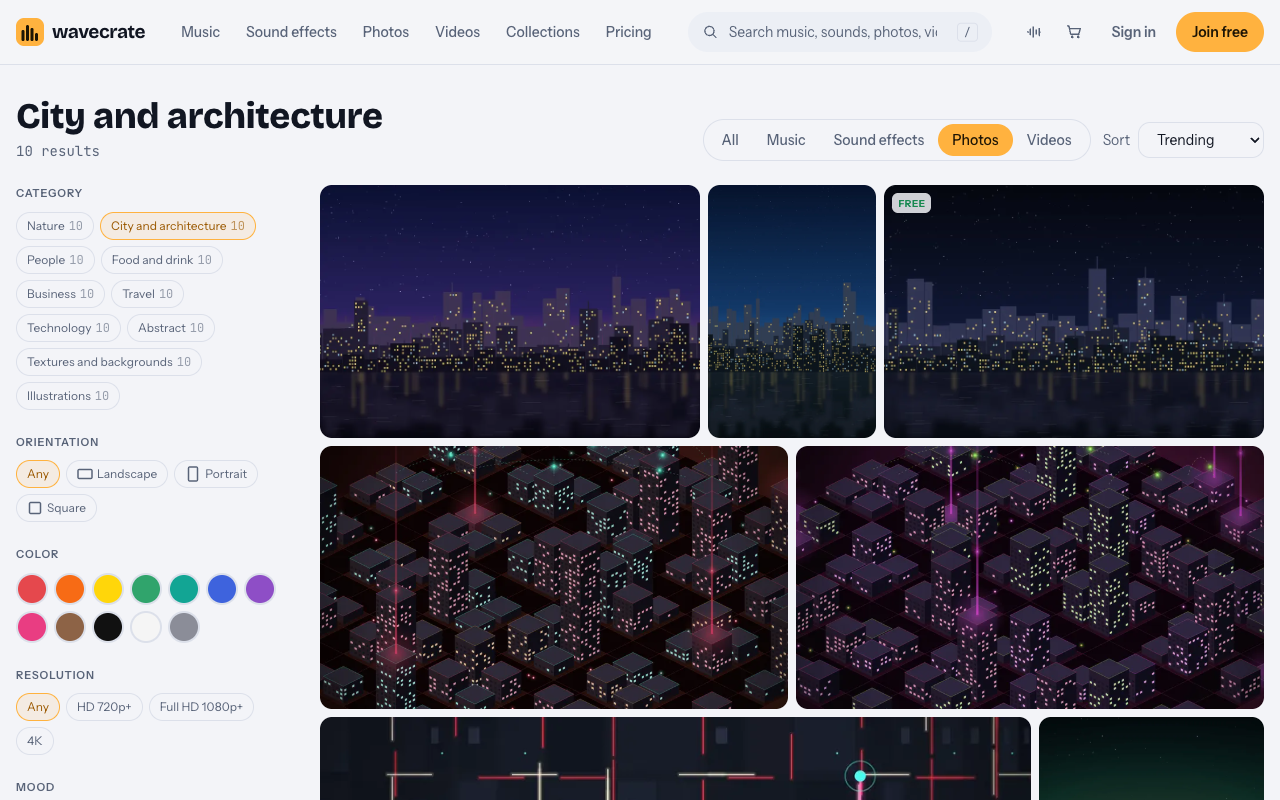
City and architecture photos on 11 October 2026.
Read the license before you fall in love with a picture. For print, this matters a lot:
- Free license (only on items marked Free): websites, blogs and social media posts, with a credit line next to the photo or in the description. It does not list print, so it does not cover a paper poster.
- Standard: your own websites, social, presentations and marketing, no credit needed, and print up to 500,000 copies.
- Extended: everything in Standard plus paid ads and TV broadcast, products for resale such as merchandise and prints, unlimited print runs, and client work.
So a poster for your own event fits Standard. If you are designing the poster for a client, or you plan to sell the poster itself, you need Extended. Pro covers Standard licenses only, never Extended. The full breakdown is on the pricing page. Paid licenses are not on sale yet (Wavecrate says purchases open soon), so any prices below are the listed prices for when sales open, while photos marked Free can already be downloaded with a free account.
One more point: a license is not ownership. Wavecrate keeps the copyright and you get a license to use the item.
Resolution and file size: making sure the skyline prints sharp
Print quality depends on how many pixels you spread over each inch of paper. A common target for close viewing is 300 pixels per inch. For a poster seen from a few steps away, your printer may accept less, so ask.
Do the math before you design. Take the City Skyline at Dusk photo on Wavecrate. Its original file is 4000 x 2667 pixels, landscape, and listed as 4K. The page also offers a Medium (1920 x 1280) and a Small (1024 x 683) jpg.
- At 300 ppi, the original covers about 13.3 x 8.9 inches.
- Stretched across the 11.7 inch width of a portrait A3 sheet, you get about 342 ppi. That is sharp.
- Stretched across the 18 inch width of an 18x24 poster, you get about 222 ppi. That holds up well at normal poster viewing distance.
Always place the Original file in your print layout. The Medium and Small files are fine for an Instagram teaser, not for paper. Also note that previews carry one small watermark. The page says licensed files are clean and full size, so never build your final layout on the preview.
Day, dusk or night: matching the skyline mood to your event
The time of day in the photo sets the tone of your poster.
- Daytime skylines feel open and practical. They suit conferences, fairs, markets and charity runs.
- Dusk skylines feel warm and expectant. They suit concerts, gallery openings and dinners, anything that starts as the sun goes down.
- Night skylines with lit windows feel energetic. They suit club nights, late shows and launches.
Use the color filter to narrow this fast. City Skyline at Dusk is described as skyscrapers with lit windows against an orange and violet dusk sky, reflected in the water, with a main color of Black. A dark main color is good news for poster designers. Light text and bright accent colors pop against it.
Cropping the skyline to leave room for your headline and details
Most skyline photos are landscape. Most posters are portrait. You have two good options.
- Skyline as a band. Run the photo across the full width and let it fill the lower half. Put the headline in a solid color block above. This keeps every building in the shot.
- Sky as the canvas. Crop so the buildings sit along the bottom edge and the sky fills the rest. Your headline goes in the sky. This works best when the sky has a smooth gradient.
Whichever you choose, keep the skyline line out of the top third if your headline lives there. Text that crosses a jagged roofline is hard to read. Leave a margin at the edges too, because print shops trim the sheet.
Worked example: building a concert poster around a skyline shot
Say you are promoting your own band's evening show by a river. You want an 18x24 portrait poster, plus a social post. Here is the workflow.
- Search. Open Photos, choose City and architecture, set orientation to Landscape and resolution to 4K. You land on City Skyline at Dusk. The water in the shot matches your riverside venue.
- Check the license. It is a Premium item. The page listed Standard at $9 and Extended at $39 on 11 October 2026. This is your own band promoting your own show, so Standard covers it, including print up to 500,000 copies. If a promoter had hired you to design it, that would be client work and you would look at Extended.
- Get the files. Use the Original (4000 x 2667) jpg for print. Keep the Medium file for the social version.
- Lay it out. Place the photo across the bottom 60 percent of the poster. Fill the top with a deep violet sampled from the sky. Set the band name in large white type, the date in orange from the sunset, and the venue and ticket link in a smaller line near the bottom, over the dark water.
- Proof it. Print one A4 sheet at actual size crops. Look at the building edges from two meters away.
- Keep the paperwork. Every download comes with a license certificate and a code. Save both with your print files. If a venue or printer ever asks, anyone can check the code on the verify page. It shows the licensee, the item and the license type.
Tip: put the poster PDF, the original photo and the certificate in one folder and zip it before you send it to the printer. Keeping them together saves a search later.
Common mistakes that make skyline posters look cheap
- Text over the roofline. Jagged edges behind letters kill readability.
- Wrong license for print. A Free license covers online and social posts with credit, not paper posters. Midnight City Lights, marked Free when read, covers your event's social teaser with a credit line, but the same picture on the printed poster needs Standard (listed at $9 on its page).
- Forgetting the trim. Dates and URLs too close to the edge get cut off.
Frequently asked questions
Can I use any skyline photo I find on Google?
No. A search result shows you an image, not a license. Use a source that states what you may do with the photo, and keep proof of your license.
What resolution does a skyline image need for an A3 or 18x24 poster?
For A3, aim for around 300 ppi, which a 4000 pixel wide photo gives you across the short side. For 18x24, a 4000 pixel wide image gives about 222 ppi across 18 inches; ask your printer what they need for that size.
Do I need permission to show recognizable buildings on a poster?
It depends on the building and the country, and Wavecrate's item pages do not address building releases. If a landmark is the focus of a commercial poster, check the rules where you will use it.
How do I make text readable over a busy skyline?
Put text in the open sky or over dark water, not across rooftops. If it must overlap, add a solid color block or a soft dark gradient behind the words.
Get started
Start by browsing City and architecture photos and filtering by color and resolution until you have two or three candidates. Join free to save favorites and get 3 free downloads a month on items marked Free. The name you sign up with is printed on your licenses. For a printed poster, match the photo to a Standard or Extended license, and keep the certificate code with your files so anyone can check it.
Browse Wavecrate: you can join free and download items marked Free now, paid licenses are not on sale yet (purchases open soon), and every download comes with a license certificate and a code anyone can check on its verify page.


Comments
No comments yet.
Sign in or make an account to comment.