Classroom problem solving: a shared board for a class
Classroom problem solving works best when the whole class can see the same problems, the same ideas, and the same results. This guide covers what to put on a shared board, how to set one up in about 15 minutes, how to run a short weekly session, and how to check whether a fix worked. The examples use Problem Graph, a free problem and solution journal drawn as a map, but the habits apply to any board.
Why classroom problem solving needs a shared board
Class problems usually come up as complaints. The pencil sharpener is always jammed. Group work falls apart. Nobody can hear the morning announcements. Someone raises it, everyone nods, and two weeks later it comes up again in the same words.
A shared board stops that loop. When a problem is written down where everyone can see it, three things change:
- The class stops re-arguing the same issue, because the history is right there.
- Ideas that were tried and failed stay visible, so nobody proposes them again as if they were new.
- Students see that raising a problem leads to an outcome.
Factories call this visual management: the Lean Enterprise Institute defines it as putting things in plain view so the status can be understood at a glance by everyone involved.
Problem Graph has a line on its home page that fits a classroom well: "A solution that failed three times stays on the map as a failed solution, and that is exactly what the next person needs to know." For a class, the next person might be a substitute, a new student, or next year's group.
What goes on a class problem board: problems, causes, ideas, and owners
Keep every entry short. One line is enough for a problem. Here is what each part of the board should hold.
Problems
Write the problem as something you can observe, not a complaint about a person. "Tables are messy after art" is better than "Some people never clean up." In Problem Graph a problem is one kind of node. You type it in one line and it appears on the graph when you press Enter.
Causes
Causes are often problems in their own right. "Tables are messy after art" might link to "Only 3 minutes left for cleanup" and "Paper towels are across the room." Problem Graph lets you link problems that belong together. Patterns then show up on the map that you would not spot in a list.
Ideas
Ideas are solutions. Add them freely, then mark the one the class is actually trying. Once you know how it went, record the outcome as worked, partly, or failed.
Owners and requirements
Problem Graph does not have a field for assigning a person. Write the owner into the solution line instead, for example "Cleanup crew rotates weekly (owner: Table 4)." If a solution depends on something outside the class, such as "a second trash can from the office", add it as a requirement, the third kind of node on the app's map key.
How to set up a shared board for your class in 15 minutes
You can look around the app before signing up. The public network is open to browse with no account. To add anything, you create an account with a username and a password. It runs in the web browser and works on a phone.
- Open the app. Go to the Problem Graph app. If the graph is empty, you will see a "Load example set" button. It shows how nodes and links look, which can help before you add your own class entries.
- Create your account. The app asks for an email for password resets. The site owner can turn password reset off, so keep your password somewhere safe.
- Write the class's top-level problem. Something like "Our classroom runs smoother" or a specific one, such as "Transitions between subjects take too long." Pick a lane (personal, work, expert or scientific) and use the same one for every class entry so you can filter by it later.
- Mark it as a main node. Only a main node can be shared. When you share it, its solutions, their outcomes and the requirements they need go along with it.
- Create a private network. Name it after your class and copy the invite code.
- Share the main node into the network. Members of the network will see it. Nobody else will.
- Hand out the code with care. The app says anyone with the invite code can join. Share it in class or through your usual school channel, not on a public page.
One detail matters for a class board. A problem you only link to a main node stays in your private graph. If you want the class to see a sub-problem, make it its own main node and share it too. With younger students, you can skip the network: keep the board on the teacher's account, show it on the projector, and no student needs an account.
Running a weekly problem solving session students actually join
Keep the session short and predictable. Twenty minutes once a week is a reasonable start. Project the board using the List view if the map gets crowded, and use the filters (Mine, Network, All shared) to show only class entries.
A simple agenda:
- Check last week's tries (5 minutes). For each solution marked as trying, ask: worked, partly, or failed? Record it right then.
- New problems (5 minutes). Read out problems collected during the week. A student scribe types each one in a single line.
- Ideas (5 minutes). Pick one problem and collect solution ideas. Add all of them as ideas, even the odd ones.
- Choose one to try (5 minutes). Mark one idea as trying and write the owner into the line.
Rotate the scribe job so different students run the keyboard each week.
Turning votes into decisions without the loudest voice winning
Problem Graph does not have voting built in, so run the vote in the room and record the result on the board. A few rules keep it fair:
- Silent first. Every student writes their pick on a sticky note before anyone talks.
- Dot voting. Each student gets two dots to place on the ideas listed on the whiteboard.
- Pick a time limit before you vote. "We try the winner for one week" is easier to accept than an open-ended change.
- Write the runner-up down too. It stays on the board as an idea, so the students who backed it know it was not thrown away.
For more structure on the decision step, see how to run a problem solving meeting that ends in decisions.
Checking whether a class fix really worked
"It feels better" is not a result. Before trying a fix, agree on one thing you will look at. Maybe minutes lost in a transition. Maybe how many tables are clean at the bell. Maybe how many students turned in the exit ticket.
Then be honest with the outcome:
- Worked if the measure clearly improved and held for the full trial.
- Partly if it helped some days or some groups but not all.
- Failed if nothing changed or it made things worse.
A failed mark is useful. It tells the class what not to try again and points toward a cause you missed. For a deeper method, read how to know when a solution has really worked.
Example: one class board from first post to solved problem
Here is how a board could look over a few weeks. This is an illustration, not a real class.
Week 1. The scribe adds a problem: "Lining up for lunch takes too long." The teacher marks it as a main node and shares it into the class network. Two causes come up and get linked as problems: "Everyone stands up at once" and "Backpacks block the aisle."
Week 1 ideas. Four solutions go on as ideas:
- Line up by table number
- Backpacks go on hooks before lunch
- Line leader calls names
- Play a 60-second song as a timer
The class votes silently. "Line up by table number (owner: line leader of the week)" is marked as trying.
Week 2. The class times it. Lining up is faster on three days out of five. Outcome: partly. The aisle cause still blocks people.
Week 3. The class tries the backpack idea. It needs more hooks, so the scribe adds a requirement: "Six more hooks from the office." While they wait, they keep table order. Once the hooks arrive, the time drops every day of the trial. Outcome: worked.
Week 4. The song idea was never tried and stays on the board as an idea. The board now shows the full story: what worked, what only partly worked, and what it needed.
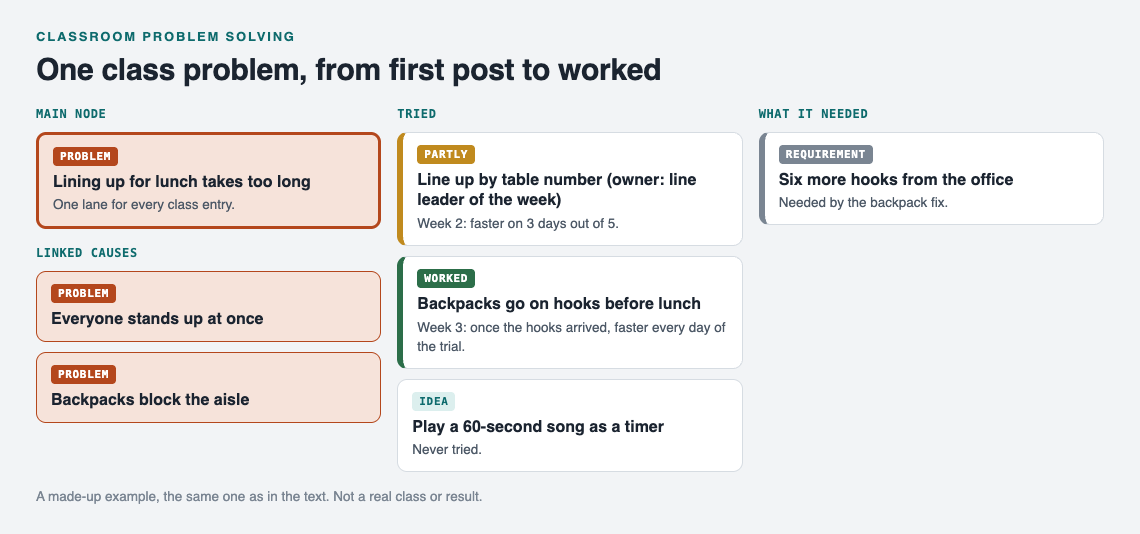
The made-up class board after four weeks.
Frequently asked questions
Do students need their own accounts?
No. The teacher can keep the board on one account, show it on the projector and type what the class says. Older students can join a private network by invite code if you want them to read it on their own.
How do you keep anonymous posts respectful?
Problem Graph accounts use a username, so collect anonymous problems on paper slips and have the teacher or scribe enter them. Set one rule: describe the situation, never name a person. Reword any slip that breaks it before it goes on the board.
How much class time does a problem board take each week?
About 20 minutes is enough for one check-in, a few new problems, and one decision. Collect problems during the week so the session moves fast.
Get started
Start with a single problem your class already talks about. Make it a main node, create a private network, and share the invite code in class. After your first session you will have a problem, a few ideas, and one fix being tried.
Try Problem Graph: it is free, and you can look around the public network without an account. Write one problem down in a line and attach the first thing you will try.
Comments
No comments yet.
Sign in or make an account to comment.